Installing takes a couple of minutes. You upload the plugin, switch it on, and paste your licence key once. Your podcast plays for listeners from the moment the plugin is active; the key opens the screens you manage it with.
Install it like any WordPress plugin:
- Download resultsaix-podcasts.zip from the ResultsAiX Podcasts page in the members area, linked in your purchase email.
- In WordPress go to Plugins, Add New, Upload Plugin, choose the zip and press Install Now.
- Press Activate.
After step 3 a Podcasts menu (with a microphone icon) appears in your admin menu, with Episodes, Add Episode and Shows already in it.
Activate your licence:
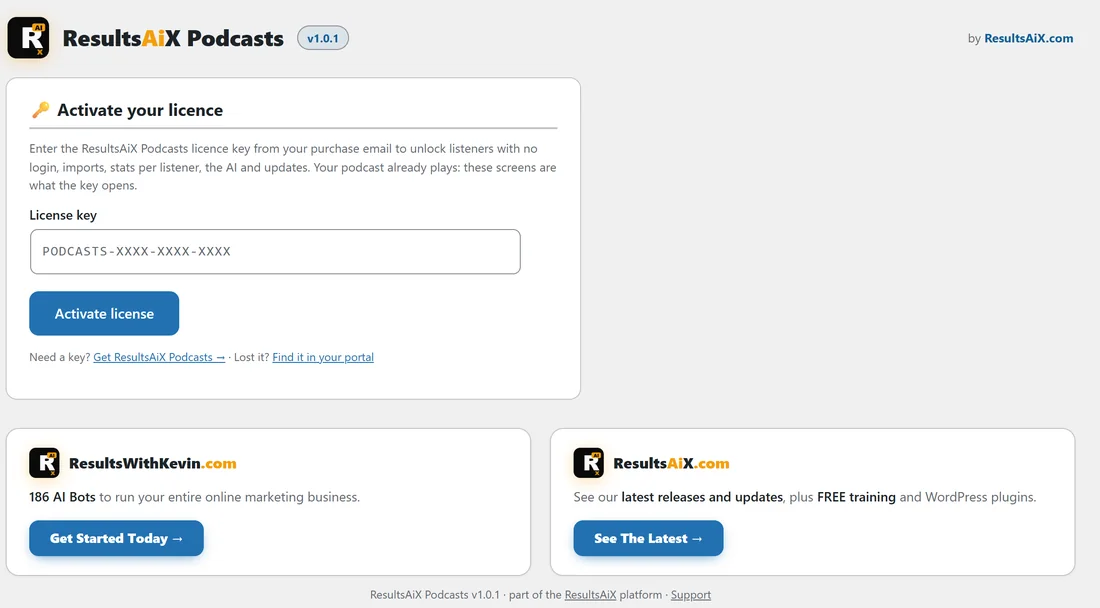
Until a licence key is saved, the plugin's own item in the Podcasts menu is Activate, with a key icon. Open it and you see Activate your licence.
- Find your key in your purchase email, or in the customer portal at resultswithkevin.com/portal/. It looks like PODCASTS-XXXX-XXXX-XXXX.
- Paste it into the License key box.
- Press Activate license (or press Enter).
- A green message confirms it and the page reloads.
A ResultsAiX Bundle key works too, because ResultsAiX Podcasts is part of the Bundle.
Once the key is active, the menu shows Episodes, Add Episode, Shows, Dashboard, Listeners, Stats and Settings, and the plugin's screen opens on the Dashboard tab.
The licence card:
From then on the licence card sits at the top of the Settings tab, with these details.
- License Key, the key in use.
- Status, Active when all is well.
- Licensed To, the email on your purchase.
- Activated Domains, the sites the key is used on.
Its buttons are Refresh License Info, which checks the key again straight away, and Deactivate This Site, which frees this site's place so you can use the key on another site. There is also a link, All my keys & downloads, to your portal.
What the key opens:
Your shows, episodes, feeds and players play for listeners as soon as the plugin is active. The key opens the Listeners screen (adding, importing and the signup tools), the stats per listener, the AI buttons and the plugin's updates.
How many sites?
A ResultsAiX Podcasts licence covers 3 websites. With the ResultsAiX Bundle, the Podcasts plugin also covers 3 websites, counted on its own, so it can be on different sites to your other Bundle plugins.
Updates:
New versions arrive in Dashboard, Updates and on the Plugins screen like any other plugin. Update the way you update anything else; your shows, episodes, listeners and settings stay as they are.
A real example:
You install ResultsAiX Podcasts on yoursite.com, paste the key from your purchase email, and press Activate license. The Dashboard tab opens with zero shows. Your next stop is Your First Show: Cover Art, Feeds And Who Can Listen.
Tips:
- The Plugins screen has a Settings link under ResultsAiX Podcasts that takes you straight to the Settings tab.
- Moving to a new domain? Press Deactivate This Site on the old site first, then activate the key on the new one.
- If you already use the paid ResultsAiX Theme, read Using ResultsAiX Podcasts With The ResultsAiX Theme before you start.