Stats tell you which episodes land, who finishes them, and which listeners are most engaged. Everything is counted on your own site, so the numbers are yours.
Where to find it:
Podcasts, Stats. Pick Last 7 days, Last 30 days, Last 90 days or Last 365 days at the top. The Settings tab also has a Listening, last 30 days card, and each listener's own page shows what they heard.
The totals:
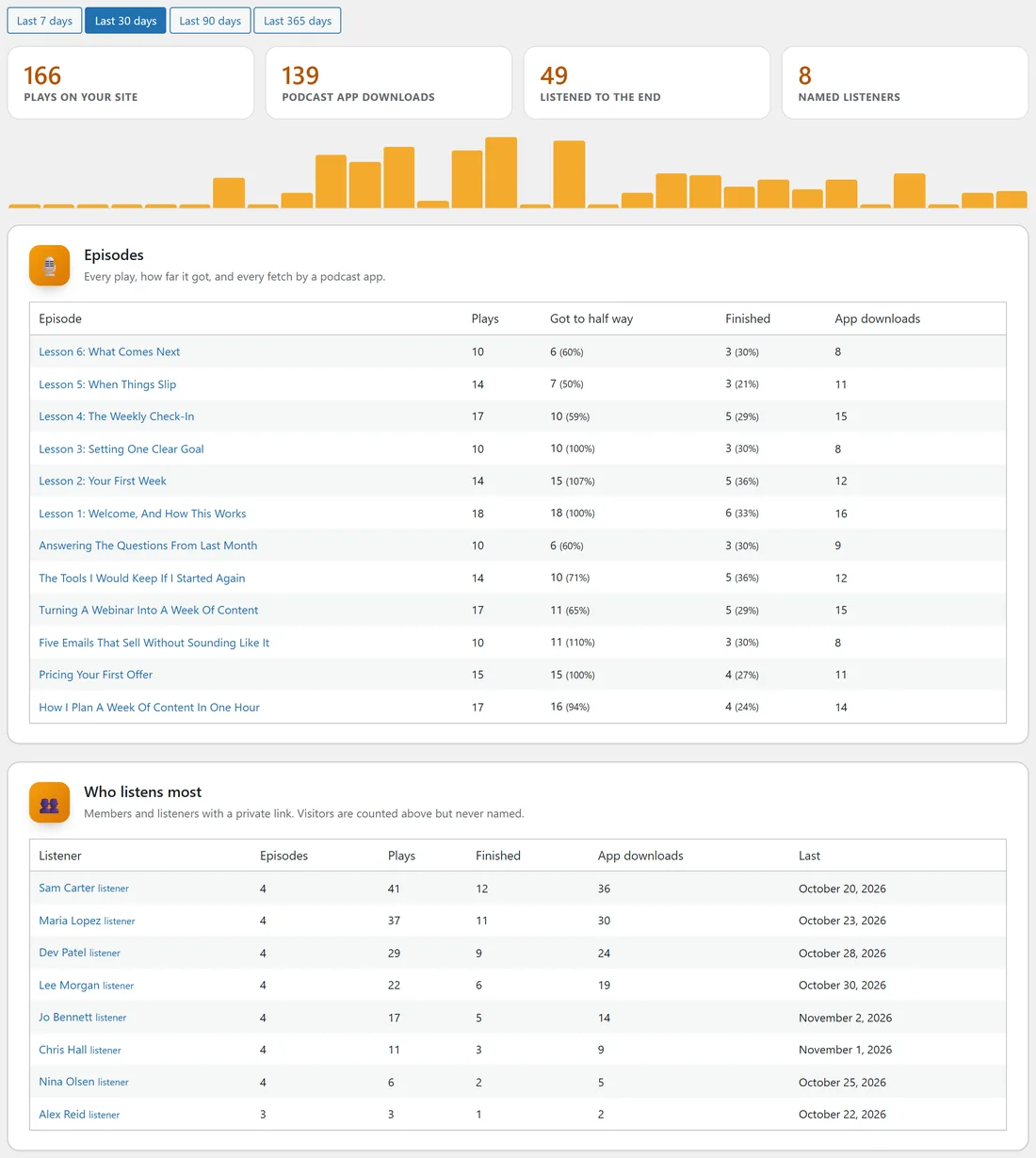
Four tiles show the period you picked.
- Plays on your site.
- Podcast app downloads.
- Listened to the end.
- Named listeners: members and listeners with a private link who played or downloaded anything.
The chart underneath shows every day of that period, plays and downloads together. Hover a bar to see the day and the number.
Per episode:
The Episodes card lists every episode with plays, how many got to half way, how many finished, and its app downloads, with percentages of plays. Click an episode to open it.
Plays and how far people got are counted on your site; downloads are each fetch of the episode by a podcast app.
Who listens most:
Members and listeners with a private link, by name, ordered by plays and downloads: how many episodes they played, their plays, finishes, app downloads and the last day they listened. Each shows listener or member beside the name. Click a listener to open their page and see everything they heard in the last 12 months.
On the Listeners screen:
Each listener also shows their plays, how many episodes they finished and how many times their podcast app fetched an episode, for the last 30 days.
Visitors:
Visitors who are not signed in are counted in the totals but never named.
Turning it off:
Counting can be switched off with Count plays on the Settings tab, in The player card. Listening per listener is kept for two years.
With WP Sync:
A listener finishing an episode for the first time can start an action in another tool. See With WP Sync: Triggers And Actions.
A real example:
After a month, Podcasts, Stats on yoursite.com shows Lesson 1 of the Client Onboarding Series finished by most clients, but Lesson 4 finished by fewer. You shorten Lesson 4, and under Who listens most you see which clients have not listened lately and send them a friendly note.
Tips:
- Compare Got to half way with Finished to see where an episode loses people.
- Last 365 days is the view to share in a yearly review.