Every show has a Who can listen setting. Between that setting and your listeners, you get three kinds of show, and you can run as many of each as you like. Picking the right kind first saves changes later.
Where to set it:
Open Podcasts, Shows and click a show (or Add Show). In the Show settings box, the first choice is Who can listen, with Everyone and Members only.
Public:
- Who can listen is Everyone.
- Anyone can listen on your site, and the show has one feed address you submit once to Apple Podcasts and Spotify.
- New episodes reach the apps from your site. You never upload anywhere else.
- Public episodes can have a download button and can be embedded on other websites.
Members-only:
- Who can listen is Members only.
- With ResultsAiX Membership you tick exactly which levels can listen, bundles included. Without it, members only means anybody signed in to your site.
- Every member gets a private feed of their own on the My Podcasts page, for the podcast app on their phone.
- When a member's level ends, the show stops for them, on your site and in their app.
Private, with no login:
- This is a members-only show that you also give to people by email, with no account at all.
- Add them on the Listeners screen, import a CSV, or let them sign up with the Podcast Signup block. A membership level, a Mailer tag or WP Sync can add them too.
- Each one gets a welcome email with their own private link and one-tap buttons for Apple Podcasts, Overcast, Pocket Casts and Podcast Addict.
- Remove someone and their link stops at once, wherever it was copied.
Your shows at a glance:
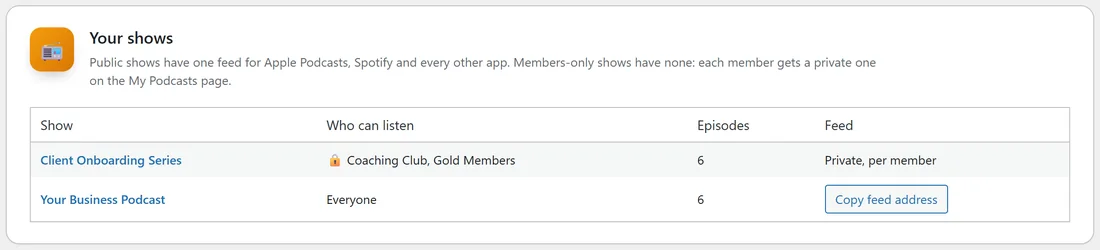
On the Settings tab, the Your shows card lists every show with Who can listen (Everyone, the levels, or Anyone signed in), how many episodes it has, and its feed: a Copy feed address button for a public show, or Private, per member for a members-only one.
What visitors see on a members-only episode:
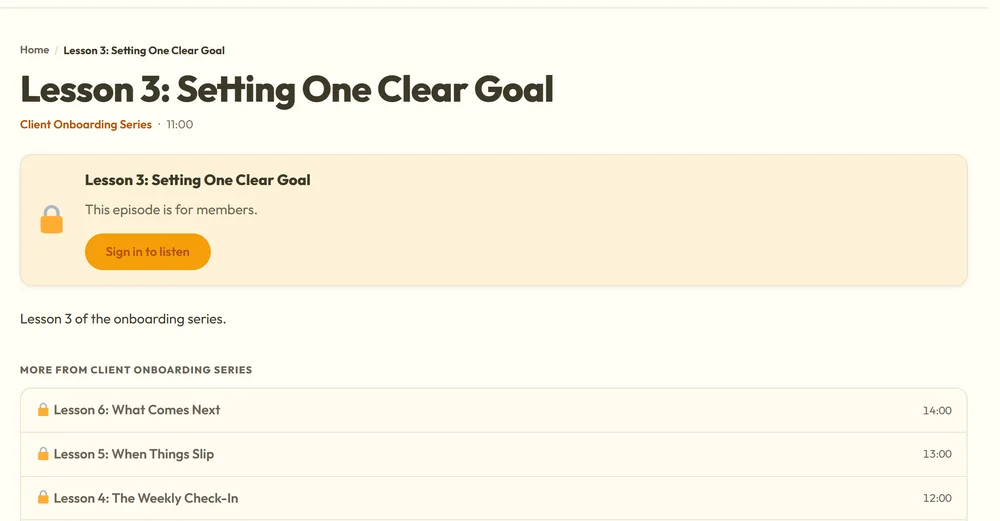
Someone who may not listen sees the episode's title, its summary, a box saying This episode is for members, a Sign in to listen button, and your Join button if you set a Join link on the Settings tab. The audio itself is never sent to them. Under the box, the More from list shows the show's other episodes with a lock beside each.
Do private shows appear in Apple Podcasts or Spotify?
No. Private and members-only feeds tell Apple, Spotify and the other directories not to list them, and they only open with a listener's own private link. Spotify does not accept private feeds at all, so private listeners use Apple Podcasts, Overcast, Pocket Casts, Podcast Addict or most other apps, or listen on your site.
Can one episode differ from its show?
Yes. Each episode has its own Who can listen, set to Same as the show unless you change it. A members-only show can have one public teaser episode, and a public show can have one members-only bonus.
Which one should I pick?
- A podcast to grow your audience: Public.
- A bonus for paying members: Members-only.
- A private series for a group, a course or a lead magnet, without making accounts: Private, with no login.
A real example:
yoursite.com runs Your Business Podcast as a public show for everyone, and the Client Onboarding Series as a members-only show for the Coaching Club and Gold Members levels. New clients who have no account yet are added as listeners by email, so they hear the same series with no login.
Tips:
- Decide the kind before you submit a feed. A public feed goes to Apple and Spotify; a members-only show has none to submit.
- Next, read Your First Show: Cover Art, Feeds And Who Can Listen and Listeners With No Login: Adding, Importing And The Signup Form.