This guide is for developers and tag manager users. Everything here is optional: the plugin works fully without any code. Use these when your own theme, plugin or snippet needs to know what a visitor agreed to.
Where to find it:
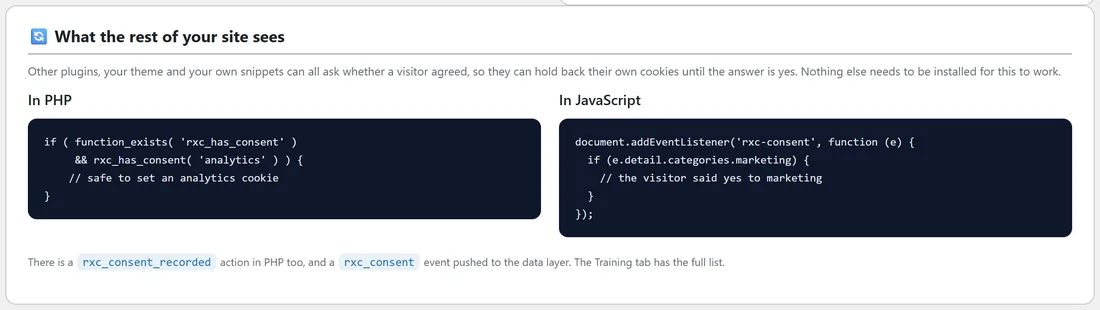
The Dashboard's What the rest of your site sees box shows two short examples, one in PHP and one in JavaScript. The Training tab's For developers section has the full list.
Group keys:
necessary, preferences, analytics, marketing, unclassified. necessary is always true.
The cookie:
The answer is stored in a cookie named rxc_consent. On a multisite network every site but the main one uses its own name, rxc_consent_ followed by the site number, so a yes on one site is never read as a yes on its neighbour.
In PHP:
- rxc_has_consent( 'analytics' ) returns true or false for the current visitor. Wrap it in function_exists, so your code is safe when the plugin is not active. Called before the plugin has finished loading, it answers false for every group but necessary.
- rxc_consent_state() returns the whole decision as an array of group keys set to 1 or 0, or null when the visitor has not answered the current wording.
- rxc_ask_again() raises the wording version, the same as the Ask everyone again button.
- Action rxc_consent_recorded fires on the server each time an answer is logged, with two arguments: the groups array and the record ID.
- Filter rxc_should_block: return false to turn blocking off for one request.
- Filter rxc_visitor_country: return a two letter country code from your own lookup. Filter rxc_visitor_region does the same for a US state code.
A PHP example:
Juniper Lane Pottery's theme sets a recently viewed cookie only when Preferences is accepted:
if ( function_exists( 'rxc_has_consent' ) && rxc_has_consent( 'preferences' ) ) { set your cookie here }
In JavaScript:
- The rxc-consent event fires on document every time a decision is applied, including on each page load where a stored answer exists. Read e.detail.categories, for example e.detail.categories.marketing.
- RXC.has('analytics') returns true or false. RXC.state() returns the whole answer, or null.
- RXC.open() opens the choices panel.
- RXC.acceptAll() and RXC.rejectAll() save an answer.
- RXC.withdraw() forgets the answer, records a Withdrew row in the log, and reloads the page so the visitor is asked again.
- An rxc_consent event is pushed to dataLayer with rxc_categories, ready to use as a Tag Manager trigger.
A JavaScript example:
document.addEventListener('rxc-consent', function (e) { if (e.detail.categories.marketing) { start your marketing widget here } });
Holding your own script:
Either add a pattern on the Blocking tab, or mark the tag up yourself.
- Give the script type="text/plain".
- Put its address in data-rxc-src in place of src.
- Add data-rxc-cat="analytics", or another group key.
The plugin leaves anything already carrying a data-rxc attribute exactly as it is, and releases it when that group is accepted. On pages outside WordPress, see Showing The Banner On Landing Pages WordPress Does Not Build.
Shortcodes:
- [rxc_cookie_table] prints the cookie declaration, grouped. Attributes: category="analytics" for one group, show_empty="yes" to include empty groups.
- [rxc_preferences] prints a link that reopens the choices panel. Attributes: style="button", text="...".
- [rxc_consent_date] prints the date the visitor last answered. Attribute: none="..." for the text shown before any answer. It starts as You have not made a choice yet.
- [rxc_data_request] prints the data request form. Attributes: title="..." (starts as Ask about your data) and button="..." (starts as Send my request).
Marking up an inline script:
An inline script can wait for consent too. Give it type="text/plain" and data-rxc-cat with the group key, and leave its code as it is. When the visitor accepts that group, the plugin runs it. Juniper Lane Pottery wraps a small review widget this way, with data-rxc-cat="marketing".
Checking the state in the browser console:
- RXC.state() shows the current answer, with one entry for each group key.
- RXC.has('marketing') gives false for that visitor.
- RXC.open() opens the panel so you can change it and watch your rxc-consent listener fire.
Tips:
- Use the rxc-consent event rather than reading the cookie yourself. It fires on every page load with a stored answer, so your code runs at the right moment.
- Test your code with RXC.withdraw() in the browser console to start again as a new visitor.
Next steps:
See Google Consent Mode v2: Signals, Switches And Tag Manager, and Blocking Scripts Before Consent: How It Works With Caching Plugins.