Google Consent Mode v2 is how Google's tags, such as Analytics, Ads and Tag Manager, learn what your visitor agreed to. ResultsAiX Consent sets it up for you, so there is nothing to paste into your site.
Where to find it:
AiX Consent, Blocking tab, the Google Consent Mode v2 box. Press Save blocking after any change.
How it behaves:
- Before any Google tag loads, every signal is set to denied. The one exception is security storage, which is always granted.
- The moment a visitor answers, the signals are updated to match.
- A returning visitor's stored answer is applied at the very top of the page, ahead of any Google tag, so their tags start with the right permissions.
- The two newer advertising signals, ad_user_data and ad_personalization, are included.
Which group controls which signal:
- Marketing: ad_storage, ad_user_data and ad_personalization.
- Analytics: analytics_storage.
- Preferences: functionality_storage and personalization_storage.
- security_storage is always granted.
So a Juniper Lane Pottery visitor who chooses Analytics only lets Google Analytics count the visit, while every advertising signal stays denied.
The four switches:
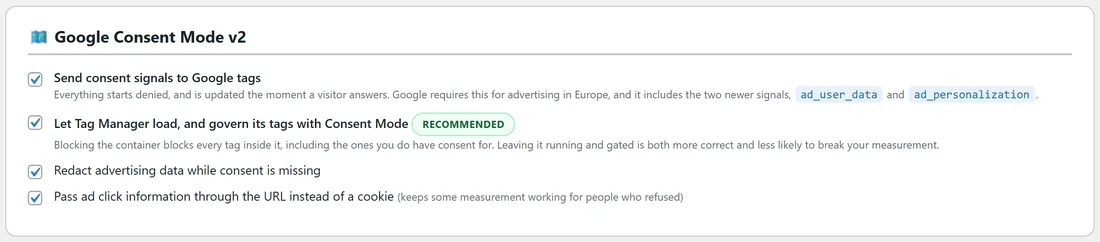
All four are on from the start.
- Send consent signals to Google tags. The main switch. Everything starts denied and is updated the moment a visitor answers.
- Let Tag Manager load, and govern its tags with Consent Mode. Marked RECOMMENDED. The Tag Manager container is left running and its tags follow the signals. Blocking the container would block every tag in it, including ones you do have consent for.
- Redact advertising data while consent is missing.
- Pass ad click information through the URL instead of a cookie. This keeps some measurement working for people who refused.
A good setting for almost every site is all four on, as the plugin ships.
Using it in Tag Manager:
Leave Tag Manager running and let Consent Mode govern the tags inside it. Every time a decision is applied, the plugin also pushes an event named rxc_consent to the data layer, carrying rxc_categories with the groups the visitor allowed. You can use it as a trigger for tags that should fire once consent is known.
Step by step, checking it:
- Open the Blocking tab and confirm the four switches are ticked.
- Open the Dashboard. The checklist item Google Consent Mode v2 is on should be ticked.
- Open the Diagnostics tab. The Consent Mode v2 row should read on, with an OK badge.
- Open your site in a private window and use Google's Tag Assistant to watch the default and update signals as you answer the banner.
Things to know:
- Consent Mode runs while the banner is switched on.
- Tags that are not from Google do not read Consent Mode. Those are handled by blocking, so check their rows on the Blocking tab.
- If the ResultsAiX Theme's own cookie notice is switched on too, it steps aside by itself while this banner is on, so Google only ever hears one answer.
- With Ask again every set to a number of days on the Settings tab, an answer older than that is not passed to Google either, so Google and the banner always agree.
What Google hears, answer by answer:
- Accept all: every signal granted.
- Reject all, or a browser signal: every signal stays denied, apart from security_storage.
- Analytics only: analytics_storage granted, every advertising signal denied, functionality_storage and personalization_storage denied.
- Preferences and Analytics: analytics_storage, functionality_storage and personalization_storage granted, the advertising signals denied.
Consent Mode and blocking together:
Consent Mode governs Google's own tags. Blocking holds back everything else on the services list, plus your own patterns. With both on, as the plugin ships, Google tags load and follow the signals, while tags from other companies wait until their group is accepted. On Juniper Lane Pottery, Google Analytics follows Consent Mode while the Meta Pixel and Hotjar wait behind blocking.
Tips:
- If you load Google Analytics through Tag Manager, you do not need a separate blocking rule for it. Consent Mode governs it inside the container.
- If you switch off Let Tag Manager load, the container is held until Analytics is accepted, like any other service.
Next steps:
See Blocking Scripts Before Consent: How It Works With Caching Plugins for non-Google tags, and For Developers: PHP Hooks, The JavaScript Event And Shortcodes for the data layer event.