By default the banner is shown to everyone, everywhere. You can narrow that to chosen regions, decide what happens when the country is unknown, and decide how browser privacy signals are treated.
Where to find it:
AiX Consent, Settings tab, the Who gets asked box. Press Save settings after any change.
Show the banner to:
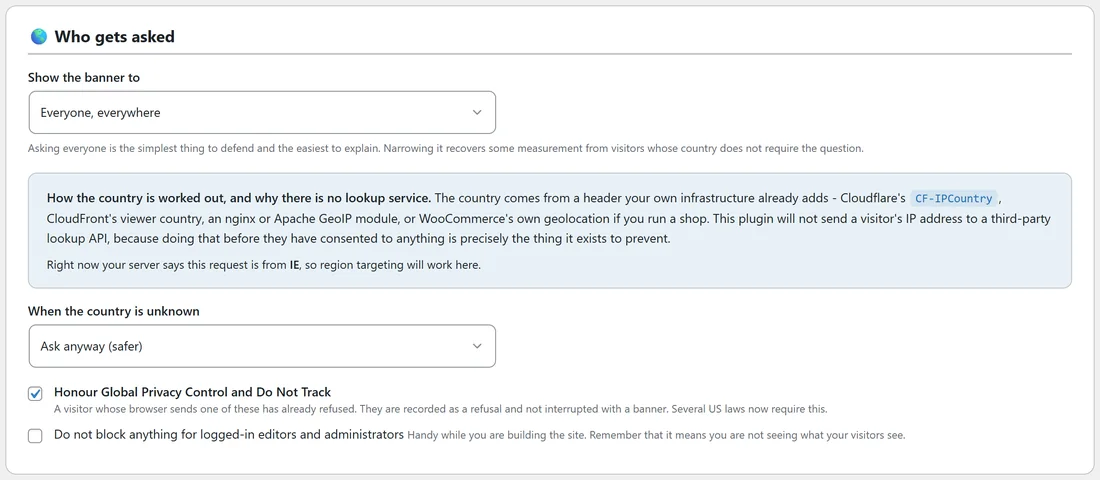
- Everyone, everywhere. The default, and the simplest to explain.
- The EU, the EEA, the UK and Switzerland only.
- Those, plus US states with an opt-out law. The plugin carries its own list of those states. A US visitor whose state cannot be seen is treated as covered.
Where the country comes from:
From a header your own hosting setup already adds: Cloudflare's CF-IPCountry, CloudFront's viewer country, an nginx or Apache GeoIP module, or WooCommerce's own geolocation if you run a shop. The plugin never sends a visitor's IP address to an outside lookup service.
The blue box under the menu tells you, live, what it can see. Either it names the country your own request is coming from, for example Right now your server says this request is from IE, so region targeting will work here. Or it says no country header is reaching WordPress. In that case, if you are not behind Cloudflare or a similar service, leave the setting on Everyone, everywhere.
When the country is unknown:
Choose Ask anyway (safer), the default, or Do not ask.
Outside your regions:
A visitor from a country you chose not to ask sees no banner, and scripts run as they would without the plugin. Nothing is recorded for them, because nothing was asked. The region check is a small separate request made by the visitor's browser, so it works correctly behind a page cache.
Global Privacy Control and Do Not Track:
Honour Global Privacy Control and Do Not Track is on from the start. A visitor whose browser sends one of these signals has already refused. They are recorded as a refusal, shown as Browser signal in the Consent log, everything optional stays held, and they are not interrupted with a banner. If the reopen button is on, they can still open the choices panel and opt in.
Logged-in editors:
Do not block anything for logged-in editors and administrators is off from the start. It is handy while building the site, but with it on you are not seeing what your visitors see.
A real example:
Juniper Lane Pottery sells to customers in Ireland, the UK and the US, and its host is behind Cloudflare. The owner left Show the banner to on Everyone, everywhere, which is the simplest choice. A shop that only wanted to ask European visitors could pick The EU, the EEA, the UK and Switzerland only, and leave When the country is unknown on Ask anyway (safer).
Step by step:
- Open the Settings tab and find Who gets asked.
- Read the blue box to see whether a country header is reaching WordPress.
- Choose Show the banner to.
- Choose When the country is unknown.
- Check the two tick boxes for browser signals and logged-in editors.
- Press Save settings.
Checking your own request:
The Diagnostics tab has a Country header row, which shows the header it can see, and a This request would row, which says whether your current request would see the banner.
Which places are covered:
- The EU, the EEA, the UK and Switzerland only covers the EU countries, Iceland, Liechtenstein, Norway, the United Kingdom and Switzerland.
- Those, plus US states with an opt-out law adds these states: California, Colorado, Connecticut, Virginia, Utah, Texas, Oregon, Montana, Delaware, Iowa, Nebraska, New Hampshire, New Jersey, Tennessee, Minnesota, Maryland, Indiana, Kentucky and Rhode Island.
How the region shows in the log:
Every answer records where it came from when your server knows: EU for any of the European countries above, US-CA style codes for US states, US when the state is not known, and a two letter country code for everywhere else. The Where column of the Consent log shows it, and a dash means no country header was reaching WordPress.
Tips:
- If you choose a region setting, test from the Diagnostics tab's This request would row.
- When you are signed in and testing, untick Do not block anything for logged-in editors and administrators, or use a private window.
Next steps:
See The Consent Log And Proof Of Consent: What Is Stored, CSV Export And Retention for how each answer is recorded, including browser signals.