
The Diagnostics tab is a one-glance health report for Login Guard. It checks the things that matter for a hidden login: whether an address is set, whether the emergency switch is on, whether your site can send email, and whether another plugin is trying to move the login too.
It also builds a report you can paste into a support ticket. The report never includes your login address, a password or a key, because the address is the secret.
Where to find it:
Open AiX Login Guard and click the Diagnostics tab. The Troubleshooting card on the Settings tab has an Open Diagnostics button too.
Copy Report for Support:
- Press Copy Report for Support. The button says Copied! Paste into your support ticket.
- Press Open Support, or go to https://kevinfahey.org/contact-support/
- Paste the report into your message.
The report lists:
- Plugin version, and that it is free
- License status
- Login address set: yes (not included in this report), saved but switched off, or not set
- Emergency switch: off, or on
- Taken over from: another hide-login plugin, or nothing
- Blocked visitors: see the 404 page, or the page they are sent to
- Help page: on or off
- Last emailed: the date and time in UTC, how many emails went out and why
- Permalinks: pretty or plain
- Page cache: WP_CACHE on or off
- WordPress and PHP versions, your site address and whether HTTPS is on
- Each of the four kinds of other login plugin: ACTIVE or not found
Plugin:
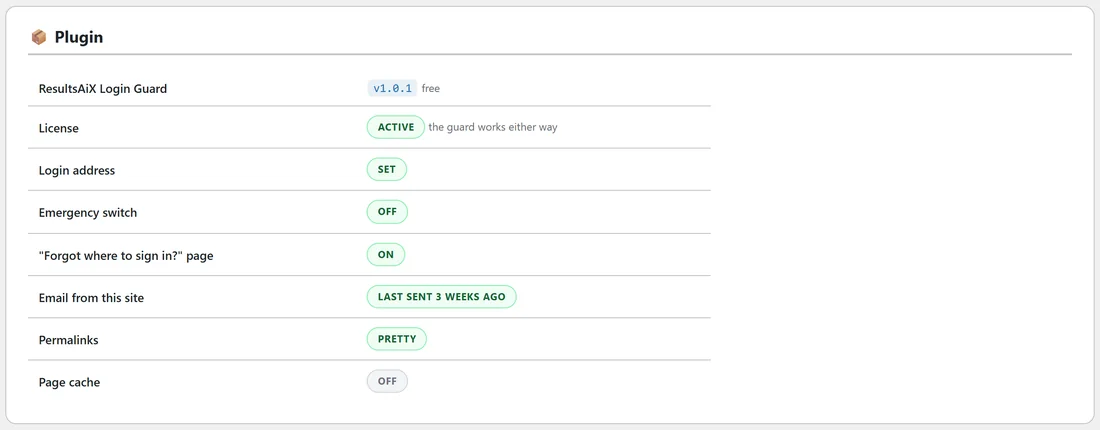
A table with a coloured badge for each check:
- ResultsAiX Login Guard: the version you are running
- License: Active, or the key's status. The guard works either way.
- Login address: Set, Saved, but "Hide my login" is off, or Not set
- Emergency switch: Off, or ON: login not hidden with a reminder to take RXLG_OFF out of wp-config.php
- "Forgot where to sign in?" page: On or Off
- Email from this site: Last sent and how long ago, or Nothing sent yet with a tip to press Email it to every administrator again on the Dashboard
- Permalinks: Pretty, or Plain with a note that the address works as ?your-address
- Page cache: off, or WP_CACHE on with a reminder to tell your cache not to cache your login address
Other login plugins:
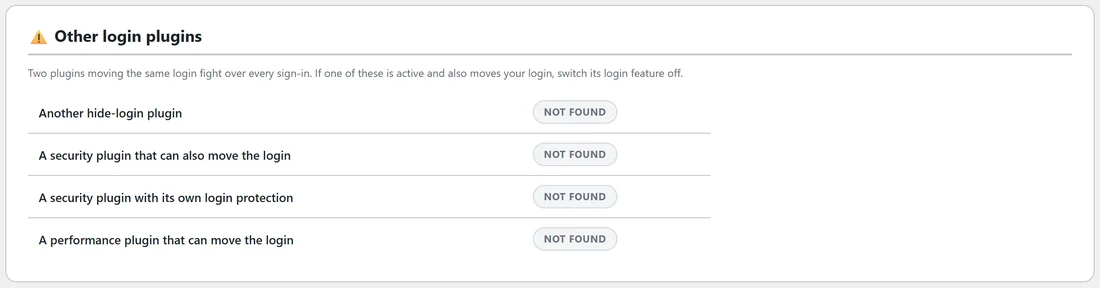
Two plugins moving the same login answer the same visitors, so only one should do it. This table shows Active or Not found for:
- Another hide-login plugin
- A security plugin that can also move the login
- A security plugin with its own login protection
- A performance plugin that can move the login
If one is active and also moves your login, switch its login feature off. Its other features can stay on.
Environment:
Your WordPress and PHP versions, your theme and its version, your site address, and whether HTTPS / SSL is active. Login Guard needs PHP 7.4 or newer, and says so here if your server runs an older one.
A real example:
Sam installs a new caching plugin on Willow Creek Pottery and wants to be sure the login still behaves. On the Diagnostics tab, Page cache now shows WP_CACHE on, so Sam adds /kiln-room-42/ to the caching plugin's never-cache list. Other login plugins still shows Not found for all four, so nothing else needs doing.
Tips:
- Open Diagnostics after installing any security, caching or performance plugin.
- Always paste the report when you contact support: it answers the first questions straight away.