Login Guard is built to sit quietly alongside everything else on your site. This article covers the places where it meets your theme and your other plugins, and what to do at each.
Login links on your site:
Some themes and plugins show a login link to visitors, such as a Member Login link in the footer or the Log in link in WordPress's Meta widget. When those links are built the standard WordPress way, Login Guard points them to your secret address automatically, so they keep working.
The flip side: anyone who can see that link can see your address. If you want the address truly secret, remove public login links from your theme and widgets and share the address only with the people who need it. Links to sign in on a different website are left alone.
Your forms and background features:
Your site's forms and features that talk to WordPress behind the scenes (through admin-ajax.php and admin-post.php), scheduled tasks and WP-CLI are not touched. Password-protected posts keep working too.
Page caches:
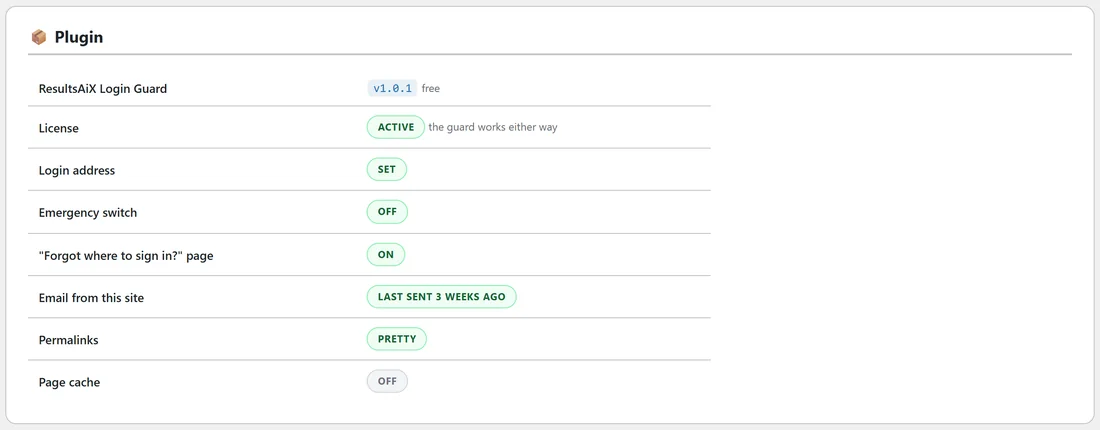
If you use a page cache, add your secret login address to the list of pages your cache must never cache, the same as you would for wp-login.php. Most caching plugins and most hosts' own caches already skip the login.
The Diagnostics tab shows a Page cache row. When a cache is switched on it shows WP_CACHE on and reminds you to tell your cache not to cache your login address.
Other plugins that move or guard the login:
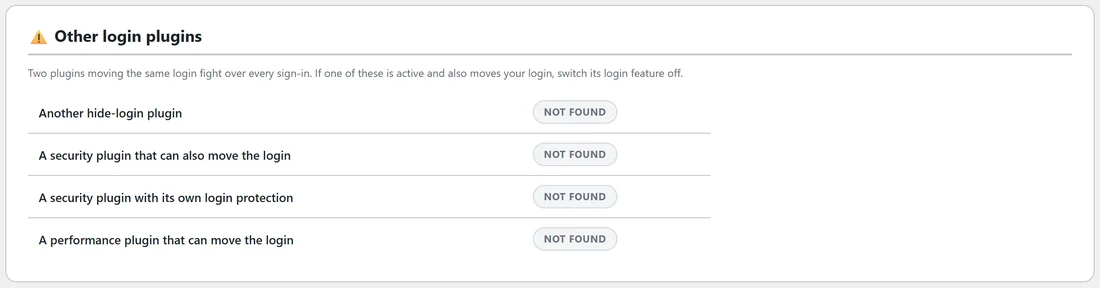
Only one plugin should move your login. The Diagnostics tab has an Other login plugins section showing Active or Not found for four kinds of plugin: another hide-login plugin, a security plugin that can also move the login, a security plugin with its own login protection, and a performance plugin that can move the login.
If one of them is active and also moves your login, switch its login-moving feature off. Its other features can stay on: only the moving of the login has to belong to one plugin. See Switching Over From Another Hide-Login Plugin.
Your theme's "page not found":
When Login Guard hides wp-login.php, it shows whatever "page not found" page your theme already has. Change your theme and the disguise changes with it. A signed-out visit to /wp-admin/ shows a plain Page not found page instead (see What Visitors And Robots See).
Permalinks:
Both ways of writing your address work, whatever your permalink setting: yoursite.com/your-address/ and yoursite.com/?your-address. The Diagnostics tab shows Pretty or Plain. Sites with "almost pretty" permalinks, which have index.php in every address, sign in at yoursite.com/index.php/your-address/.
The ResultsAiX Hub:
Login Guard registers with the free ResultsAiX Hub, so it appears there alongside your other ResultsAiX plugins, and a Hub tab appears on the Login Guard screens. The Login Guard screens follow the Hub's colour scheme unless you pick one of your own under Appearance.
Multisite:
Login Guard is built for a standard single WordPress site and keeps its settings per site. It has no network-wide settings screen. If you run a multisite network, contact support at https://kevinfahey.org/contact-support/ before installing it.
A real example:
Willow Creek Pottery uses a caching plugin. After choosing kiln-room-42, Sam opens the caching plugin's settings, finds the list of pages never to cache, adds /kiln-room-42/ next to wp-login.php and saves. The theme's footer had a Log in link from an old widget, so Sam removes it to keep the address private.
Tips:
- After installing any new security or caching plugin, open the Diagnostics tab once to check the Other login plugins and Page cache rows.
- Clear your page cache after changing your login address.