Results tells you whether your promo is working. In one card you see how many people visited your bonus page, how many clicked through to the sales page, and how many buyers used their bonuses.
Where to find it:
Open a project, click 5. Delivery & leads, and scroll to the Results card.
The numbers:
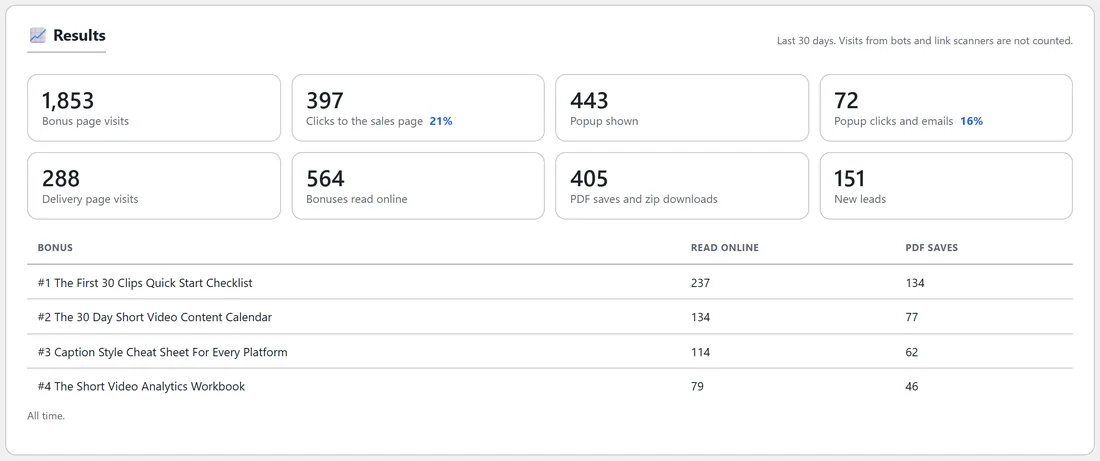
All of these cover the last 30 days.
- Bonus page visits. Every visit to your bonus page.
- Clicks to the sales page. Clicks on the buttons on your bonus page, with the share of visits that clicked.
- Popup shown. How many times the leave popup appeared.
- Popup clicks and emails. Clicks on the popup button plus emails left in the popup, with the share of popups that got one.
- Delivery page visits. Visits to your bonus delivery page, including the email step.
- Bonuses read online. Every time a bonus was opened with Read online.
- PDF saves and zip downloads. Every Save as PDF and every Download all (zip).
- New leads. Leads from the email step and the popup.
Each bonus:
Under the numbers, a table lists every written bonus with how often it was Read online and its PDF saves, all time. It shows which bonuses buyers use most.
What is not counted:
- Visits from bots and link scanners, such as the robots that check links in emails.
- You. While you are signed in as the site owner, your own visits and clicks are left out, so you can check your pages as often as you like.
Reading your results:
- A low click share on the bonus page: try a new headline or look on step 4.
- Popup shown but few clicks or emails: try different words, or switch between Reminder and Collect emails.
- Many delivery visits but few reads: your buyers may need a nudge, such as a follow-up email that points to the first bonus.
- The bonus with the most reads is a good one to reuse in your next promo: see Reusing Bonuses From Another Project.
A real example:
Sam's ClipForge AI Results show 1,853 bonus page visits and 397 clicks to the sales page, 21% of visitors. The Quick Start Checklist is the most read bonus, so Sam leads with it in the next email.