Smart Detection is what lets WP Record With Privacy hide data on any plugin's screens without being told about them. Instead of looking names up in the database, it reads the page the way a person does, and masks whatever sits in a personal-data position.
Where to find it:
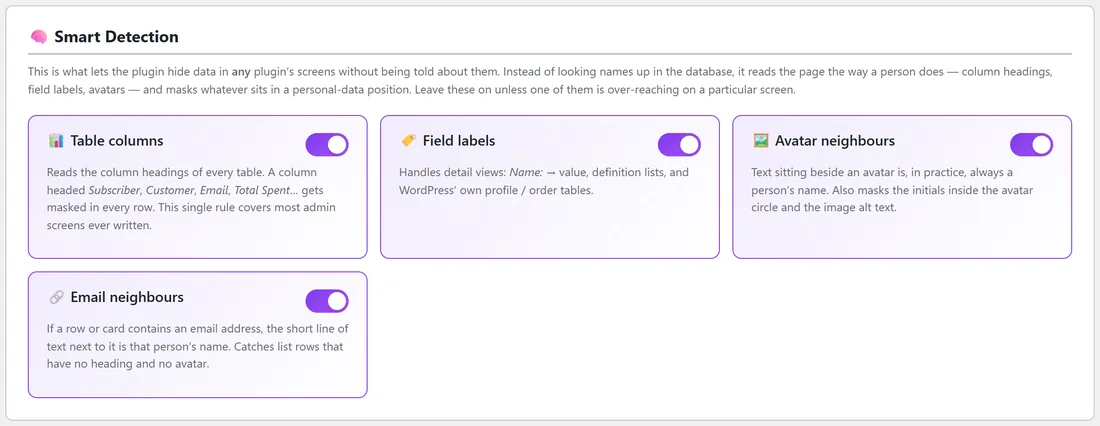
Open 🔒 Record Privacy, click ⚙️ Settings and scroll to 🧠 Smart Detection. All four switches are on by default. The Settings screen's advice is to leave them on unless one is over-reaching on a particular screen. Click Save Settings after any change.
The four switches:
Each switch is one way of reading the page. They work together, and the filters decide which types they may hide.
Table columns:
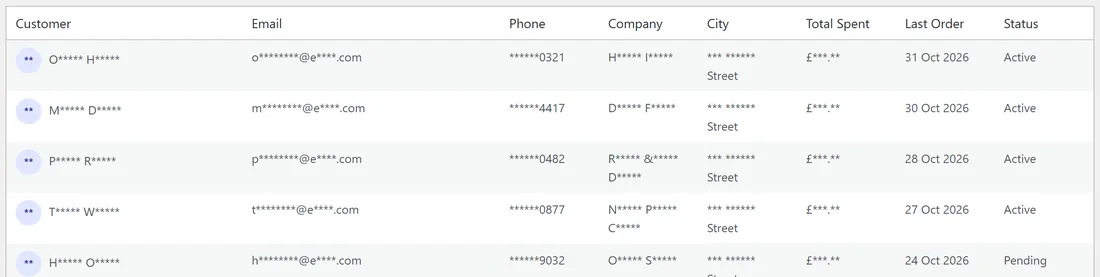
Reads the column headings of every table. A column headed Customer, Email, Phone, Company, City or Total Spent gets masked in every row. This single rule covers most admin screens. On Maya's Customers screen it is what hides the Company and City columns, which have no fixed shape a pattern could spot.
Field labels:
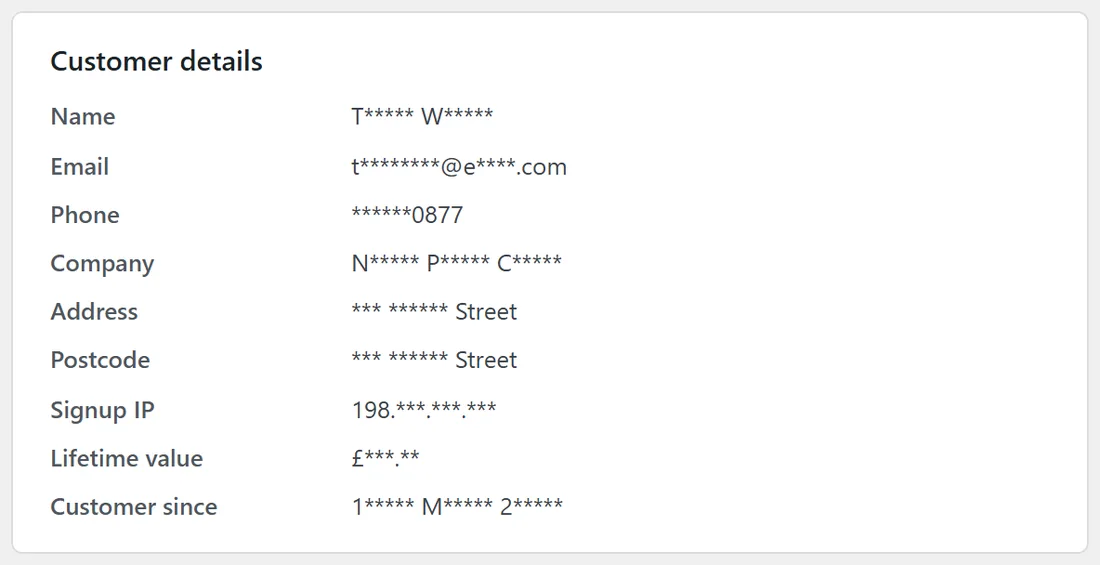
Handles detail views: a label followed by its value (Name and then the name), definition lists, form labels, and WordPress's own profile and order tables where the label sits at the start of each row. On Maya's Customer details card it hides the Name, Company, Address, Postcode and Lifetime value rows.
Avatar neighbours:
Text sitting beside an avatar is almost always a person's name, so it is masked when it reads like one. It also masks the initials inside an avatar circle and the image's alt text.
Email neighbours:
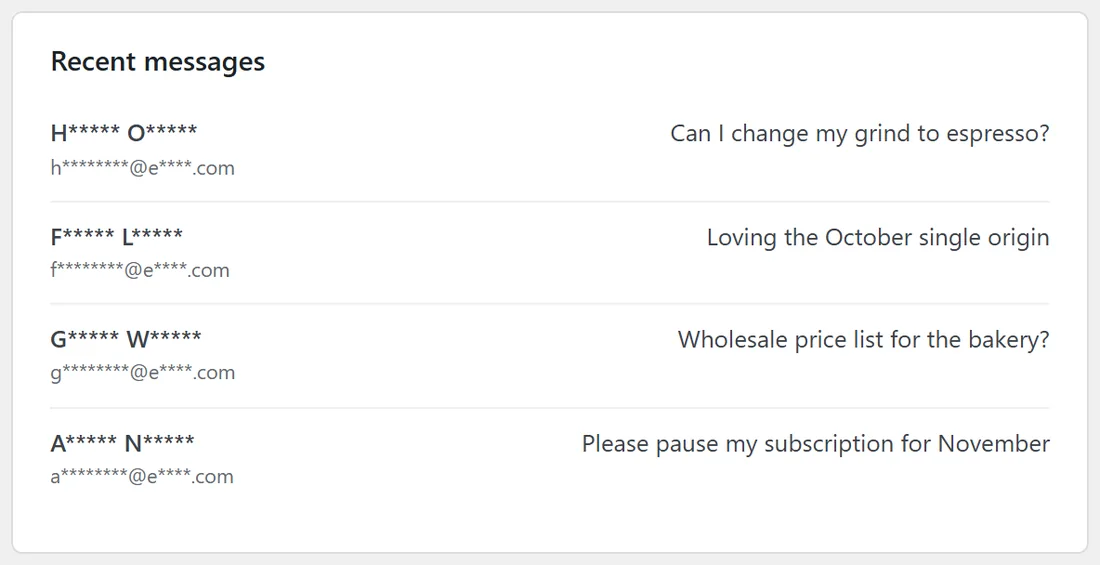
If a row or card contains an email address, the short line of text next to it that reads like a name is treated as that person's name. This catches list rows that have no heading and no avatar, like Maya's Recent messages box.
Avatar neighbours and Email neighbours need at least one name filter switched on.
The words it recognises:
Headings and labels are matched as whole words, ignoring capitals and punctuation. A few examples:
- People: Name, Full Name, Subscriber, Customer, Contact, Client, Member, Recipient, Lead, User, Buyer, Author, Sender, Attendee, Student, Affiliate, Partner, Bill To, Ship To, Account Holder, Display Name
- First and last names: First Name, Given Name, Forename, Last Name, Surname, Family Name
- Email: Email, E-mail, Email Address, Mail, From, To, Reply-To, Contact Email
- Username: Username, Login, Handle, Nickname, Screen Name, Slug
- IP address: IP, IP Address, Remote IP, Last IP, Signup IP, Registered IP, Host
- Phone: Phone, Telephone, Tel, Mobile, Cell, WhatsApp, Fax, Contact Number
- Address: Address, Street, City, Town, Postcode, Zip, State, County, Location, Region, Billing Address, Shipping Address
- Money: Total, Total Spent, Amount, Revenue, Price, Value, Spent, Paid, Earnings, Commission, Balance, Subtotal, Cost, Order Total, Lifetime Value, LTV, Sales
- Company: Company, Organisation, Organization, Business, Employer, Firm, Agency, Brand
It also reads the hidden labels that many plugins put on their table cells in the page code, and common class names such as customer-name or subscriber-email.
Numbers on their own:
Under a money, phone or address heading, a cell is masked even when it holds only numbers and symbols, such as £49.00, 07700 900123 or 90210. A phone needs at least six digits. Under a name or email heading, a cell made only of numbers is left alone, because a number is never a name. The Blurred style blurs the whole cell whatever it contains.
The safety rules:
Masking the wrong thing makes a screen look broken, so Smart Detection is deliberately careful:
- Labels that look personal but aren't are skipped. First Seen, Last Login, Last Order and Last Contact are dates. Campaign Name, Product Name, List Name and Form Name belong to things, not people. Date, Created, Registered, ID and counts such as Total Opens or Number Of Orders are left alone, as are Opens, Clicks, Views, Score and Quantity.
- A vague heading like Name is judged by its surroundings. Under a heading about subscribers or customers it is treated as people. Under a heading about broadcasts, products or orders, only values that genuinely read like a person's name are masked, never subject lines or product titles.
- Status words such as Active, Pending, Paid or Completed, times like 3 days ago, and plain numbers are never masked.
- The left admin menu and code blocks are never touched. In the top admin bar only your own name is hidden. Form fields are handled separately: see Exactly What Gets Hidden, And What Does Not.
Screens that load data later:
Smart Detection keeps watching the page. Tables that load after the page, slide-out detail panels and infinite scroll are all masked as they appear, and it sweeps the whole page again about 0.4, 1.2 and 3 seconds after it loads, for dashboards that draw themselves late.
See the difference:
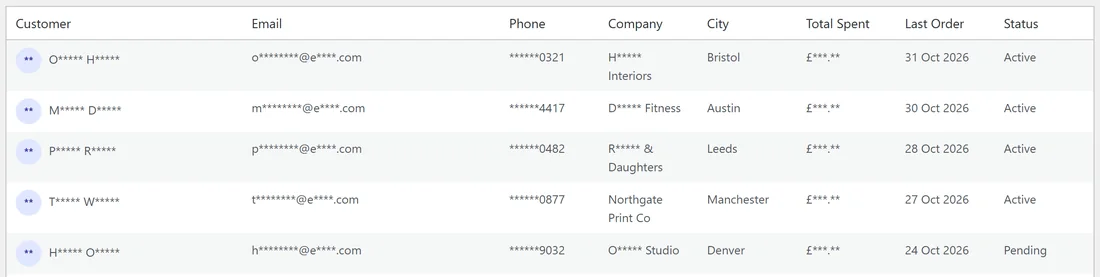
Here is Maya's Customers screen with Table columns switched off and every filter still on. Emails, phones and totals are still hidden, because the patterns catch them anywhere. Names are still hidden, because they belong to registered users. The City column and most company names now show, because only the column headings said they were personal.
When to switch one off:
If one switch masks something it shouldn't on a screen you need to show, turn that switch off, click Save Settings and check again. The other switches, the filters and Point & Mask keep working. Two examples from real screens:
- A label that merely starts with a people word, such as Customer since, can be read as a name and its date masked. Turn off Field labels for that recording, or simply leave it, since a masked date gives nothing away.
- On the WordPress Dashboard, the Activity box sits next to commenters' avatars, so Avatar neighbours can mask its Recently Published and Recent Comments headings and post titles that read like names. If you show that box, turn off Avatar neighbours for the recording.