WP Record With Privacy is a free WordPress plugin from ResultsAiX. It lets you screen-record, screenshot or screen-share your WordPress admin without showing your customers' private details to the people watching.
You turn on Privacy Recording Mode with one button. From that moment, the wp-admin screens you open show masked data in place of real email addresses, names, usernames, IP addresses, phone numbers, street addresses, company names and prices, depending on which filters you switch on. When you are done, you press the button again and your admin shows the real data straight away.
What it looks like:
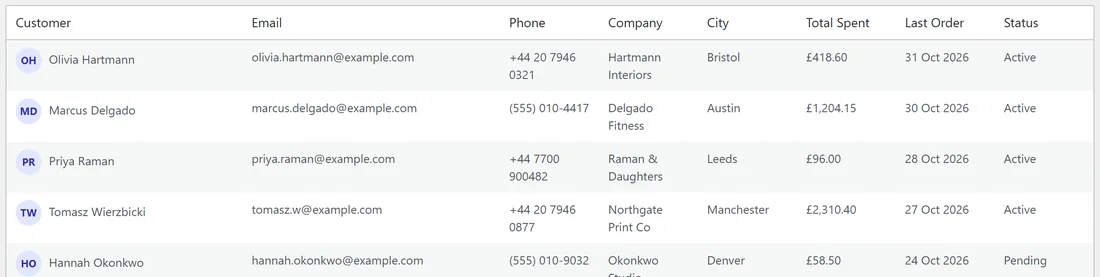
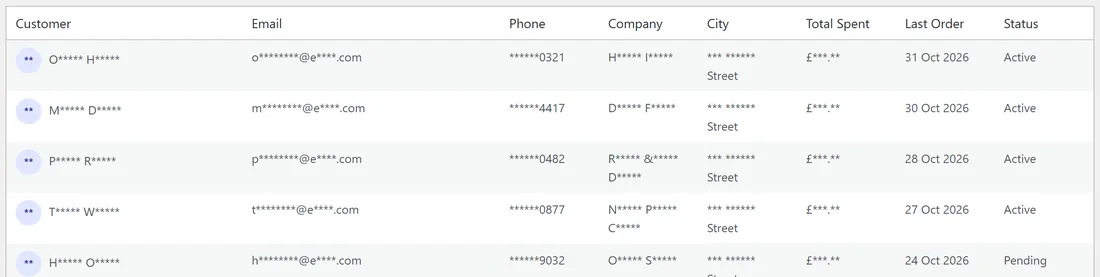
Here is a customer list on the made-up coffee shop we use in these docs, Harbor Lane Coffee at yoursite.com. First with the switch off, exactly as the owner sees it every day.
Then the same screen with Privacy Recording Mode on and the filters for a shop walkthrough switched on. Names keep their first letters, emails keep their shape, phones keep their last four digits, and prices keep their currency sign, so the screen still makes sense on camera while nothing personal can be read.
Nothing in your database is changed:
The plugin never edits a user, an order or a post. It only changes what is sent to your browser, and what your browser shows, while the switch is on. Turn it off and every screen is exactly as it was. Forms you save while recording still save the real values.
Who it is for:
- Anyone making video tutorials or course lessons inside WordPress
- Support teams taking screenshots for help articles and tickets
- Agencies and freelancers showing client dashboards in walkthroughs and case studies
- Sales demos and live webinars where you screen-share your admin
- Team trainings on a real site, without showing real customers
- Anyone asking for help in a forum or a support ticket who needs to share a screenshot of their admin
How it works in one minute:

- Two layers do the masking. The first swaps emails, IP addresses, phone numbers, prices and the names of your registered users before the page even leaves your server. The second runs in your browser and catches everything else, including content that loads after the page.
- Smart Detection reads each page the way a person does: column headings, field labels, avatars and the text sitting next to an email address. That is how it finds people's details on other plugins' screens without being told anything about them.
- Point & Mask covers the rest. If something slips through, you click it once, say what kind of data it is, and it stays hidden on every future recording.
What it does not do:
It only works inside wp-admin. Your public website, checkout, emails and visitors are never touched, and it does not edit recordings after you make them. The article Exactly What Gets Hidden, And What Does Not gives you the full, honest list.
Everything is free:
There is no paid version and nothing is locked. One free sign-up gives you this plugin and the other free ResultsAiX plugins, and you can use it on as many of your own sites as you like.
Where to go next:
- Getting It Free, Installing And Activating gets the plugin onto your site.
- Training: Getting Started In 60 Seconds is the short version of everything.
- Getting Started Guide walks you through your first private recording step by step.