ResultsAiX Forms is a form builder for WordPress that tells you where every lead came from. You build contact forms, quote requests, feedback forms, sign up forms and anything else you need, put them on any page, and every submission lands in your own WordPress database.
What makes it different is the attribution. Every entry is saved with its traffic source, its UTM campaign, the device and browser, the page it was sent from and how long the visitor took to fill it in. There is nothing to set up for this, and you see it on every entry, on the Dashboard, in your notification emails and in the CSV export.
Who it is for:
Anyone who runs a business website and wants more than a pile of messages. If you pay for ads, send newsletters, post on social media or rank in search, the plugin tells you which of those actually brings enquiries. In this guide we follow Northfield Renovations, a made up building company at yoursite.com, with five forms and a few hundred entries.
What you get:
- A builder with 19 field types and a live preview that shows the real form as you build it. There is no field limit.
- Conditional logic to show or hide fields based on earlier answers, checked again on your site when the form arrives.
- A Dashboard with date ranges from Today to Lifetime, or your own From and To dates, that shows how many leads came in, where they came from and how that compares with the period before.
- Five spam protection layers that run quietly on every submission, plus optional Google reCAPTCHA v3 and Akismet.
- A notification email to you and an optional thank you email to the visitor, both with merge tags, sent from a name and address you choose.
- An Entries inbox with search, filters, stars, bulk actions, a full view of every entry and a CSV export that opens cleanly in Excel.
- Form abandonment counting, so you can see how many people start a form and how many finish it.
- Direct delivery of leads to ResultsAiX Mailer lists, and to your autoresponder through WP Sync.
- Privacy tools: a GDPR consent field, automatic deletion of old entries, private file uploads, support for the WordPress Export and Erase Personal Data tools, and no visitor IP addresses stored.
- A Diagnostics tab with a built in error log and a one click report for support.
What a visitor sees:
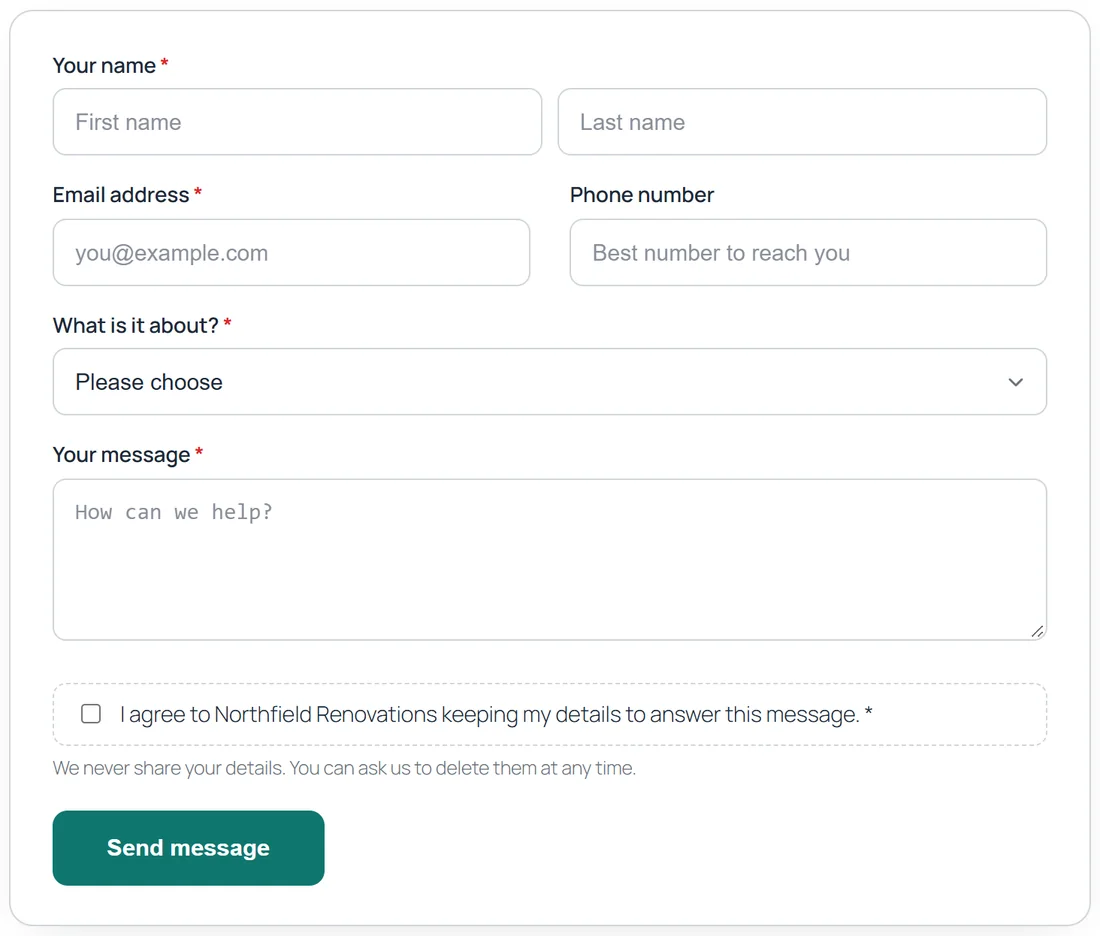
Your forms appear as a clean card in your own page, with your accent colour and button text. Fields that belong together can sit side by side, choice questions are easy to tap on a phone, and the form checks each answer before it is sent.
What you see:
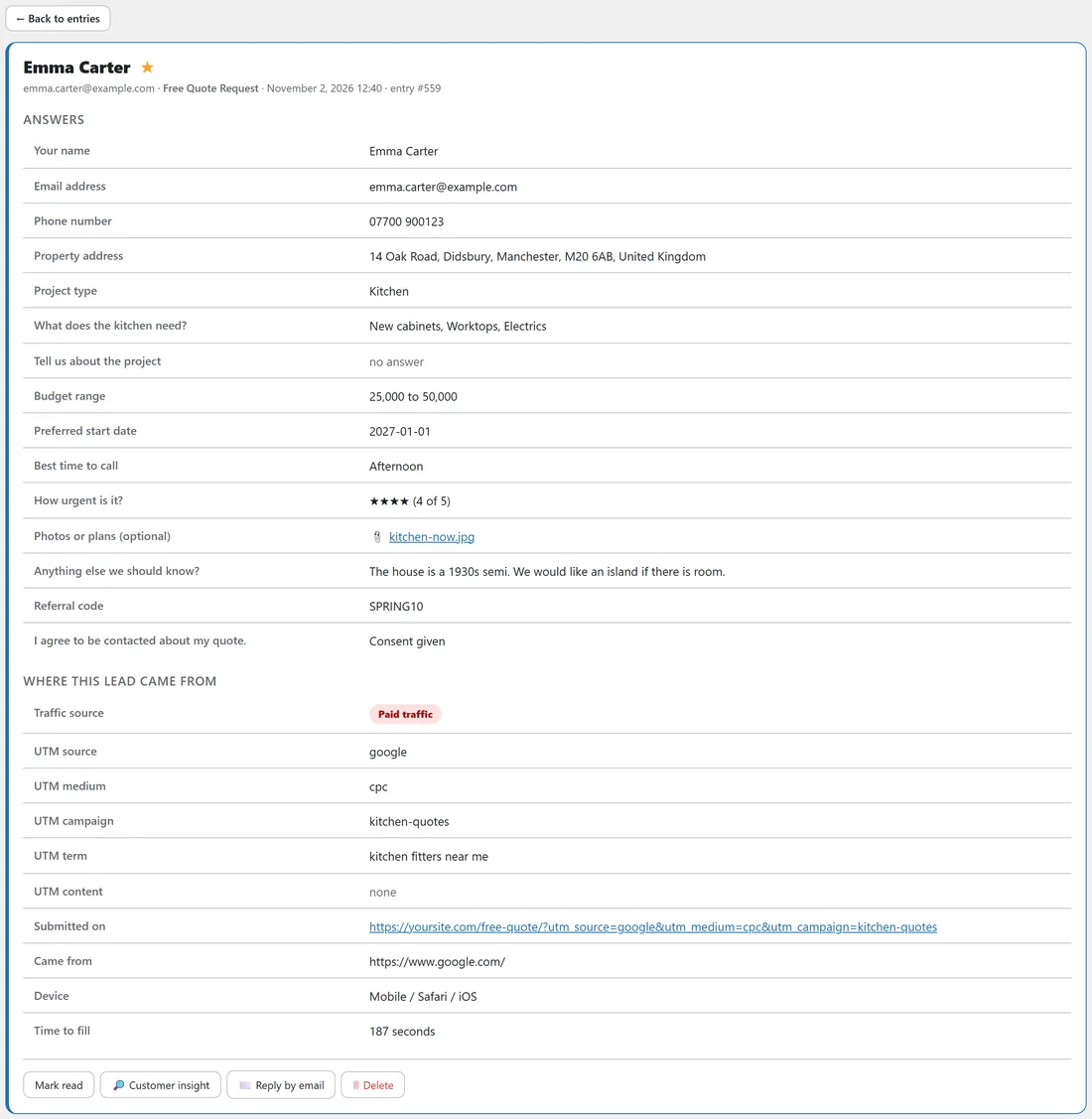
Every entry arrives in the Entries tab tagged with where it came from. Below is a quote request from Emma Carter: she clicked a Google ad from the kitchen-quotes campaign on her iPhone and took 187 seconds to fill in the form.
What the Dashboard tells you:
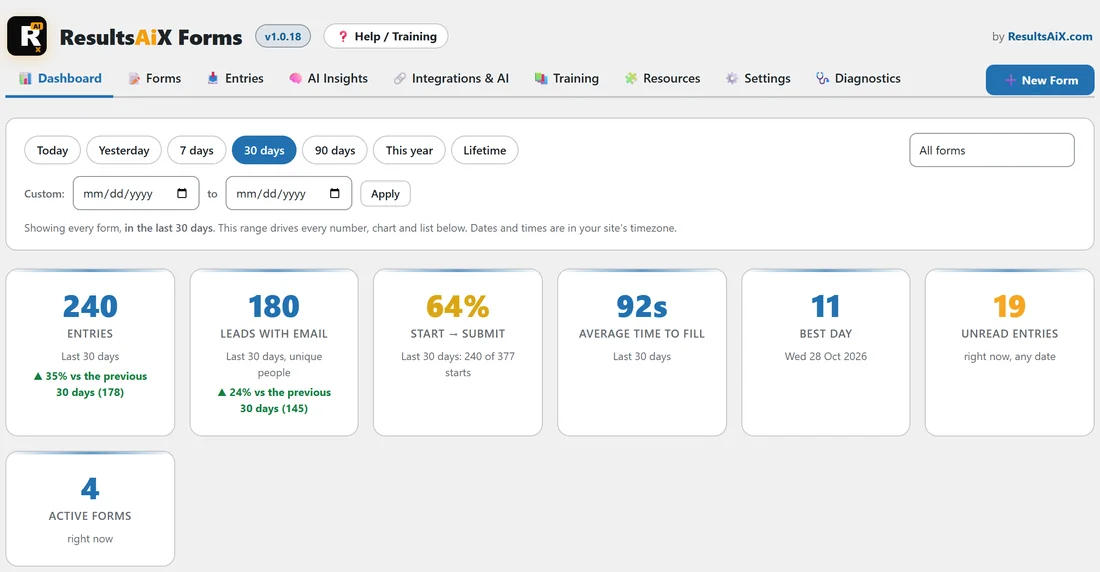
For Northfield Renovations, the last 30 days brought 240 entries from 180 different people, 35% more than the 30 days before. Organic search brought the most leads, and 60% of them were sent from a phone. Those are the answers the Dashboard gives you at a glance.
How the parts fit together:
A form's life has four stages, and each tab of the plugin looks after one of them:
- Build: the builder, with its field palette, field cards, style, emails and live preview.
- Publish: the ResultsAiX Form block, the shortcode or the Elementor widget, on any page.
- Collect: each submission passes the spam layers, is checked against the form's own rules, and is saved with its attribution. Your emails go out, and Mailer and WP Sync receive the lead.
- Understand: Entries for the people, the Dashboard for the numbers, AI Insights for the meaning.
The five forms in this guide:
The Northfield Renovations demo site runs these forms, and the guides use them as examples throughout:
- Contact Us: name, email, phone, a topic dropdown, a message and a consent box. Active, 147 entries.
- Free Quote Request: 17 fields in two parts, with conditional logic, a file upload, a hidden referral code and leads sent to a Mailer list. Active, 140 entries.
- Customer Feedback: a dark card with a star rating and a follow up question for low scores. Active, 47 entries.
- Home Tips Newsletter: first name, email, interests and consent, with floating labels. Active, 205 entries.
- Join Our Team: a job application with a CV upload. Closed, 23 entries.
- Home Consultation Booking: a booking form with date and time pickers. Still a draft.
What happens when someone sends a form:
- The visitor's browser checks every visible field and points to anything missing.
- Your site checks the spam layers, works out the conditional logic again, and checks every answer against the form.
- Any uploaded file is stored privately, and the entry is saved with its source, campaign, device, page and fill time.
- Your notification email and the visitor's thank you email go out.
- The lead goes to your Mailer list and your WP Sync bridges, if you use them.
- The visitor sees your thank you message, or is taken to your thank you page.
What it does not need:
- No outside form service and no monthly per entry fee: everything is stored in your own WordPress.
- No code: the block, shortcode and widget place forms anywhere.
- No extra spam plugin: five layers are built in.
- No tracking script: attribution is recorded with the submission itself.
Do I need an AI key?
No. Building forms by hand, publishing, collecting entries, attribution, the Dashboard, emails, export and the answer charts all work with no AI key. Adding your own Google Gemini, Anthropic Claude or OpenAI key switches on two extras: "Describe it, AI builds it" in the builder, and the written analysis on the AI Insights tab. See AI Form Drafting And AI Insights: What AI Does In ResultsAiX Forms.
Is it accessible to every visitor?
Yes. Forms work with a keyboard and with screen readers. Groups of choices are announced as one question, required fields say so out loud, each error is linked to its field, and the thank you message is read out when the form is sent.
Where to go next:
- Installing ResultsAiX Forms And Activating Your Licence Key
- Quick Start: Your First Form Live In Five Minutes
- Lead Attribution: Traffic Source, UTM Campaigns, Device And Abandonment