ResultsAiX Forms is complete by itself. Other plugins add to it when they are active on the same site, and nothing stops working when they are not. This guide lists what each one adds and where to see it.
With nothing else installed:
Building forms, publishing, entries, lead attribution, the Dashboard, abandonment counting, both emails, the five spam layers, CSV export, the Answer breakdown charts, the privacy tools and Diagnostics with its error log.
With your own AI key:
"Describe it, AI builds it" in the builder, and the written summary, findings and next actions on AI Insights. See AI Form Drafting And AI Insights: What AI Does In ResultsAiX Forms.
With ResultsAiX Mailer:
- Every form gains a working Send leads to ResultsAiX Mailer box: tick, pick a list, add an optional tag. No API key.
- The traffic source and campaign are saved on the subscriber.
- Customer insight on your entries can use Mailer's subscriber and purchase records.
See Sending Leads To ResultsAiX Mailer And Your Autoresponder With WP Sync.
With WP Sync:
ResultsAiX Forms becomes a source in WP Sync's bridges, so every lead can flow to any autoresponder or service connected there, with its answers and attribution.
Customer insight:
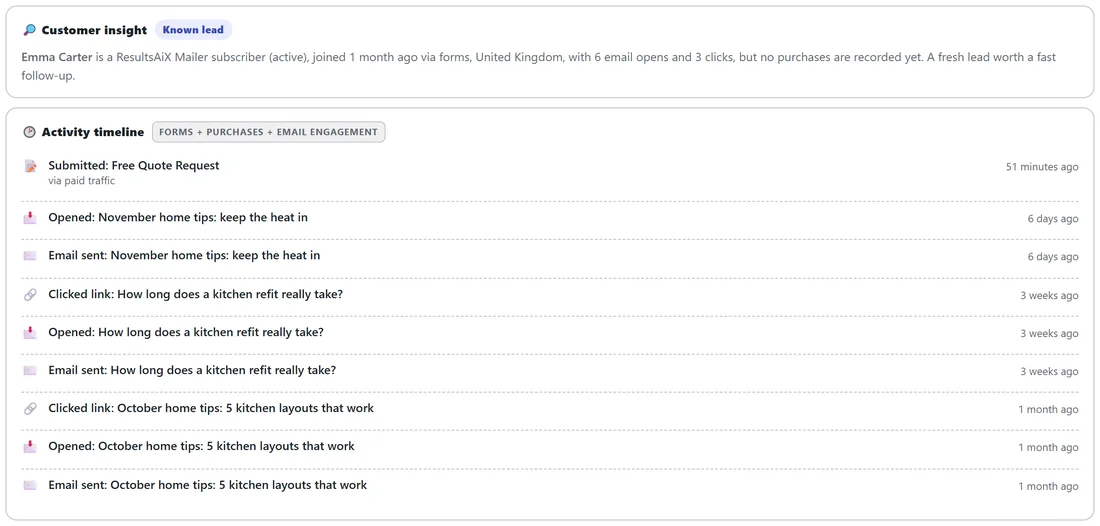
Entries that have an email, or a tracked click from WP Conversion Tracker, show a Customer insight button, in the list and on the full entry. One click shows who the lead is:
- Existing buyer, with a VIP badge where it applies: total spent, number of purchases, first and last sale, and their recent purchases, with the advice "An existing customer just raised their hand. Answer this one first."
- Known lead: someone you already know, with no purchases recorded yet. From Mailer, it says when and how they joined, their status, their country and how many emails they opened and clicked.
- No match yet: a first time visitor.
Where the panel gets its information:
- With WP Conversion Tracker and its Audience Vault add-on, it reads your sales and visitor records, and can match a lead by the tracked click that brought them, even before the vault knows their email.
- With ResultsAiX Mailer, it uses your Mailer subscribers and purchase records. A buyer's figures carry a "from ResultsAiX Mailer" tag.
- With both, WP Conversion Tracker and Audience Vault are asked first, and Mailer is checked for anyone the vault does not know yet.
- With neither, the button explains what it needs.
The activity timeline:
Known people also get an Activity timeline, newest first: the forms they submitted with the traffic source each time and, with ResultsAiX Mailer on the site, their purchases and every email they were sent, opened and clicked.
A real example:
Emma Carter's quote request arrives from a Google ad. Dana clicks Customer insight: Emma is a Known lead, a Mailer subscriber who joined a month ago through a form, with 6 email opens and 3 clicks. The timeline shows she clicked "How long does a kitchen refit really take?" three weeks ago. Dana calls her that afternoon with the answer ready.
With the ResultsAiX Hub:
- The admin colour scheme can follow the Hub, so every ResultsAiX plugin matches.
- A Hub link joins the tab row.
- ResultsAiX Forms is listed in the Hub with this week's entries and leads.
With Elementor, Akismet or an SMTP plugin:
- Elementor gets a dedicated ResultsAiX Form widget, shown fully styled in the Elementor editor.
- Akismet can act as an extra spam layer under your own Akismet account.
- Any SMTP service set up on your site carries the notification and thank you emails, and an SMTP plugin's own sender is kept.
Customer insight, step by step:
- Open the Entries tab.
- Find an entry that has an email, or a tracked click.
- Click Customer insight, in the list or on the full entry.
- The panel opens under the buttons. Click again on another entry to look up that person.
The panel is looked up only when you click, so the Entries list stays fast however many entries you have.
How the plugins share without keys:
ResultsAiX Mailer, WP Sync and WP Conversion Tracker all run inside the same WordPress site, so ResultsAiX Forms talks to them directly. There is nothing to paste and no outside service in between.
When you add a plugin later:
- Add ResultsAiX Mailer: the Mailer box appears in every form's builder at once. Earlier entries are not sent; new ones are.
- Add WP Sync: build a bridge, and every new entry with an email goes out.
- Add WP Conversion Tracker with Audience Vault: Customer insight starts matching people, including entries collected before.
With WP Conversion Tracker and Audience Vault:
When both run on the same site, Customer insight can show an Existing buyer with their total spent, number of purchases, first and last sale and up to five recent purchases, named after the tracking link that sold them. A VIP badge appears for people the vault marks as VIP. Even when a lead's email is new to the vault, the tracked click that brought them can still find their history.
Without any of them:
Customer insight shows a short note explaining that the panel fills in when WP Conversion Tracker with Audience Vault, or ResultsAiX Mailer, runs on the site. Everything else on the entry is unchanged.
The colour scheme and the Hub:
The Color scheme setting in Settings, Appearance starts on Follow the ResultsAiX Hub. With the Hub installed, choosing a scheme there changes every ResultsAiX plugin at once. Without the Hub, the plugin uses the WordPress Native look until you pick a scheme yourself.
Where to check:
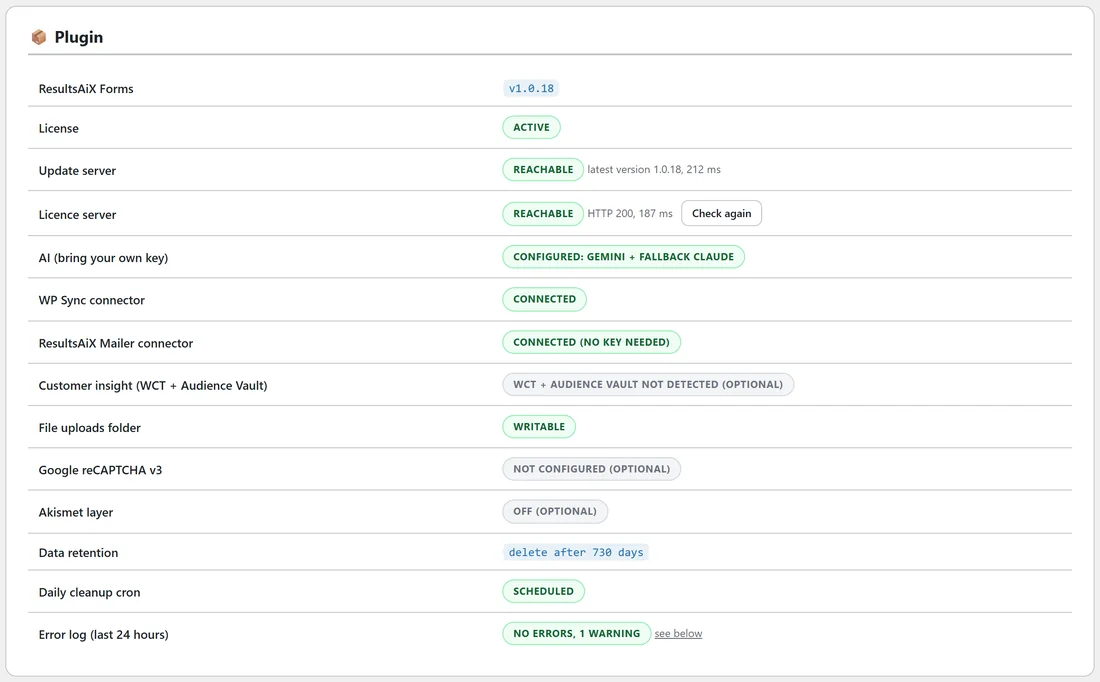
The Plugin table on the Diagnostics tab shows a status line for AI, the WP Sync connector, the ResultsAiX Mailer connector, Customer insight (WCT + Audience Vault), Google reCAPTCHA v3 and the Akismet layer. The error log records any Mailer or WP Sync hand-off that did not go through.
The Resources tab:
Lists other tools from the same team, with anything already running on your site marked Installed.