You have three ways to step back: switch the visitor side off, deactivate the plugin, or delete it. This article explains what each one does, so you can pick the right one.
Just want the button off for a while?
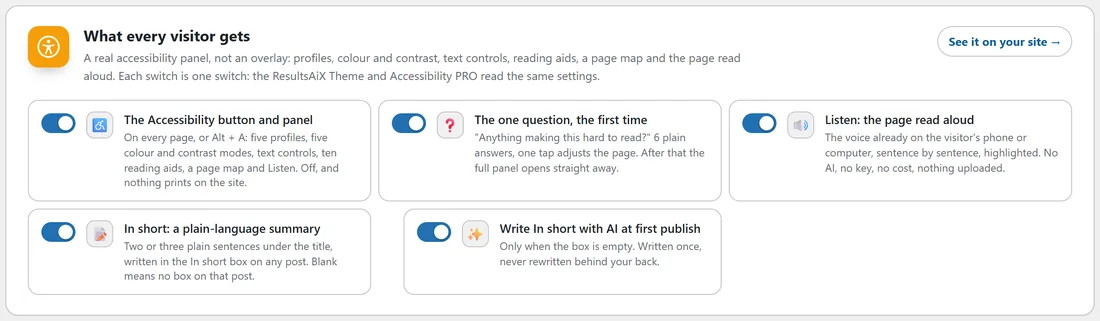
You do not need to deactivate anything.
- Open AiX Accessibility, Reading tools.
- Switch off The Accessibility button and panel.
- Press Save.
Nothing prints on your site, and every setting is kept for when you switch it back on.
Deactivating:
Deactivating the plugin in Plugins removes the button, the panel and the reading bar from your site straight away, unless the ResultsAiX Theme is active, which carries the same tools. It also releases this site's slot on your key.
Your settings, your In short summaries and your visitors' own choices all stay. When you activate it again, press Get my free key and activate, or paste your key, to reopen the settings screens.
Deleting:
Deleting the plugin from Plugins removes its saved key details and its update record.
When neither the free plugin nor PRO is left on the site, it also removes the plugin's own settings (where it shows, the post types, the article selector, the admin colour scheme and the statement details) and the error log files.
It keeps:
- The visitor-side settings, meaning the switches and the button design, because the ResultsAiX Theme and Accessibility PRO use the same ones.
- Your In short summaries, saved with your posts, ready if you install it again.
- Your visitors' own choices, which live in their browsers, not on your site.
Deleting Accessibility PRO:
Deleting PRO removes its AI settings, its licence details and its update record, and, when no other copy is left, the same plugin settings and log files as above. A statement page it created is an ordinary page and stays until you delete it yourself.
Moving from the free plugin to PRO:
You do not need to delete anything first. Installing PRO switches the free plugin off for you and carries your settings over. See Free Key, PRO Licence And Updates.
A real example:
Maya is redesigning Green Lane Garden Studio on staging.yoursite.com and wants the button out of the way while she works. She switches off The Accessibility button and panel on the staging site only and presses Save. When the new design is ready she switches it back on, and every setting, the green Reading help button included, is exactly as she left it.
Tips:
- Use the switch, not deactivation, for a short pause. It keeps your key slot in use and your screens open.
- If you move a site to a new domain, press Deactivate This Site on the old one first, then activate on the new one.