Analytics follows every page view on this site and your other sites, all the way to the Buy click and the sale. It is built for split testing: every number leads to revenue per visitor, the number tests are won on, and every page has a Heatmap and a Test it button beside it.
Where to find it:
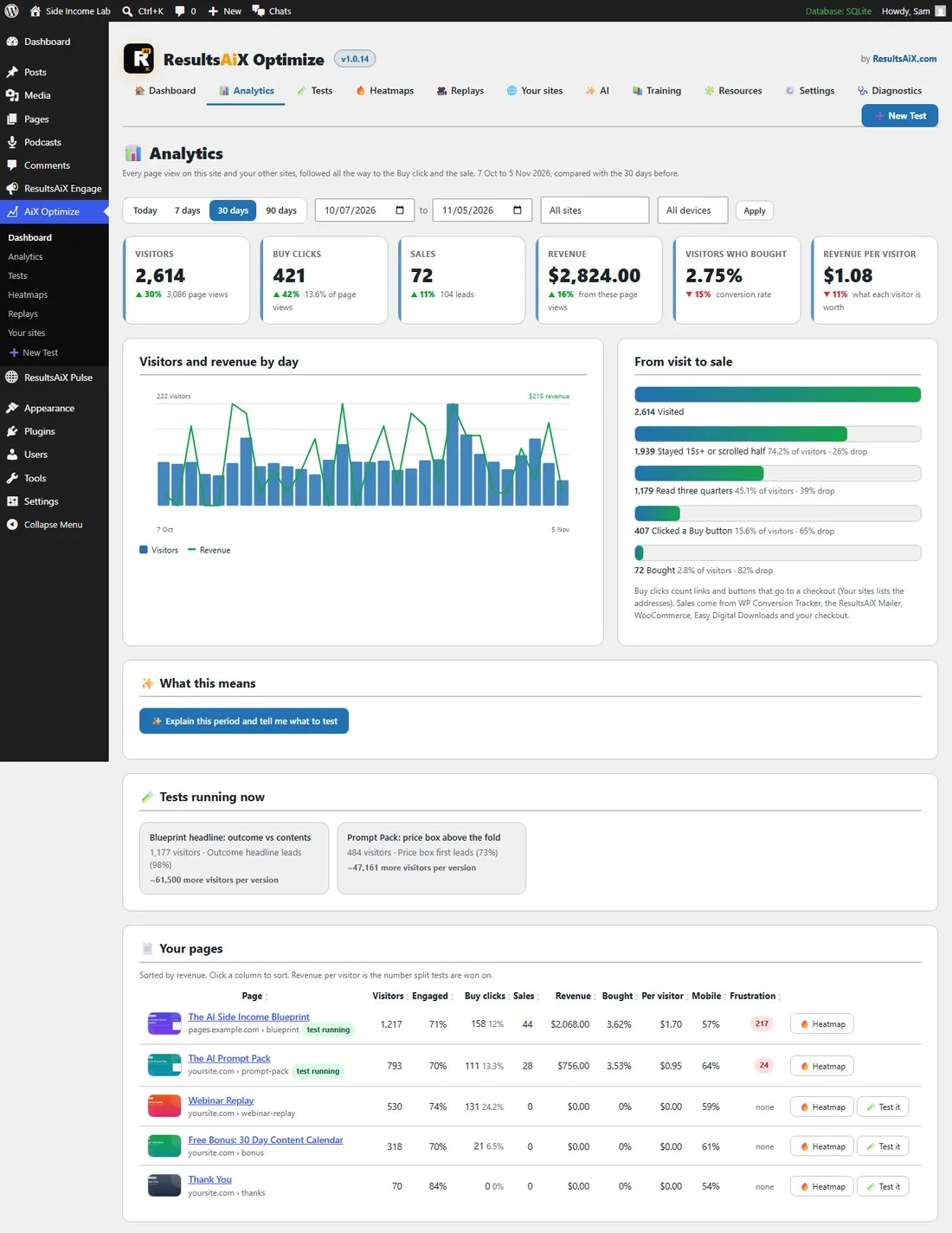
AiX Optimize, Analytics. The WordPress sidebar has an Analytics shortcut too.
The filters:
- Today, 7 days, 30 days or 90 days, or two dates for a period of your own.
- All sites, or one of your sites.
- All devices, Desktop, Mobile or Tablet.
Press Apply after changing the dates. The line under the title names the period and what it is compared with, for example 7 Oct to 5 Nov 2026, compared with the 30 days before.
The six numbers:
Each number has an arrow with the change against the period before, green when it moved the right way.
- Visitors, with the page views under it.
- Buy clicks: clicks on links and buttons that go to a checkout, with their share of page views.
- Sales, with the leads under it.
- Revenue from these page views.
- Visitors who bought: the conversion rate.
- Revenue per visitor: what each visitor is worth.
Visitors and revenue by day:
A bar for each day's visitors and a line for each day's revenue. Hover a bar to see that day's visitors, Buy clicks, sales and revenue.
From visit to sale:
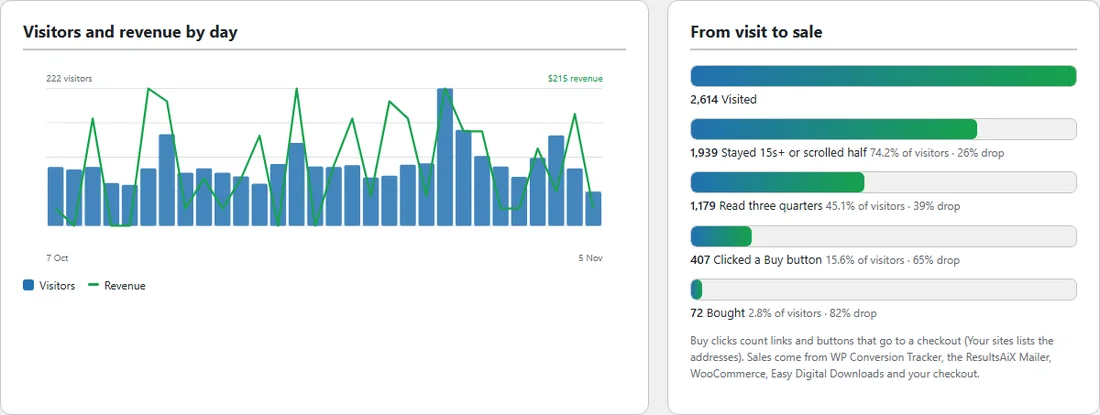
The funnel shows how many visitors reached each step, their share of all visitors and the drop from the step before.
- Visited.
- Stayed 15s+ or scrolled half.
- Read three quarters.
- Clicked a Buy button.
- Bought.
The step with the biggest drop is the one most worth a test. What a Buy click counts is set on the Your sites tab, under What counts as a Buy click. Sales come from WP Conversion Tracker, the ResultsAiX Mailer, WooCommerce, Easy Digital Downloads and your checkout.
What this means:
With an AI key connected, press Explain this period and tell me what to test. The AI reads the numbers for your filters and writes a headline, a short summary, what is Working, what is Leaking, the Tests worth running (each tied to a page and a number) and one thing to watch. The read is kept for the same filters, with how long ago it was written, and Read it again asks for a fresh one. See Building A Test With AI And The Other AI Readers.
Who counts as a visitor:
A visit counts once a real person moves the mouse, touches the screen, scrolls with the wheel or presses a key. Email link checkers (Outlook, Gmail and company security scanners open every link in a mailing in a hidden browser) never do, so they are not counted, recorded or added to tests. Sales, leads and goals always count.
Tests running now:
Each running test with its visitors, the version in the lead and its probability of being best, and Ready to call or what it is still waiting for (the first conversion, more visitors, more conversions, more days or a clearer leader). Click a test to open its report.
Your pages:
One row per page, sorted by revenue. Click a column title to sort by it.
- Page: the picture, title and address, with test running when a test is live on it.
- Visitors.
- Engaged: the share of page views that stayed 15 seconds, scrolled half the page or clicked.
- Buy clicks, with their share of page views.
- Sales and Revenue.
- Bought: the share of visitors who bought.
- Per visitor: revenue per visitor.
- Mobile: the share of visits from phones.
- Frustration: dead and rage clicks together.
- Heatmap opens the page's heatmap, and Test it starts a new test on that page.
Click a page title to see Analytics for that page alone. All pages takes you back.
Sources, devices and campaigns:
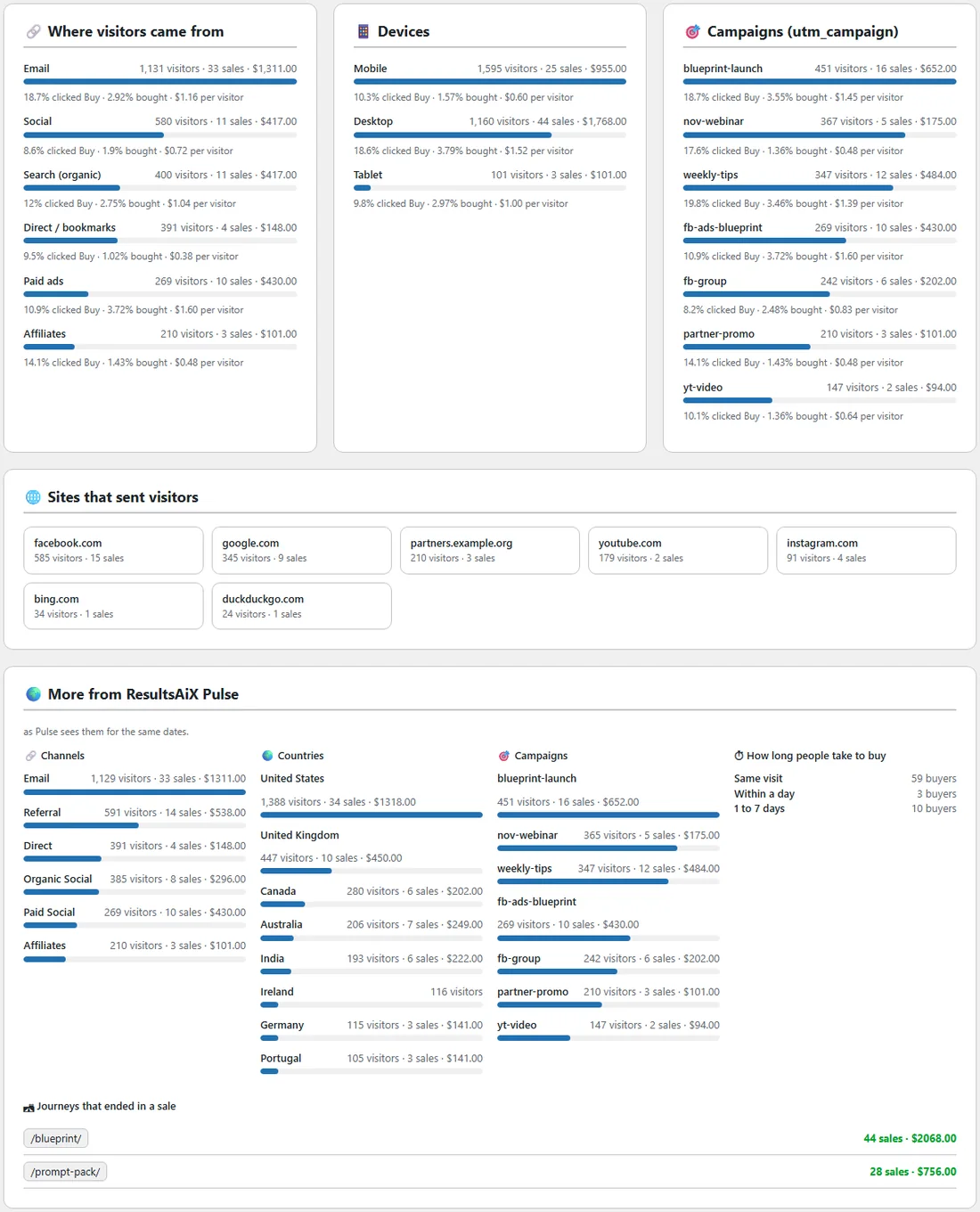
Three panels show each traffic source, each device and each utm_campaign with its visitors, sales and revenue, the share that clicked Buy, the share that bought and the revenue per visitor. The sources are Email, Paid ads, Social, Search (organic), Other sites, Direct / bookmarks and Affiliates. Under them, Sites that sent visitors lists the other sites your visitors came from.
More from ResultsAiX Pulse:
When ResultsAiX Pulse runs on the same site, this panel adds Pulse's view of the same pages and dates: the countries buyers come from, the search terms that bring them, every channel and campaign, the page journeys that end in a sale and how long people take to buy.
A real example:
Side Income Lab opens Analytics for the last 30 days: 2,614 visitors, up 30%, 421 Buy clicks, 72 sales and $2,824 in revenue. The funnel shows 407 visitors clicked a Buy button and 72 bought, the biggest drop of the five steps. In Your pages, The AI Side Income Blueprint on pages.example.com earns $1.70 per visitor and shows 217 frustrated clicks, so the owner presses Heatmap on that row to see where people get stuck.
Tips:
- Sort Your pages by Per visitor to find the pages each visit is worth most on, then test the busiest of them.
- Use the device filter to compare Mobile and Desktop before you plan a test.
- Pages on other sites appear here once they carry the one line of code. See Using Optimize On Any Page Of Any Site (The One Line Of Code).