Every test has an Original and one or more challengers. This article covers how many visitors each one gets, who takes part at all, and the two ways of sharing traffic.
Where to find it:
AiX Optimize, Tests, Edit on a test. Versions are in section 2, The versions. Traffic settings are in section 4, Traffic and the winner.
The versions:
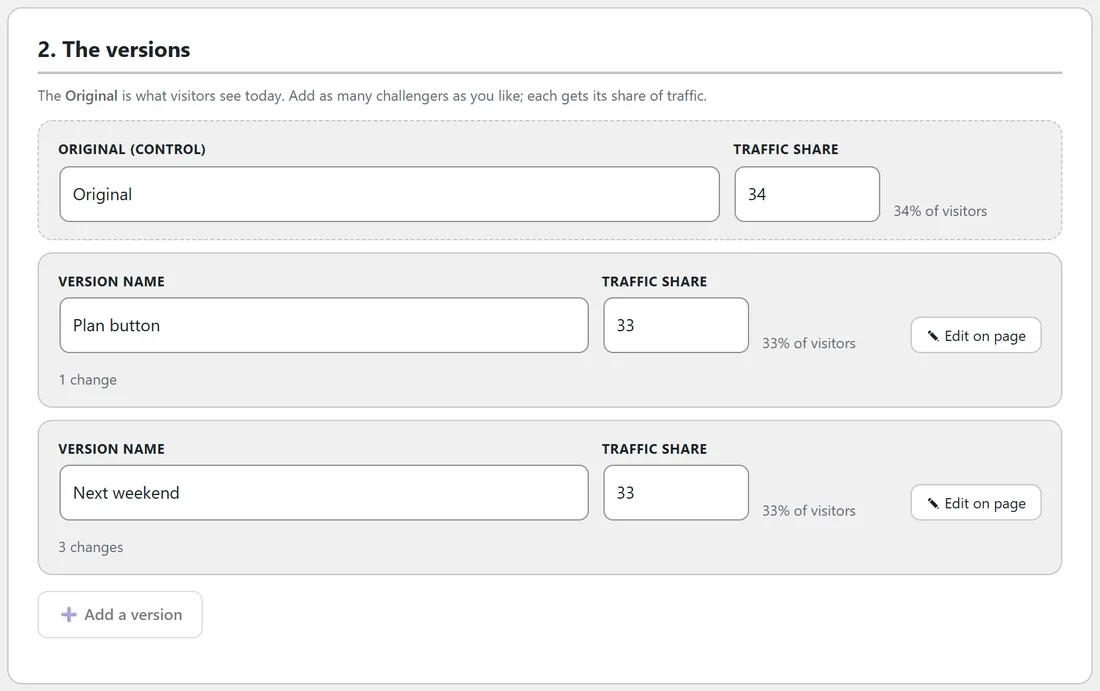
- The Original (control) is your page as it is today. It is the line every challenger is measured against.
- A new test starts with the Original and Version B.
- Add a version adds another challenger. You can add as many as you like.
- Rename any version in Version name. Clear names, such as Plan button, make the report easy to read.
- The bin button removes a challenger. Edit on page jumps to the editor with that version selected.
- The line under each challenger says how many changes it has.
Traffic share:
Each version has a Traffic share number, and the line beside it shows the share of visitors that works out to. Shares are relative: 50 and 50 is an even split, 34, 33 and 33 is an even three-way split, and 80 and 20 sends four visitors to the Original for every one to the challenger. When you add a version, the shares are reset to equal.
Each visitor is given one version on their first visit and keeps it, because the choice is stored in a cookie on their browser.
Mode, share of visitors and devices:
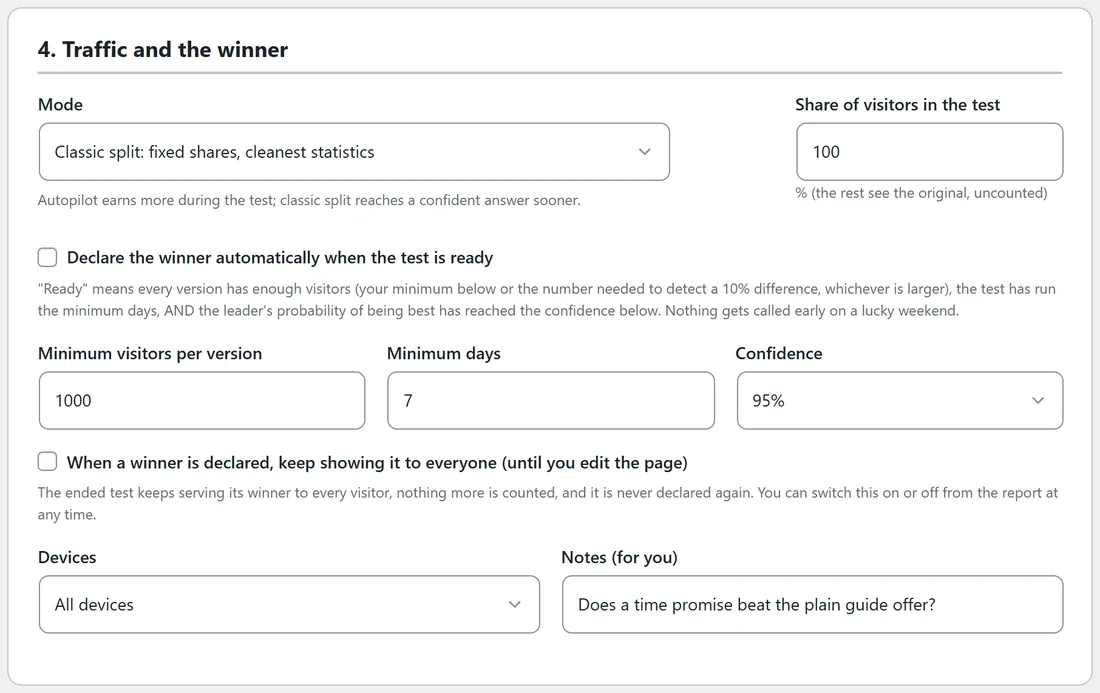
- Mode, Classic split: fixed shares, cleanest statistics. Each version gets its traffic share for the whole test. This reaches a confident answer soonest.
- Mode, Autopilot: shift traffic to the leader as it learns. See below.
- Share of visitors in the test: the percentage of visitors who take part, from 1 to 100. The rest see the Original and are not counted.
- Devices: All devices, Desktop only, or Mobile and tablet only. Visitors on other devices see the Original and are not counted.
- Notes (for you): a line to remember your idea, for example Hypothesis: a specific outcome headline beats the clever one.
Autopilot: send more visitors to the leader:

Autopilot picks each new visitor's version with a method called Thompson sampling. A version that is doing better becomes more likely to be shown, while the others still get some visitors so the plugin keeps learning. When the test is scored by revenue per visitor, Autopilot weighs the order value too.
With Autopilot on, the traffic shares are not used. An Autopilot badge shows beside the test on the Dashboard, the Tests tab and the report.
Which mode to choose:
- Classic split for a clear, fast answer you can build on, and for pages with modest traffic.
- Autopilot for short promotions and busy pages, where earning more during the test matters more than the speed of the answer.
A real example:
On the Free Starter Guide page, Yoursite Bakery School tests three versions with an even split of 34, 33 and 33. On its blog post about dense loaves it runs Autopilot instead. After six days the report shows the Show me button version with 1,003 visitors, Best loaf yet with 655 and the Original with 412: Autopilot has moved traffic towards the version earning the most clicks.
Tips:
- Keep the shares even unless you have a reason. Even splits reach an answer soonest.
- Use Share of visitors in the test below 100 when a change is bold and you want only part of your traffic to see it at first.
- Leave Devices on All devices unless the change is only for one screen size, such as a shorter mobile headline.
- See How A Winner Is Called: Ready, Too Early To Call And Confidence for the rules in the rest of section 4.