ResultsAiX Optimize lets you show different versions of a page to your visitors and find out which one earns more. It also shows you where people click, how far they scroll and how they move through a page, so you know what to test in the first place.
Everything runs from your own WordPress site, and your tests, results, heatmaps and replays are kept in your own database. The pages you test can live on that site or on any other site of yours, with one line of code.
What you can do with it:
- Run three kinds of split test. An Element test changes headlines, buttons, prices, images and styles on one page. A Page test shows a different WordPress page at the same address. A URL test sends visitors to another address.
- Build each version with a point and click editor that loads your live page. Click the headline, type the new one, press Apply change.
- Score the versions by revenue per visitor, conversion rate, lead rate or engagement.
- Read a report that shows the probability each version is the best one, and tells you plainly when the test is ready to call.
- Let the plugin declare the winner for you, and keep showing that winner to every visitor.
- Use Autopilot to send more visitors to the version that is doing better while the test runs.
- Open click, mouse, scroll and attention heatmaps for any page, and see the dead clicks and rage clicks where visitors get stuck.
- Watch session replays: the layout of the page as the visitor saw it, with their cursor, scrolling and clicks played back.
- Follow every page from the visit to the Buy click and the sale on the Analytics tab.
- Test, map and count pages outside WordPress too: a plain HTML page, another WordPress site or a page builder page, with one line of code in its head.
- Count sales from any checkout, such as JVZoo, WarriorPlus, ClickBank, ThriveCart or Stripe, with a thank-you page line or a postback address.
- Connect your own AI key if you like, for challenger copy, a plain English reading of any report or heatmap, a read of your Analytics, and a whole test built from one sentence.
- Get a weekly email report every Monday with your visitors, Buy clicks, sales and running tests.
What you see first:
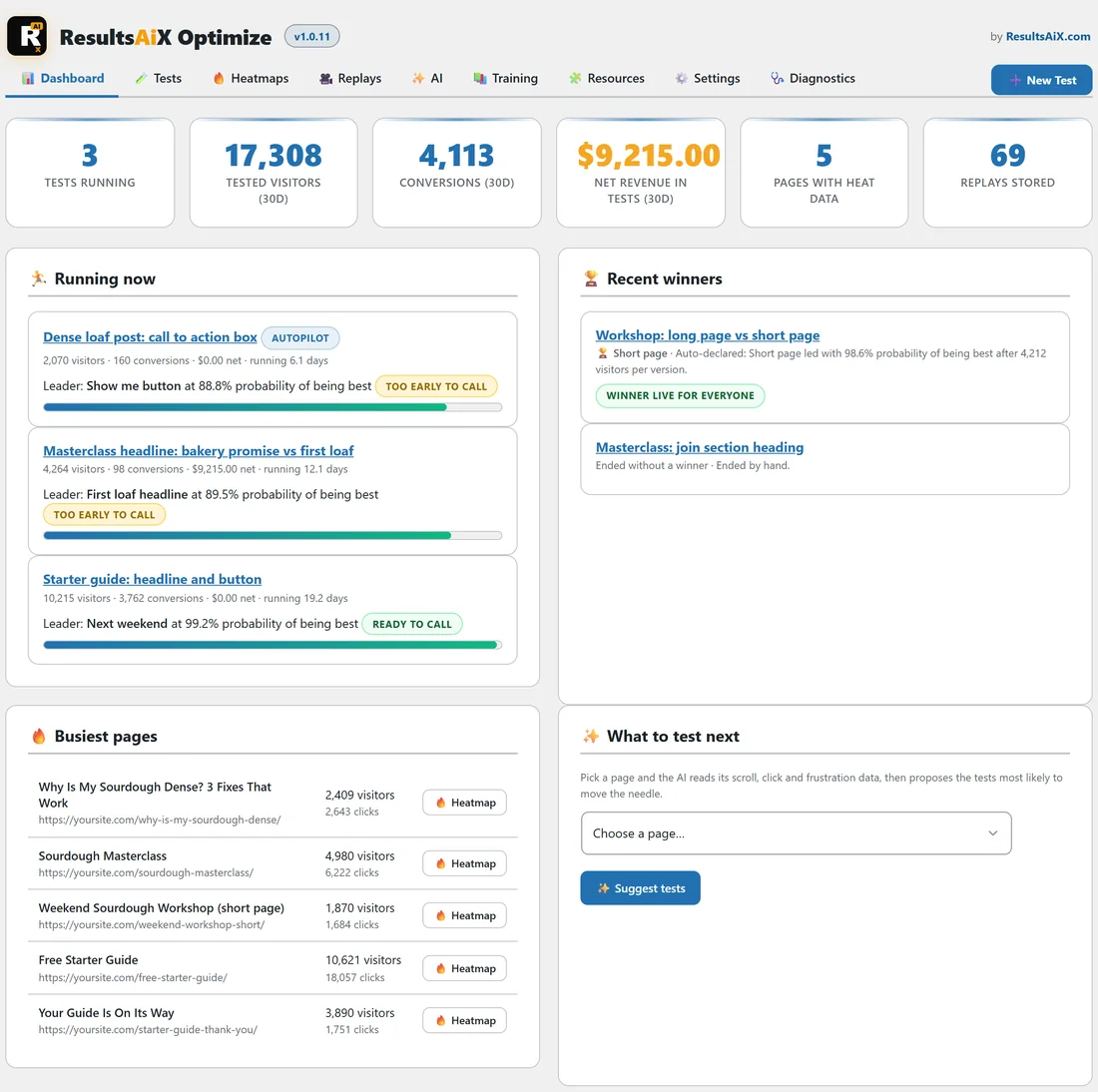
After activation the AiX Optimize menu opens on the Dashboard. The six numbers across the top show the tests running now, the visitors and conversions counted in tests over the last 30 days, the net revenue in tests, how many pages have heat data and how many replays are stored. Under them sit Running now, Recent winners, Busiest pages and What to test next.
How a version reaches the visitor:
The version a visitor sees is chosen on your server before the page is sent. Text changes are swapped inside the page itself, and colour, size and hidden block changes are plain CSS in the page head. So the visitor never sees the original flash first.
Changes that need the browser, such as a new link or new HTML, are applied as the page loads, behind a short veil that lifts after 400 milliseconds at most. A visitor keeps the same version on every visit, because the choice is stored in a cookie on their browser.
On a page on another site, the one line of code in the page head does the same job: it picks the version before the page shows.
What it measures:
Every version records visitors, conversions, leads, sales, revenue, money given back, time on page, scroll depth, clicks, rage clicks, dead clicks, bounces and video watch time. You pick one of these to choose the winner by, and the rest are recorded either way.
Leads and sales arrive by themselves from WP Conversion Tracker, ResultsAiX Mailer, ResultsAiX Forms, WP Sync, Launch Manager, WooCommerce and Easy Digital Downloads. Without any of them, a test can count a visit to a thank-you page, a Buy click, any other click, a form, a scroll depth or a time on page. For any other checkout, the Conversions tab gives you a thank-you page line and a postback address.
A real example:
Yoursite Bakery School sells an online Sourdough Masterclass and gives away a Free Starter Guide. In the screenshot above, three tests are running: the Masterclass headline, the headline and button on the guide page, and the call to action box on a blog post. An older test found that the short Weekend Workshop page books more places than the long one, and that winner is now shown to every visitor.
What it needs:
- WordPress 5.6 or later.
- PHP 7.4 or later.
- An administrator account to manage tests.
It works by itself. When WP Conversion Tracker or one of the other plugins above is installed, Optimize picks up their leads and sales with nothing to set up.
Where to go next:
- See Installing The Plugin And Activating Your Licence Key to get started.
- See Five Minute Quick Start: Your First Split Test for a first test.
- See The Admin Tabs Explained: Dashboard, Tests, Heatmaps, Replays And Settings for a tour of every screen.
- See Using Optimize On Any Page Of Any Site (The One Line Of Code) to test pages outside this WordPress site.