Pulse comes with the ResultsAiX Bundle, and your Bundle key activates it. One key covers your main site; your other connected sites need no key of their own. Updates arrive in Plugins like any other plugin.
Where to find your key:
On your purchase email and in your account portal, under your keys and downloads.
Activating Pulse:
Before a key is active, Pulse opens on its activation screen. Paste your key and press Activate. Pulse switches on the moment the key is accepted, and the Dashboard's Setup list ticks Licence active.
The Licence panel:
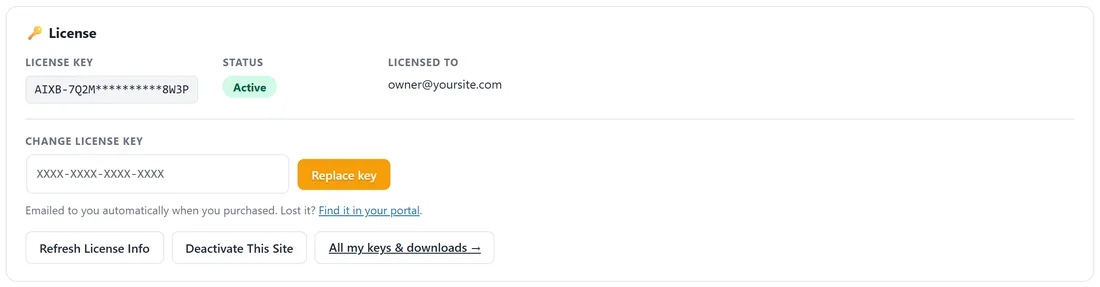
⚙️ Settings, at the top.
- License key: your key, masked (the first and last few characters).
- Status: Active.
- Licensed to: the email on the key.
- Change license key: paste another key and press Replace key.
- Refresh License Info: asks the licence server again, for example after you moved the key.
- Deactivate This Site: frees this site's place on the key, so you can use it on another site.
- All my keys & downloads: opens your account portal.
When the key is used on more than one site, the panel lists those sites, so you can free a place you no longer use.
Your other sites:
A site that only reports to your main site needs no key. The main site holds the licence, and a connected site fetches its updates through the main site. See More Than One Site: The Hub and Pairing Codes.
Updates:
Updates show in Dashboard, Updates and in Plugins like any other plugin. Update as usual. Your settings, sites, Moments and history stay as they are, and anything new is set up by itself the first time the new version loads.
A real example:
The owner of yoursite.com moves the main site to a new domain. On the old site, Settings, Deactivate This Site. On the new one, the activation screen, paste the same key, Activate. Refresh License Info shows the new site in the list.
Tips:
- Lost the key? Open All my keys & downloads.
- 🩺 Diagnostics, The Essentials shows Licence with its status.