The Live View is the screen you leave open. It shows everybody on every site you connect, right now, on a 3D globe or a real map, with today's numbers around it and a full table of who is here underneath. It runs the real renderer in the real stylesheet, so what you see is exactly what a shortcode or your public page shows, plus the things only you may see: names, emails and what each person is worth to you.
Where to find it:
WordPress menu, ResultsAiX Pulse, 🌍 Live View. The bar above the globe has Chats (with the number waiting for you), Full Screen (made for a second monitor), Open Public Page, Copy Public Link and Settings.
The globe and the panels around it:
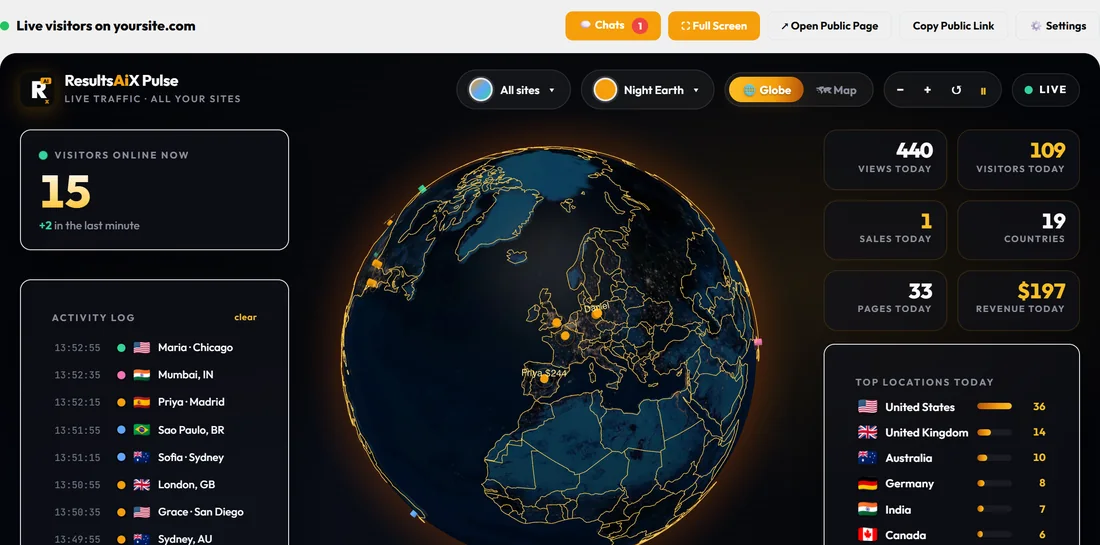
- The dots. One dot per place. Everybody online right now is a bright, pulsing dot, and on your Live View their first name and lifetime value sit beside it, for example Priya $244. Visitors seen earlier stay on as softer dots. A dot grows when more people are in the same place.
- Visitors online now, with how many arrived in the last minute.
- The Activity Log: each arrival with the time, the site's colour, the flag and the place, with the name of anybody you know. Press clear to empty it.
- Today's numbers: views, visitors, sales, countries, pages and revenue.
- Top locations today and, with more than one site, a By site list in each site's colour.
- At the top of the globe: All sites (or one site), the theme picker, Globe or Map, zoom in and out, reset, pause, and LIVE.
Globe or Map:
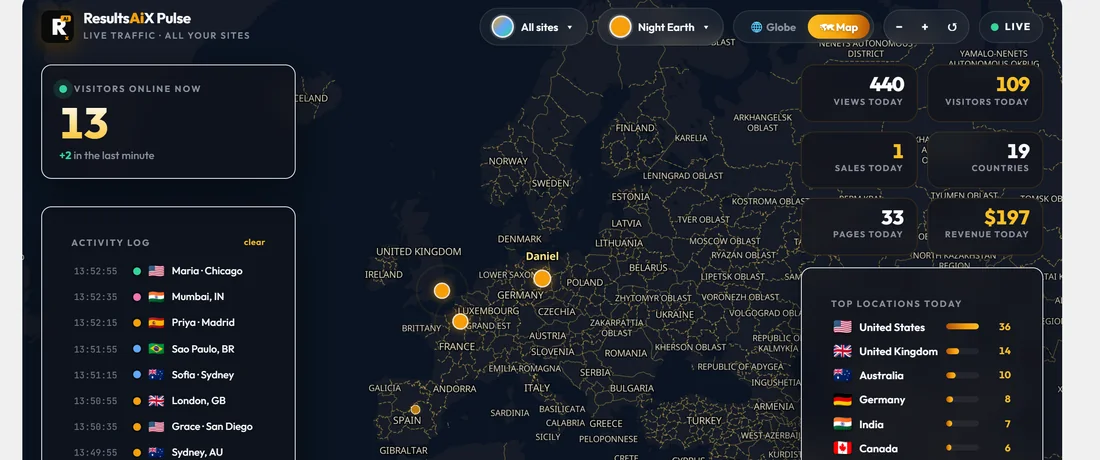
Drag the globe to spin it. The Map is a real map: zoom from the whole world down to the streets of a visitor's city with the mouse wheel, a pinch or the minus and plus buttons, and drag to move around. Click a dot to see who is there. Both turn to where your visitors are when they open. Visitor locations are city level, so a dot sits in the right city, not on a street address.
The Map's style is set under Settings, Map And Google 3D: Real map (recommended) or Classic, which draws country outlines only and loads nothing from outside your server. If the real map cannot load its tiles, the classic map shows by itself.
Google 3D:
With a Google Maps API key saved under Settings, Map And Google 3D, a third button, 🛰️ Google 3D, shows Google's photorealistic 3D Earth: real buildings and terrain, a pin on every place with a visitor (taller for online now, with their name on your own screen), flying down to the newest one, then orbiting slowly. The buttons in the top bar zoom, turn left and right, tilt, and pause or restart the orbit; a hand on the map stops it too. If Google says no to the key, Pulse says why in plain words and goes back to the globe. To open on the map or Google 3D every time, set Your Live View opens on under Settings, Map And Google 3D.
Live and Playback:
- Press Playback on the timeline at the bottom.
- Press the window button (it says 1h) and pick how far back: the last hour, 6 hours, today, 24 hours, 7 days, 30 days, or everything Pulse keeps.
- The replay plays the whole window in under a minute, with quiet stretches skipped, every visit listed in the Activity Log, and sales and leads popping up as they happened. A long window shows an even spread of visits across all of it, and every sale and lead.
- The speed button (10x) changes the pace. Click the timeline to jump. Live brings you back to now.
Everybody here, in full:
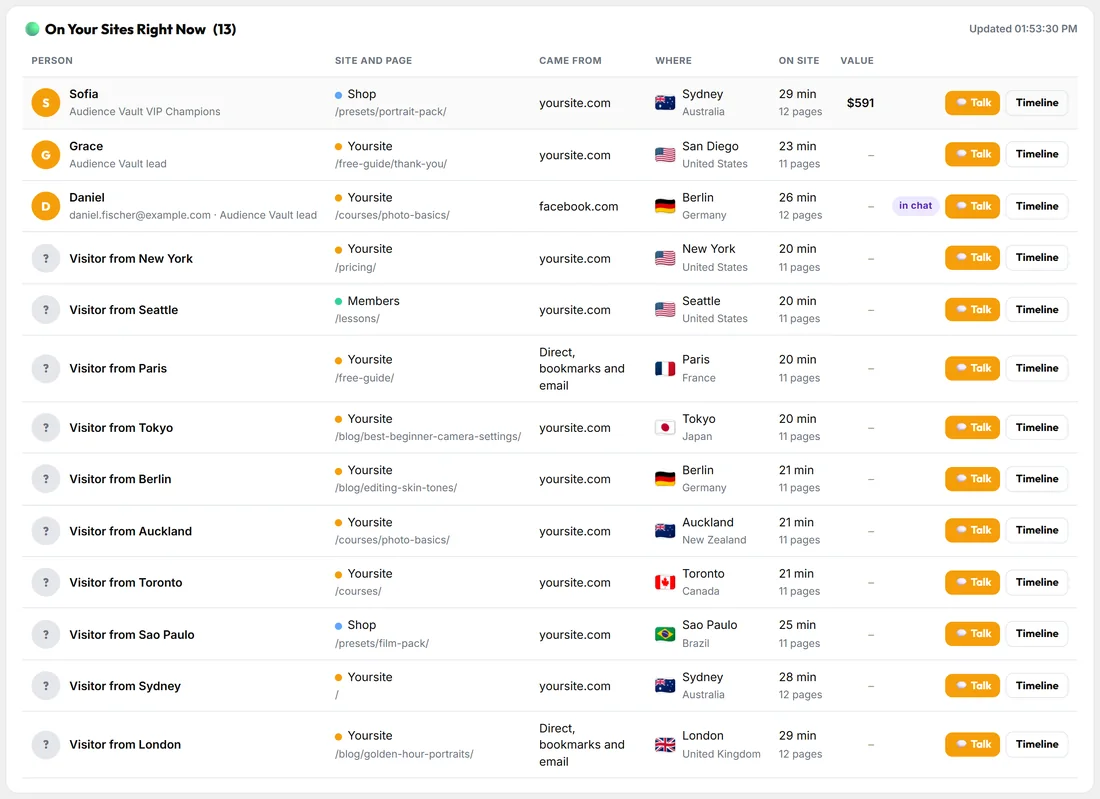
Under the globe, the same numbers as tiles (online now and how many you know, visitors today, page views today, people you know, new leads, sales, revenue and chats), then the table On Your Sites Right Now:
- Person: their photo or initial, first name and what your plugins know about them (for example Audience Vault VIP Champions, or their email if they gave it in a chat). Somebody unknown shows as Visitor from their city.
- Site and page: the site in its colour and the page they are on.
- Came from: where this visit came from.
- Where: city and country with the flag.
- On site: how long they have been here and how many pages they read.
- Value: their lifetime value, when known.
- in chat shows when a chat with them is open, and 1 new when they wrote something you have not read.
- Talk opens a chat on their screen; Timeline opens their whole story on the People tab.
Today's sales, pages and countries:
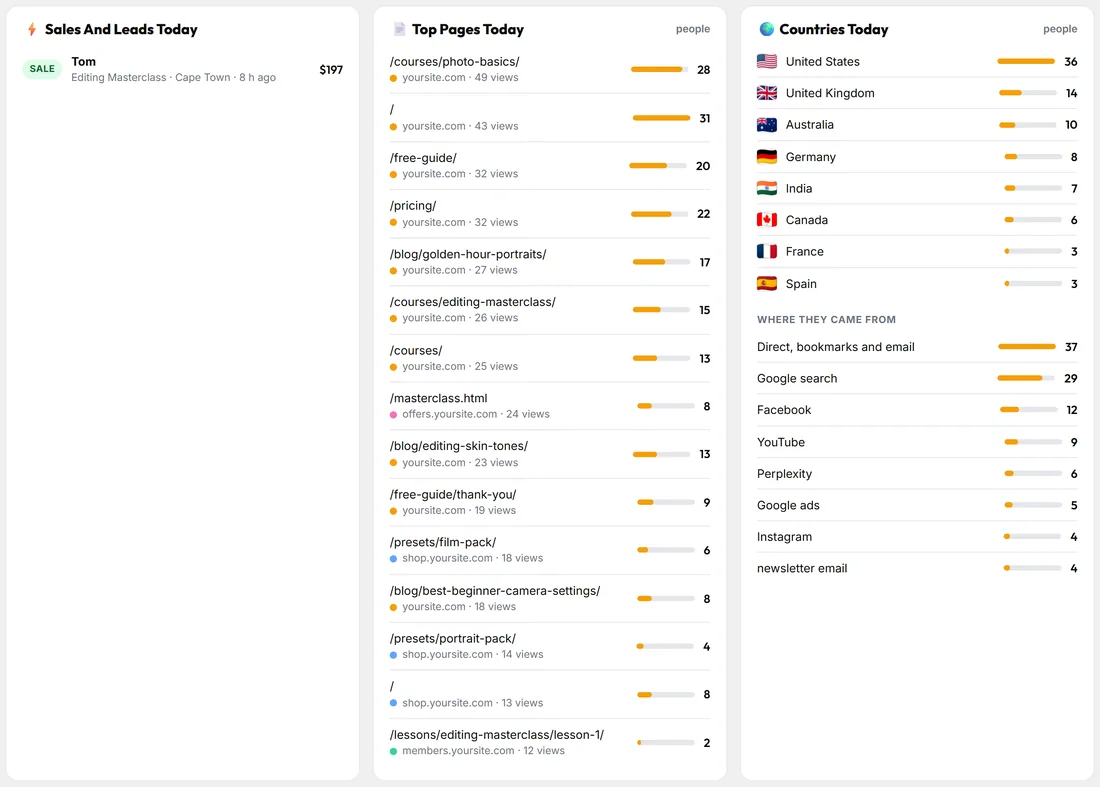
Under the table: Sales And Leads Today, Top Pages Today with the site of each page, and Countries Today with Where they came from.
Talking from the Live View:
Press Talk on anybody, type a line (or leave it empty to send your opening line from Chat Setup) and send. The chat opens on their screen within a few seconds, on WordPress or a plain HTML page. The Chats button opens the chat panel beside the globe with who is online, open chats and closed ones. See Visitor Chat: Talk to the People on Your Site.
Themes and layouts:
Ten globe themes: Night Earth, Daylight, Midnight Gold, Deep Space, Aurora, Blossom, Emerald, Sunset, Blueprint and Carbon. Two layouts: Command center (the globe with the figures around it) and Hero (the globe and one big number). Pick one from the theme button on the globe, or set the defaults under Settings, How The Globe Looks.
A real example:
At 13:40 the owner of yoursite.com glances at the Live View: 15 online. The Activity Log shows Maria arriving on the members site and Priya reading the Masterclass page in Madrid. The table shows Priya has been on the site 19 minutes, 7 pages, and is already in a chat. Daniel from Berlin, a lead, has been on Photo Basics for 13 minutes. The owner presses Talk next to Daniel.
If the globe stays empty:
Your own visits are never shown, so open your site in a private window or on your phone with wifi off. If it still stays empty, 🩺 Diagnostics tells you which part is not answering. See Troubleshooting.
Tips:
- Press Full Screen on a second monitor for an all-day view.
- Share the view without names with Copy Public Link. See The Public Live Page.