Pulse is part of the ResultsAiX family, and the family already knows your people. When a visitor is somebody in your Mailer list, a buyer in Commerce or Launch Manager, a member, a support customer, a webinar registrant, a survey or form lead, and so on, Pulse shows their first name, their lifetime value and what they are to you. The People tab lists them all, and one click opens everything one person did.
How somebody becomes known:
- They click a link in an email you sent from the ResultsAiX Mailer.
- They are logged in to one of your WordPress sites.
- They opt in or buy through a ResultsAiX plugin on your site.
- They type their email into the chat.
- A plain HTML or members page tells Pulse who is logged in with one line of code (see Ten Sites, HTML, PHP and Protected Member Areas).
From then on that browser is recognised. Settings, The Family on the Connections tab shows which family plugins are connected on this site.
The People tab:
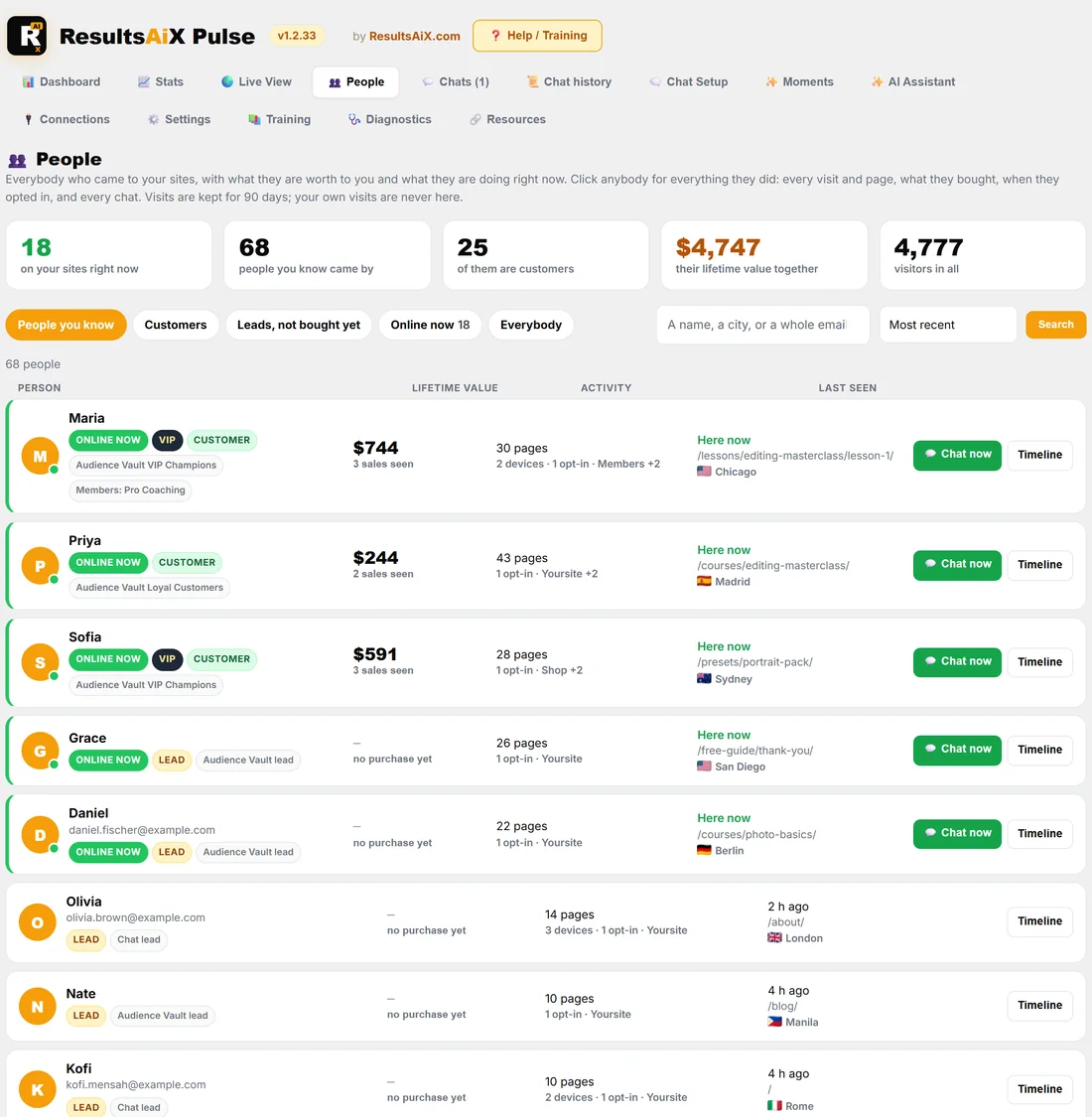
WordPress menu, ResultsAiX Pulse, 👥 People.
- Across the top: how many are on your sites right now, how many people you know came by, how many of them are customers, their lifetime value together, and visitors in all.
- The buttons: People you know (the default), Customers, Leads, not bought yet, Online now and Everybody (unknown visitors too).
- Search by a name, a city or a whole email address. An address is matched by its fingerprint, so type it in full.
- Sort by Most recent, Highest lifetime value or Most pages.
Each row shows the person, their badges (ONLINE NOW, VIP from $500 of lifetime value, CUSTOMER or LEAD) and what your plugins call them, their lifetime value and sales seen, their pages, opt-ins, devices and sites, and when they were last seen and where. Somebody online right now sits at the top with a green Chat now button. Timeline opens their story.
Everything one person did:
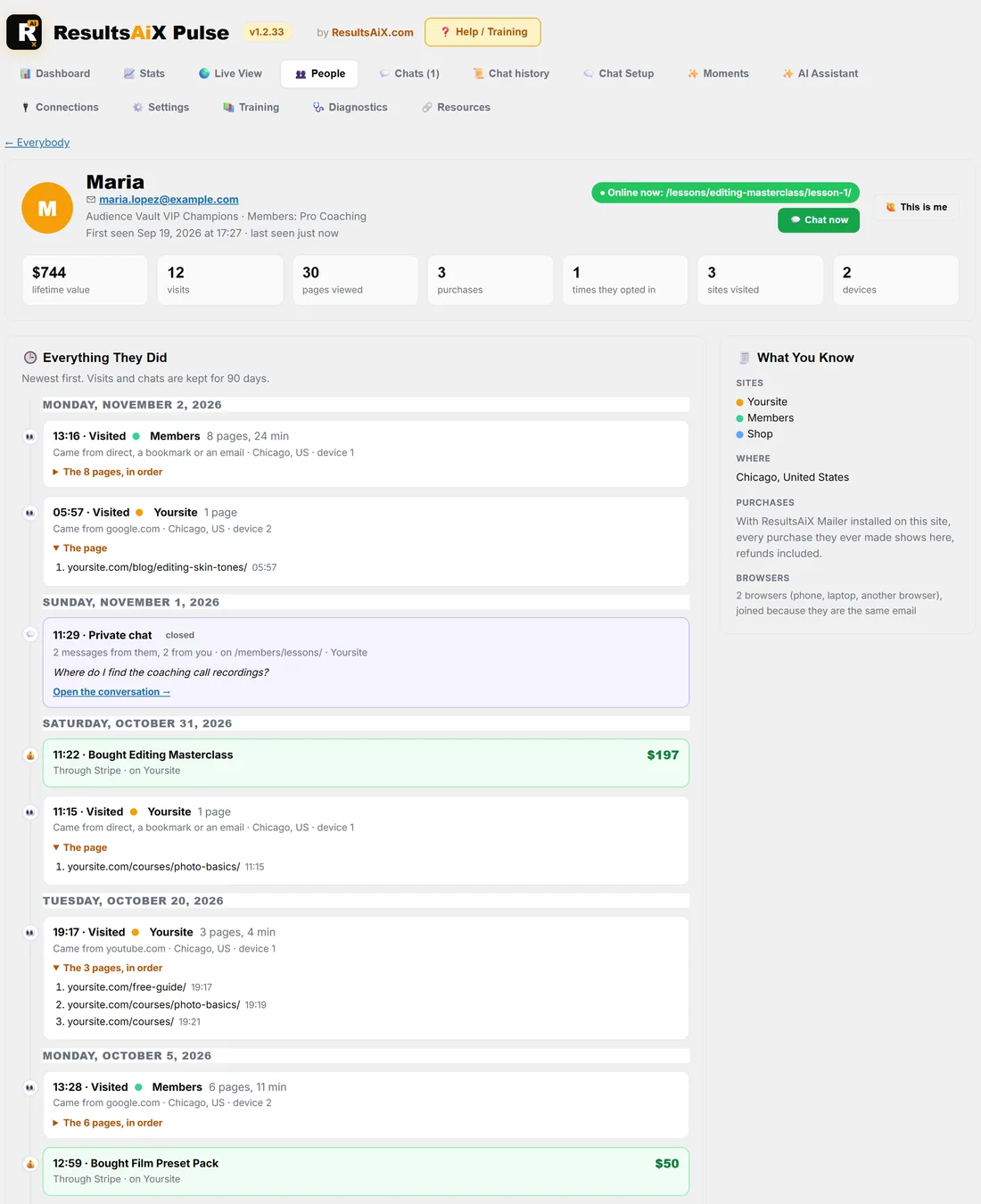
Click a name on the People tab, on the Dashboard, on Stats, in the Live View or on a chat, and their page opens.
- At the top: their name, their email (for your eyes only), what your plugins call them, and when they were first and last seen. Online now: shows the page they are on, with 💬 Chat now.
- The numbers: lifetime value, visits, pages viewed, purchases, times they opted in, sites visited and devices.
- 🕒 Everything They Did, newest first: every visit with the site, how long, where they came from (with the ad keyword when there was one), the city and the device, and the pages in order with the time of each; every opt-in; every purchase with the product, amount and how they paid; and every private chat with the first thing they wrote and Open the conversation.
- 🧾 What You Know: the sites they visit, where they visit from, and their browsers. With the ResultsAiX Mailer on the site it adds what they spent, the products they own and their email opens and clicks, and purchases then go back to the very first one.
One person, many devices:
The same email on a phone and a laptop is one person with two browsers, so the timeline shows both and marks each visit device 1 or device 2.
A name but no email yet:
When Audience Vault saw the same internet connection under a name, the person's page says Probably and shows the address it guessed. Press ✓ Yes, that's them to make it theirs, or Not them and the guess is never shown again.
This is me:
Your own visits are never counted. If Pulse ever shows you as a visitor (a new phone, a test address), open that person's page and press 🙋 This is me. Pulse stops counting those browsers and the internet connection they used, and takes their page views out of your numbers.
How far back:
Visits and chats are kept for as many days as Settings, Data & Access says (30 unless you changed it). With the Mailer installed, purchases come from its ledger and go back to the very first one.
A real example:
The owner of yoursite.com searches People for Maria. Her page says Maria, maria.lopez@example.com, Audience Vault VIP Champions, $744 lifetime value, 12 visits, 3 purchases, 3 sites, 2 devices, and Online now on lesson 1 of the Editing Masterclass. Her timeline shows she bought the Masterclass on Saturday after a visit from the newsletter, and asked in a chat where the coaching recordings are. The owner presses Chat now to ask how the course is going.
For your eyes only:
Names and money never leave the admin. The public globe, the shortcodes and the public page never carry a name, an email or a person's value. Pulse does not store emails to recognise people: it keeps a one-way fingerprint of the address, enough to match the person next time and of no use to anybody who reads the database.
Tips:
- Use Customers and sort by Highest lifetime value to see your best people at a glance.
- Use Online now and Chat now to greet a known customer while they are on your site.