Image keys make pictures. A text key makes the words: stories, page plans and your KDP listing. You need just one, and the free Google AI key you may already have for images counts.
Where to find it:
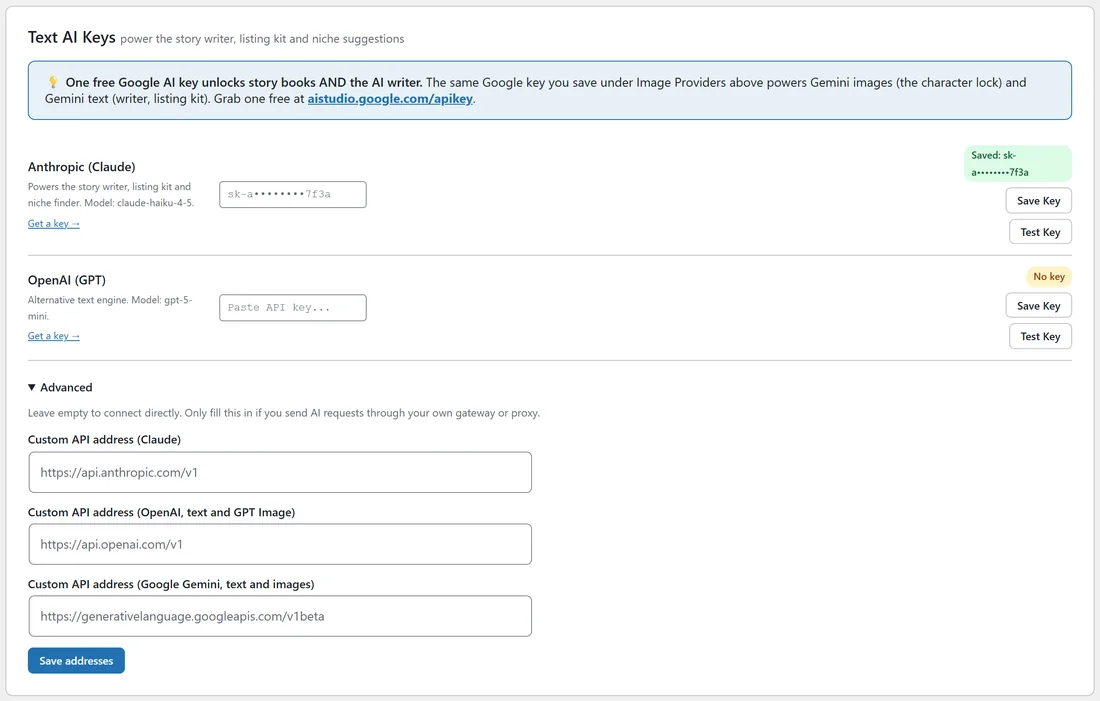
Open the Providers tab and scroll to Text AI Keys. It has a row for Anthropic (Claude) and a row for OpenAI (GPT), each with a key box, a status badge, Save Key and Test Key.
What a text key does:
- Writes story books: the title, the main character, a style hint, and for each page a read aloud line and a separate picture description. Long books are written in batches of 24 pages, each batch carrying the story forward.
- Plans coloring books: a different scene for every page, up to 100 scenes.
- Plans activity books: the type of each page and a child friendly instruction, up to 100 pages.
- Writes the KDP Listing Kit on the Publish tab.
- Powers the AI Rewrite button on page text boxes.
The three ways to get text AI:
- Anthropic (Claude): its own row. The model is claude-haiku-4-5.
- OpenAI (GPT): its own row. The model is gpt-5-mini.
- Google (Gemini): no row of its own. The text engine uses the Google key saved under Image Providers, with Google's latest Flash model. The blue box at the top of the section says so.
The plugin tries Anthropic first, then OpenAI, then Google. If a request to the first one does not come back with text, it tries the next key you have saved.
Adding a text key:
- Paste your key into the Anthropic (Claude) or OpenAI (GPT) row.
- Click Save Key. The badge shows Saved and the masked key.
- Click Test Key. This sends a real short request. The badge shows the answer, or the provider's own message if something needs fixing, such as billing or a typo.
Advanced, custom API addresses:
Click Advanced at the bottom of the section to see three boxes: Custom API address (Claude), Custom API address (OpenAI, text and GPT Image) and Custom API address (Google Gemini, text and images). Leave them empty to connect directly, which is right for almost everyone. Fill one in only if you send AI requests through your own gateway or proxy, then click Save addresses. A provider using a custom address shows through and the address under its status badge.
What happens without a text key?
Coloring books still work: the plugin builds the scene list itself by pairing your theme with 30 built in scenes such as flying a kite on a breezy day. Activity books still work: the plugin rotates maze, dot to dot, counting, spot the difference, matching and tracing pages. Story books, the listing kit and AI Rewrite show a message asking you to add a key on the Providers tab.
Keeping an eye on usage:
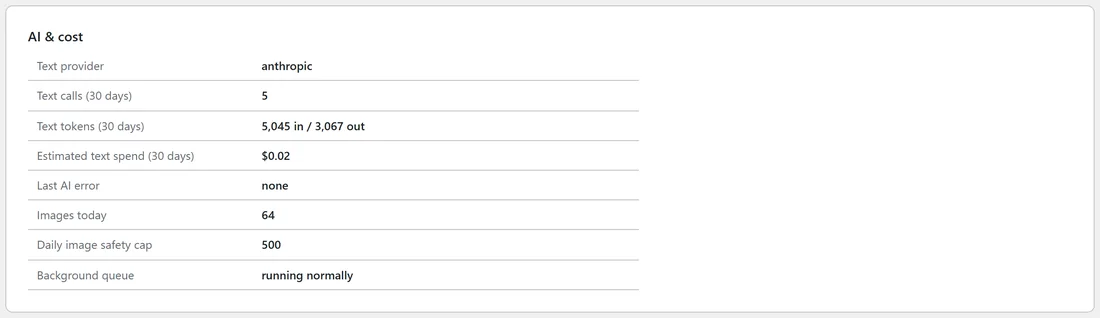
Settings, Cost & safety, and the Diagnostics tab show your text calls, tokens and an estimate of the cost on your own keys over the last 30 days, plus the last AI error if there was one.
A real example:
Ella saved an Anthropic key on yoursite.com. It wrote the scene list for Dinosaur Friends Coloring Fun, the 24 page story for Milo, the activity plan for Space Explorers and the listing kits for her coloring book and journal: five calls in all, a few cents on her own key.
Tips:
- One free Google AI key covers images with the character lock and every text feature.
- If a provider retires the model in use and names a replacement, the plugin switches to the replacement for you.