The full ResultsAiX Theme runs your podcast on your own site. A public show goes out to Apple Podcasts, Spotify and every other app. A members-only show has no public feed: each member gets a private link of their own. Every episode gets a page with a player and the transcript, and a player can go on any page you like.
Podcasts are in the full theme. The same engine is also available as the ResultsAiX Podcasts plugin for sites on another theme. With the plugin active, the theme's copy steps aside and every show, episode, feed and private link keeps working, because they share the same data.
Where to find it:
- Podcasts in your WordPress sidebar: Episodes, Shows, Listeners, Stats and Settings and help.
- ResultsAiX Theme, Podcasts: the getting started steps, your shows, the player, listeners, podcast app details, AI and the stats.
Getting started:
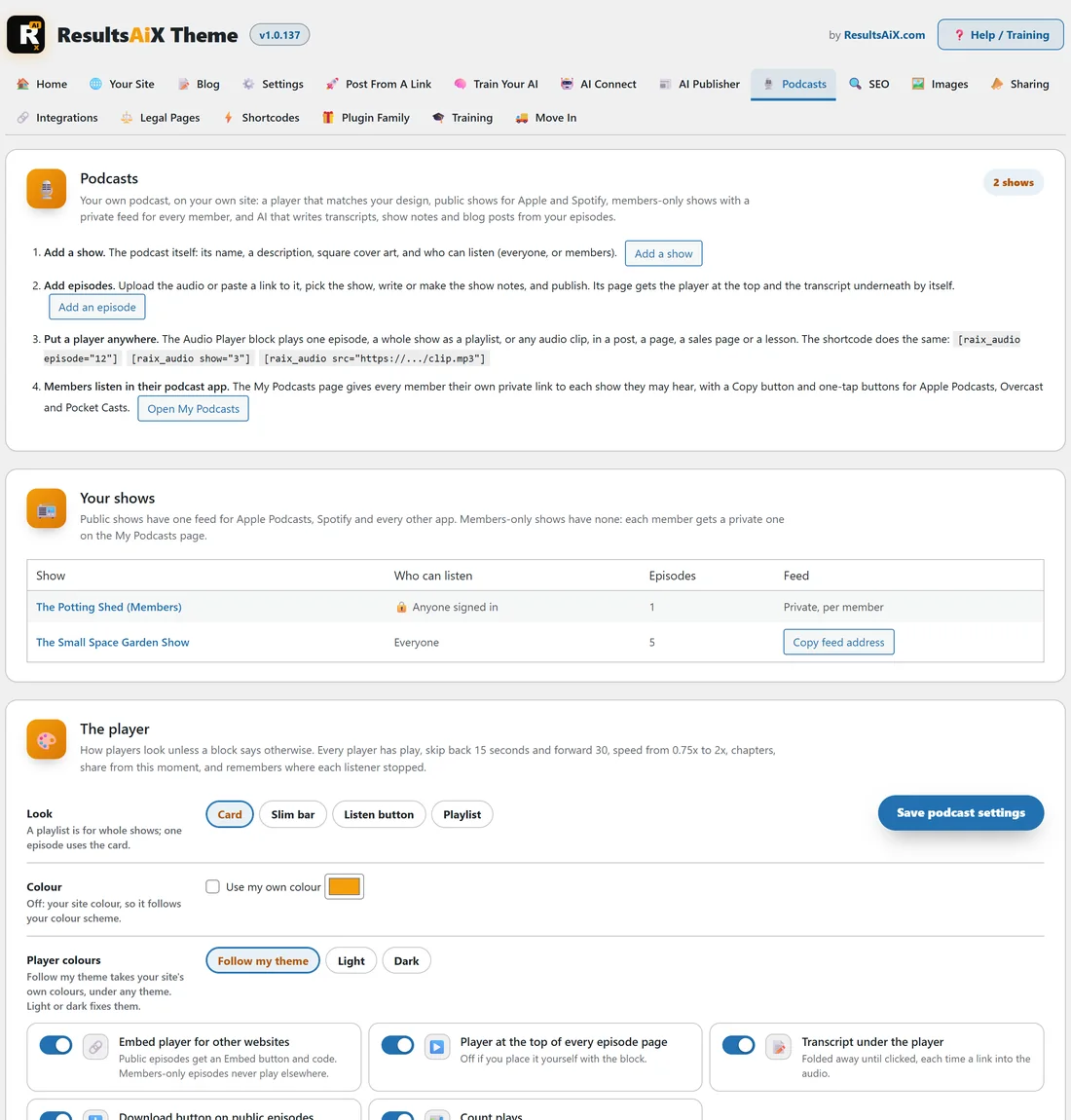
The top of the Podcasts tab walks you through it: Add a show, Add episodes, Put a player anywhere, and Members listen in their podcast app with an Open My Podcasts button (or Make the My Podcasts page, the first time).
A show:
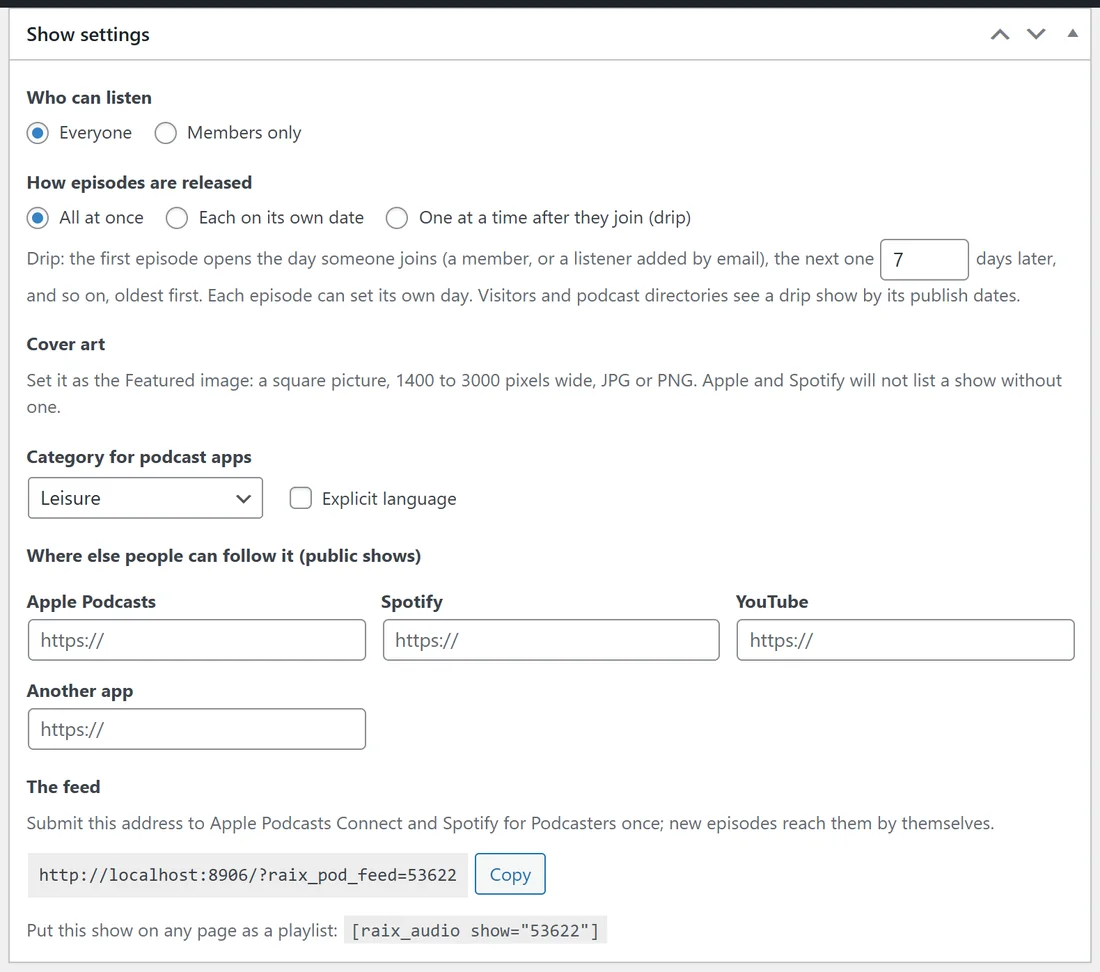
A show is the podcast itself. Go to Podcasts, Shows, Add New, give it a name and a description, then fill in Show settings:
- Who can listen: Everyone, or Members only.
- How episodes are released: All at once, Each on its own date, or One at a time after they join (drip). With drip, the first episode opens the day someone joins and the next one so many days later, oldest first.
- Cover art: set it as the Featured image, a square picture 1400 to 3000 pixels wide, JPG or PNG.
- Category for podcast apps and Explicit language.
- Where else people can follow it: Apple Podcasts, Spotify, YouTube or another app.
- The feed: the address to submit once to Apple Podcasts Connect and Spotify for Podcasters, with a Copy button.
The box also gives the playlist shortcode for the show.
An episode:
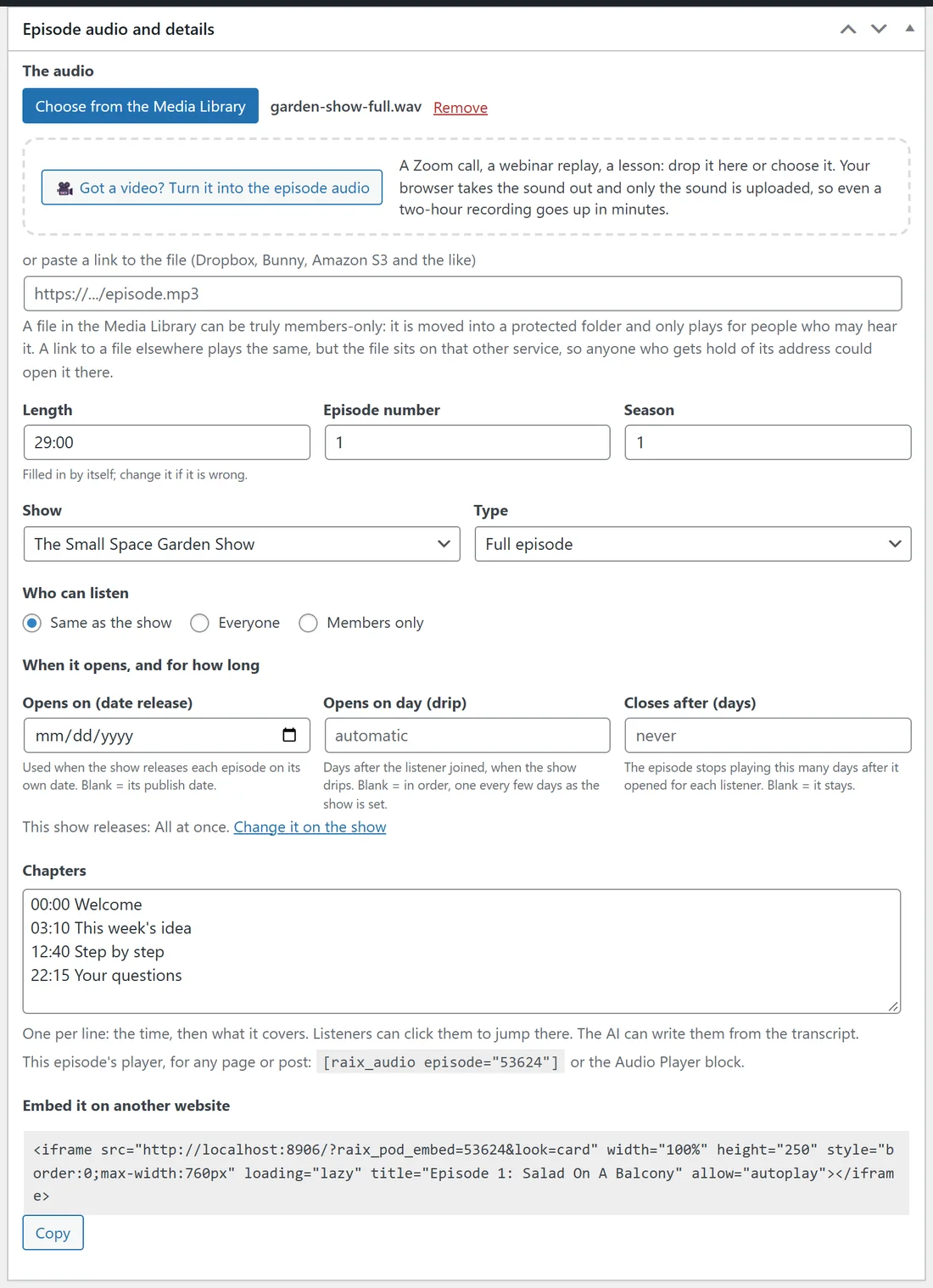
Go to Podcasts, Episodes, Add New. Episode audio and details holds these settings.
- The audio: Choose from the Media Library, or paste a link to the file (Dropbox, Bunny, Amazon S3 and the like). Got a video? Turn it into the episode audio: your browser takes the sound out and only the sound is uploaded.
- Length (filled in by itself), Episode number and Season.
- Show and Type: Full episode, Trailer or Bonus.
- Who can listen: Same as the show, Everyone or Members only.
- When it opens, and for how long: Opens on (date release), Opens on day (drip) and Closes after (days).
- Chapters, one per line: the time, then what it covers, for example 12:40 Step by step.
- The episode's own shortcode, and Embed it on another website with the iframe code and Copy.
The Transcript and AI box underneath holds the transcript. See Podcast AI: Transcripts, Show Notes And A Blog Post From Every Episode.
Members only:
Without ResultsAiX Membership, members-only means anybody signed in to your site. With it active you can pick exact levels. A members-only file in your Media Library is moved into a protected folder and plays through your site, which checks the listener every time, so its address never appears for anyone to copy. Audio added as a link to another service plays for members too, but the file itself stays on that service.
Visitors who land on a members-only episode see its title, its summary and Sign in, plus Join when you set a Join link on the Podcasts tab.
Private feeds and the My Podcasts page:
Every member gets their own private feed on the My Podcasts page, with a Copy button and one-tap buttons for Apple Podcasts, Overcast and Pocket Casts. Members can reset their link if it gets out, which turns the old one off everywhere. Spotify does not take private feeds, so members listen on your site or in another app. Put [raix_my_podcasts] on any page, or let the Podcasts tab make the page.
Listeners with no login:
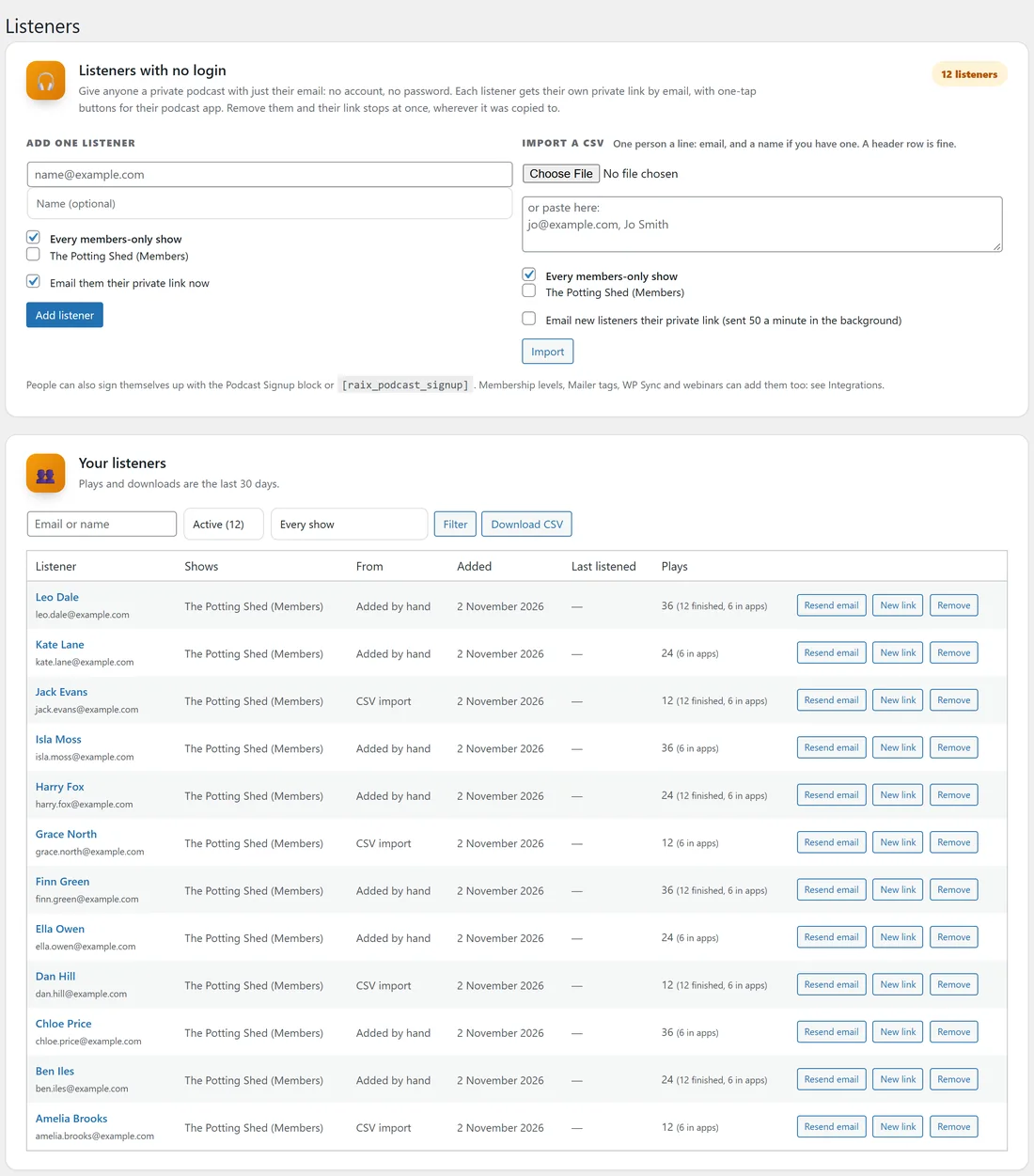
Podcasts, Listeners gives anyone a private podcast with just their email: no account and no password.
- Under Add one listener, type the email and a name, tick the shows (or Every members-only show) and tick Email them their private link now.
- Press Add listener.
Import a CSV takes one person a line, email then name. People can also sign themselves up with the Podcast Signup block or [raix_podcast_signup]. Your listeners lists everyone with plays and downloads for the last 30 days, with Download CSV. Remove someone and their link stops at once.
The player:
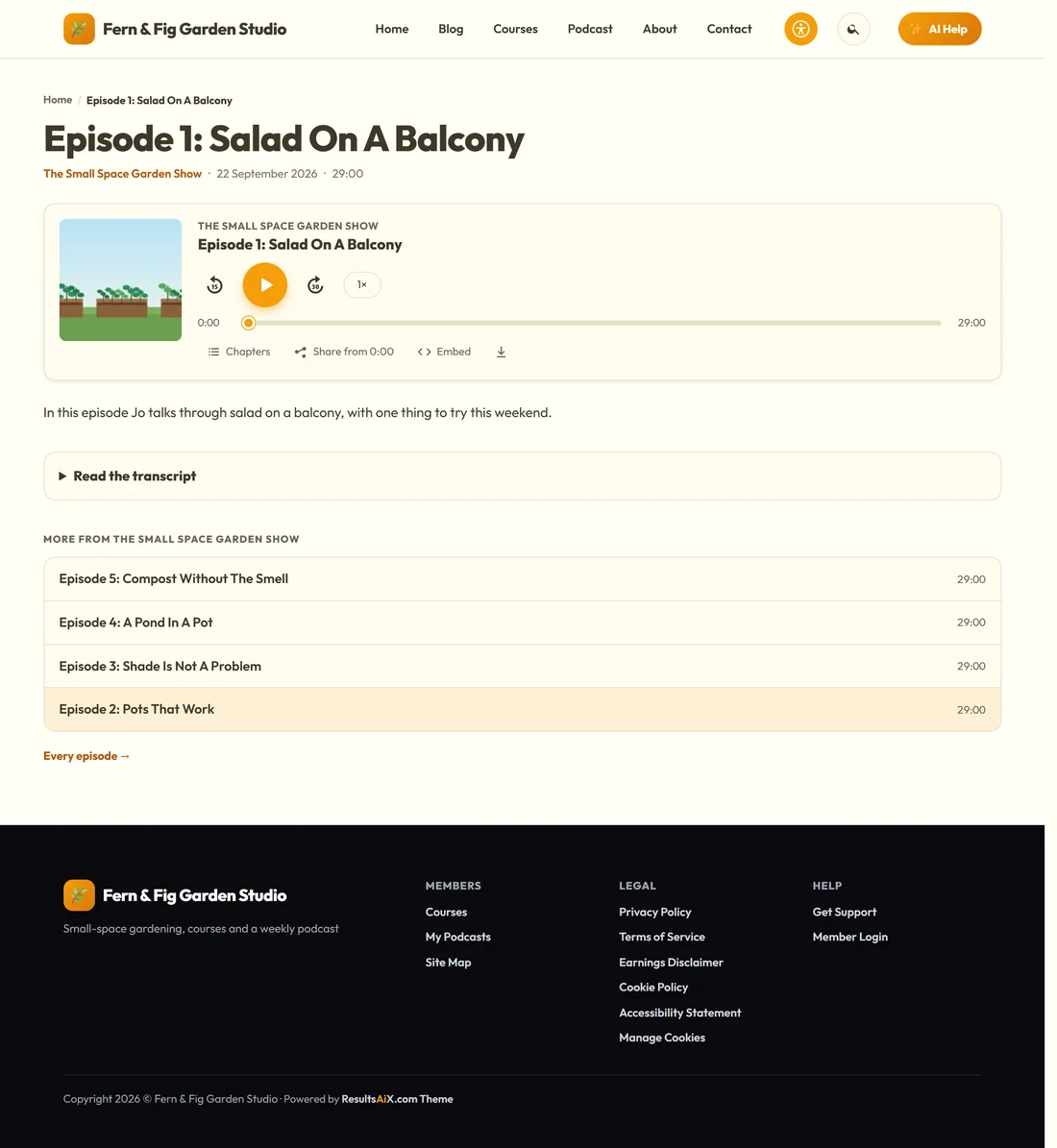
Every player has play, back 15 seconds, forward 30 seconds and speed from 0.75x to 2x, chapters, Share from this moment, and it remembers where each listener stopped. Add the Audio Player block, or a shortcode:
- [raix_audio episode="12"] plays one episode.
- [raix_audio show="3"] plays a whole show as a playlist.
- [raix_audio src="https://yoursite.com/clip.mp3"] plays any clip.
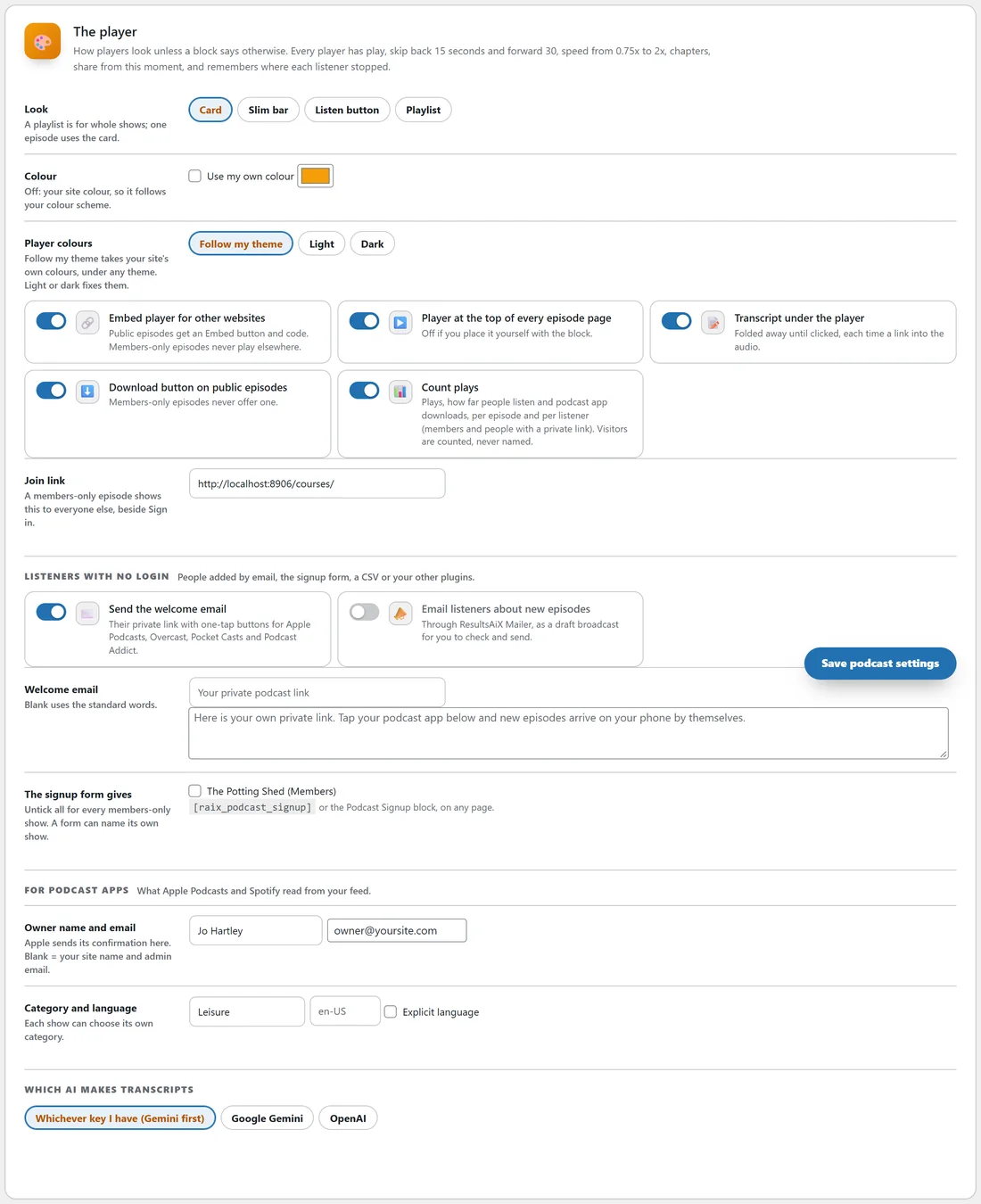
On the Podcasts tab, The player sets the defaults: Look (Card, Slim bar, Listen button, Playlist), Colour (your site colour, or Use my own colour) and Player colours (Follow my theme, Light or Dark). Switches: Embed player for other websites, Player at the top of every episode page, Transcript under the player, Download button on public episodes and Count plays. Members-only episodes never offer a download or play elsewhere.
For podcast apps:
Owner name and email (Apple sends its confirmation there), Category and language, and Explicit language. Which AI makes transcripts: Whichever key I have (Gemini first), Google Gemini or OpenAI. Press Save podcast settings.
Stats:
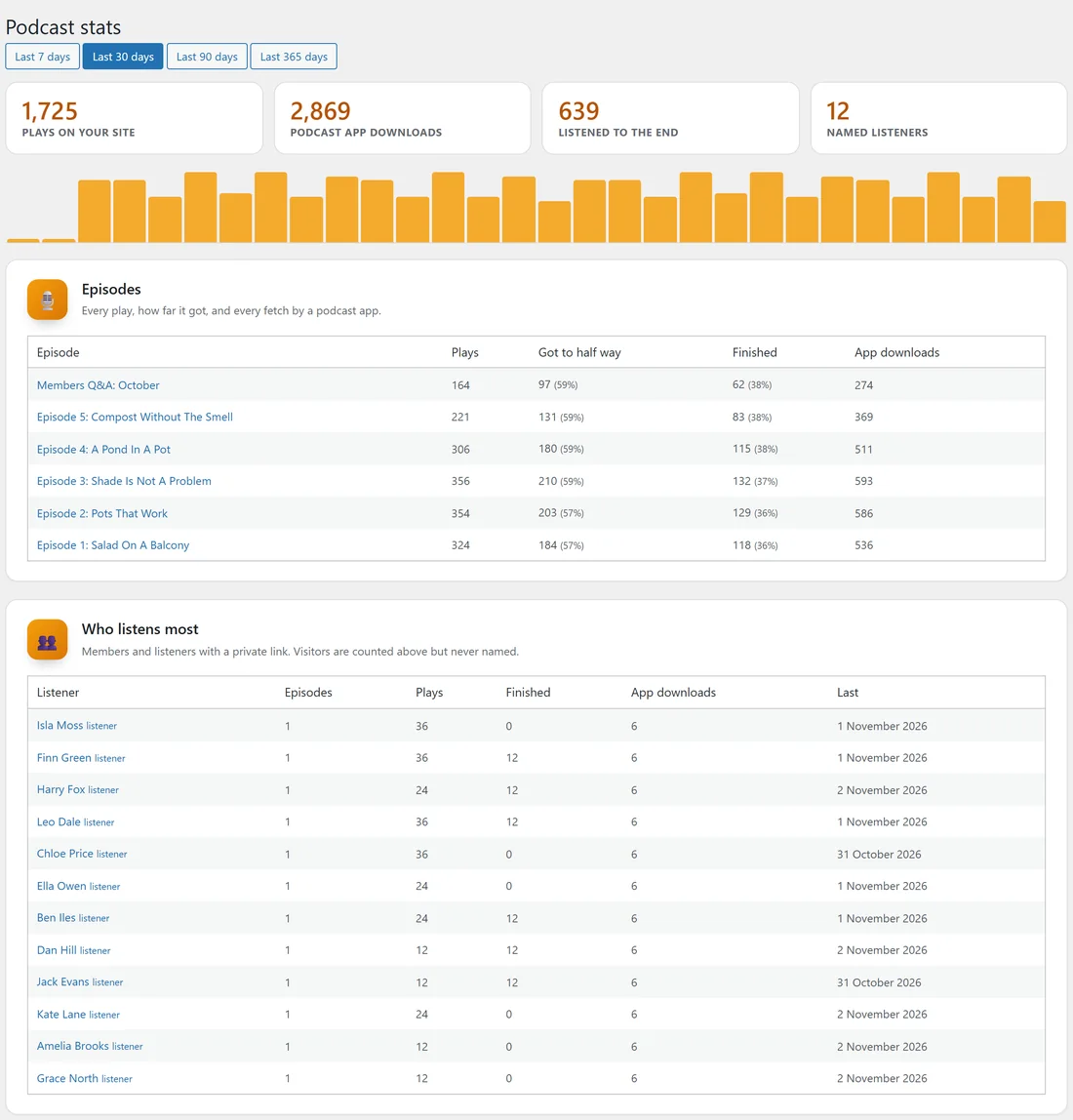
Podcasts, Stats shows Plays on your site, Podcast app downloads, Listened to the end and Named listeners for the last 7, 30, 90 or 365 days, a chart of named listening by day, every episode with how far people got, and Who listens most. Visitors are counted but never named. The Podcasts tab shows the same for the last 30 days.
Moving from Thrive:
The page mover on the Move In tab turns audio in Thrive pages into this player. See Move In: Moving Thrive Pages Onto The Theme.
A real example:
Jo runs two shows on yoursite.com. The Small Space Garden Show is public, with its feed submitted to Apple Podcasts and Spotify. The Potting Shed (Members) is members-only, with a monthly Q&A episode. Twelve workshop guests who never made an account were added on the Listeners screen from a CSV, so they hear the members show in their own podcast app.
Tips:
- Use square cover art. Podcast apps will not list a show without it.
- Upload members-only audio to the Media Library so it can be fully protected.
- Put the show playlist on your About page with [raix_audio show="3"], using your show's number.