Train Your AI is a short brief about your business. Every AI feature in the theme reads it: Create With AI on every edit screen, the AI Publisher, Auto Start, Post From A Link, the podcast show notes and the legal page rewrites. With it filled in, the AI writes like someone who works for you rather than a stranger who only read the title.
Where to find it:
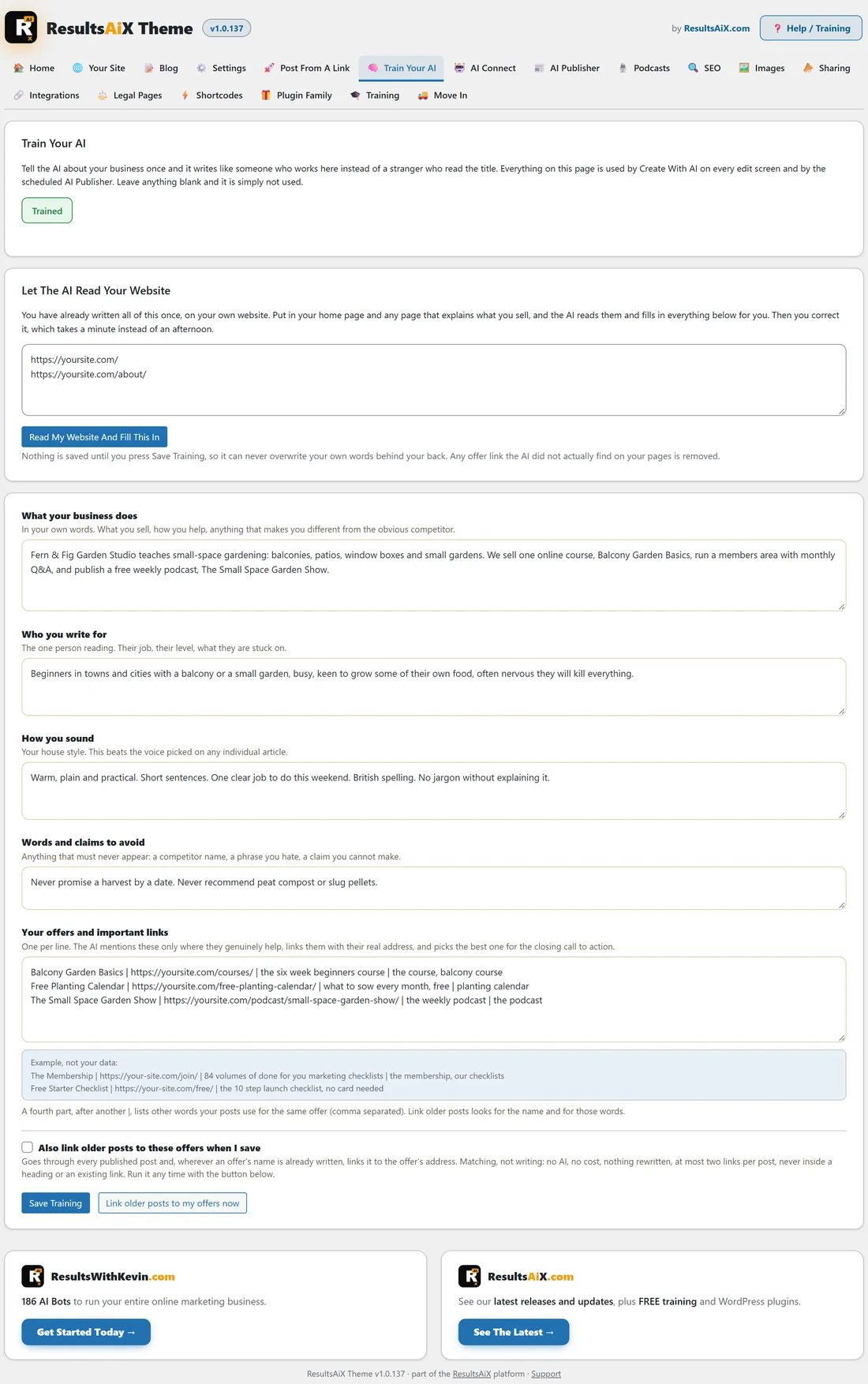
ResultsAiX Theme, Train Your AI. It is also in the sidebar under ResultsAiX Theme. The badge at the top says Trained once the brief has content.
Let the AI read your website:
You have already written most of this on your own site.
- In Let The AI Read Your Website, put your home page and any page that explains what you sell, one address a line.
- Press Read My Website And Fill This In.
- The AI reads the pages and fills in the boxes below.
- Correct anything that is not quite right.
- Press Save Training.
Nothing is saved until you press Save Training, so it never overwrites your own words behind your back. Any offer link the AI did not actually find on your pages is removed.
The five boxes:
- What your business does: in your own words. What you sell, how you help, what makes you different.
- Who you write for: the one person reading. Their job, their level, what they are stuck on.
- How you sound: your house style. This beats the voice picked on any single article.
- Words and claims to avoid: a competitor name, a phrase you dislike, a claim you cannot make.
- Your offers and important links: one per line.
Leave anything blank and it is simply not used.
Your offers:
Each offer line has up to four parts, separated by |.
- The offer's name.
- Its address.
- A short description.
- Optional: other words your posts use for the same offer, comma separated.
The AI mentions offers only where they genuinely help, links them with their real address, and picks the best one for the closing call to action. The fourth part helps the older-post linking find the offer under other names.
Link older posts to your offers:
Tick Also link older posts to these offers when I save, or press Link older posts to my offers now. It goes through every published post and, wherever an offer's name is already written, links it to the offer's address. It is matching, not writing: no AI, no cost, nothing rewritten, at most two links per post, and never inside a heading or an existing link.
Real links only:
The writing prompts ask for plain, specific writing and give the AI your real post addresses, so the internal links it adds point at pages that exist.
A real example:
For yoursite.com, Jo puts the home page and the About page in the box and presses Read My Website And Fill This In. The AI fills What your business does with the course, the podcast and the members area. Jo adds Never promise a harvest by a date to Words and claims to avoid, and three offers: Balcony Garden Basics, the Free Planting Calendar and The Small Space Garden Show, each with its address on yoursite.com. From then on every draft ends with the offer that fits it best.
Tips:
- Update the brief whenever you launch something new, so calls to action point at it.
- Keep How you sound short and concrete, for example Short sentences. British spelling.
- Next, connect your AI keys. See AI Pictures, Changing The Layout With AI, And Posts On Autopilot.