The Leaderboard Scraper reads any WarriorPlus or JVZoo affiliate contest leaderboard and saves every affiliate on it into Launch Manager, with their rank and sales. You see straight away who is already your partner and who is new, and you can add them to a launch in one click.
Contest leaderboards are full of affiliates who are actively mailing in your market. They are the best list of people to invite to your next launch.
Where to find it:
Open Partners, then Scraper.
The four bookmarklets:
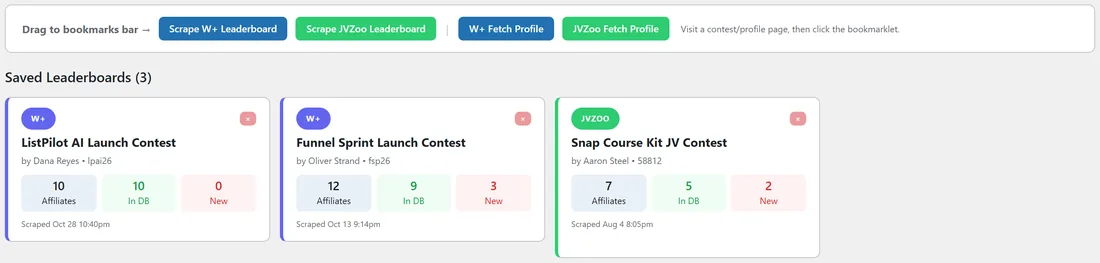
At the top of the page are four buttons. Drag each one to your browser's bookmarks bar once.
- Scrape W+ Leaderboard: saves every affiliate from a WarriorPlus contest page.
- Scrape JVZoo Leaderboard: saves every affiliate from a JVZoo affiliate contest page, including their JVZoo user ID and photo.
- W+ Fetch Profile: on any WarriorPlus member profile, saves their stats, badges, bio and photo to the matching partner.
- JVZoo Fetch Profile: on any JVZoo public profile, saves their seller and affiliate stats, badges, photo and endorsements.
Scraping a contest:
- Open a contest leaderboard on WarriorPlus or JVZoo.
- Click the matching bookmarklet in your bookmarks bar.
- A new tab opens in Launch Manager with the saved snapshot.
The snapshot page:
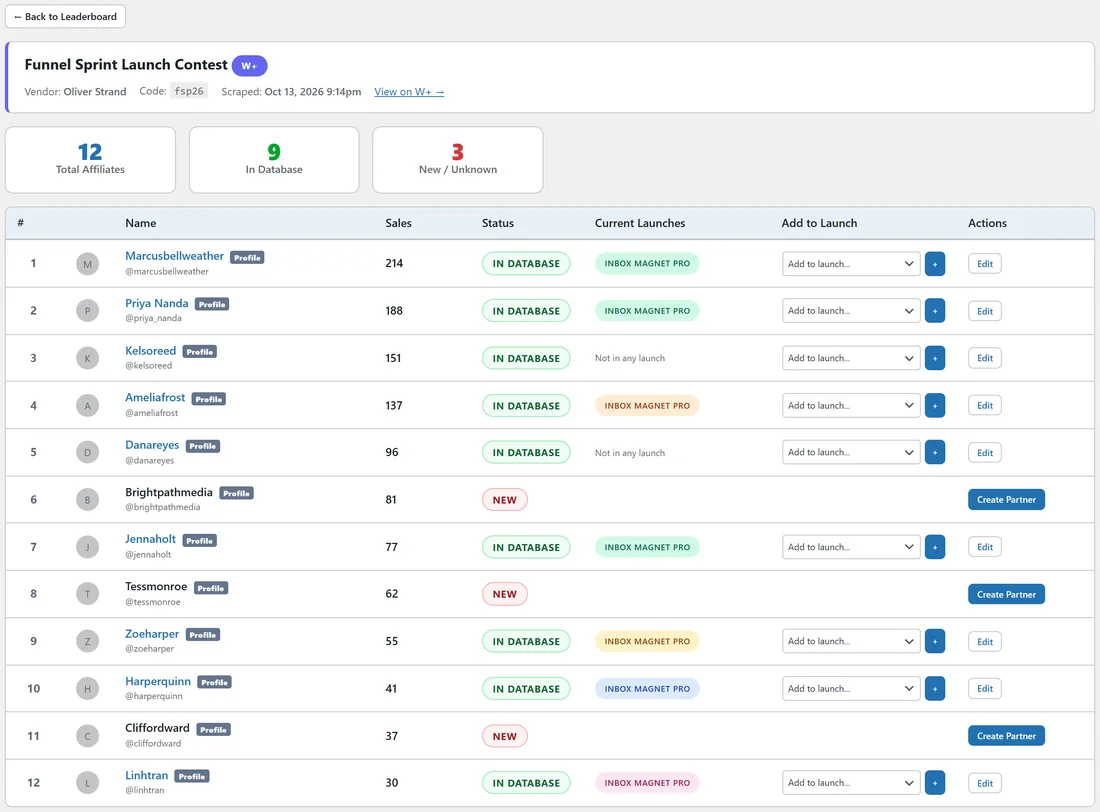
The top shows the contest name, vendor, code, the date it was scraped and a link back to the contest. Three counters show Total Affiliates, In Database and New / Unknown. The table lists each affiliate with their rank, name, sales, a status of IN DATABASE or NEW, the launches they are already in, an Add to launch menu, and actions. Click Create Partner next to a new affiliate to add them as a partner.
Saved Leaderboards:
Every snapshot is kept under Saved Leaderboards on the Scraper page. Each card shows the source (W+ or JVZoo, with a purple or green border), the contest name, the vendor, how many affiliates are on it, how many are in your database, how many are new, and when it was scraped. Click a card to open it, or the cross to delete it.
Fetching profile data:
- Visit a partner's WarriorPlus member profile or JVZoo public profile.
- Click W+ Fetch Profile or JVZoo Fetch Profile.
- The data is saved to the matching partner and shows on their profile cards.
Badges filled in this way drive the badge filters and the Value Score. See Badge System and Smart Value Score.
Linking a snapshot to your own launch:
On one of your own launches you can link a W+ leaderboard snapshot under Linked W+ Leaderboard Snapshot. The Launch Stats tab and the Final Leaderboard then use the affiliate ranking from that snapshot, so they match the contest page exactly. See Launch Stats, Live Sales Feed And Final Leaderboard.
A real example:
Oliver Strand's Funnel Sprint contest ran last month. Dana opens the leaderboard and clicks Scrape W+ Leaderboard. The snapshot shows 12 affiliates: 8 already in her database and 4 new. She clicks Create Partner on the new ones and uses Add to launch to put the strongest into her Inbox Magnet Pro pipeline.
Tips:
- Scrape the contests in your niche on both WarriorPlus and JVZoo. Every affiliate on them is actively promoting.
- After scraping a JVZoo contest, merge new JVZoo entries with partners you already know from WarriorPlus. See Merging Partners.
- Bookmarklets are saved copies of the button. After a plugin update, drag them to your bar again to get the newest version.