Smart Insights are cards on the Today page, worked out from your own data and ranked by urgency. The biggest signals come first, so you can glance at them and know where to spend the next hour.
Each card has a severity label (CRITICAL, HIGH, MEDIUM or LOW), a date chip, a short title, one or two lines of detail, and a button that takes you straight to the partner, launch, mailing or day it is about.
Where to find it:
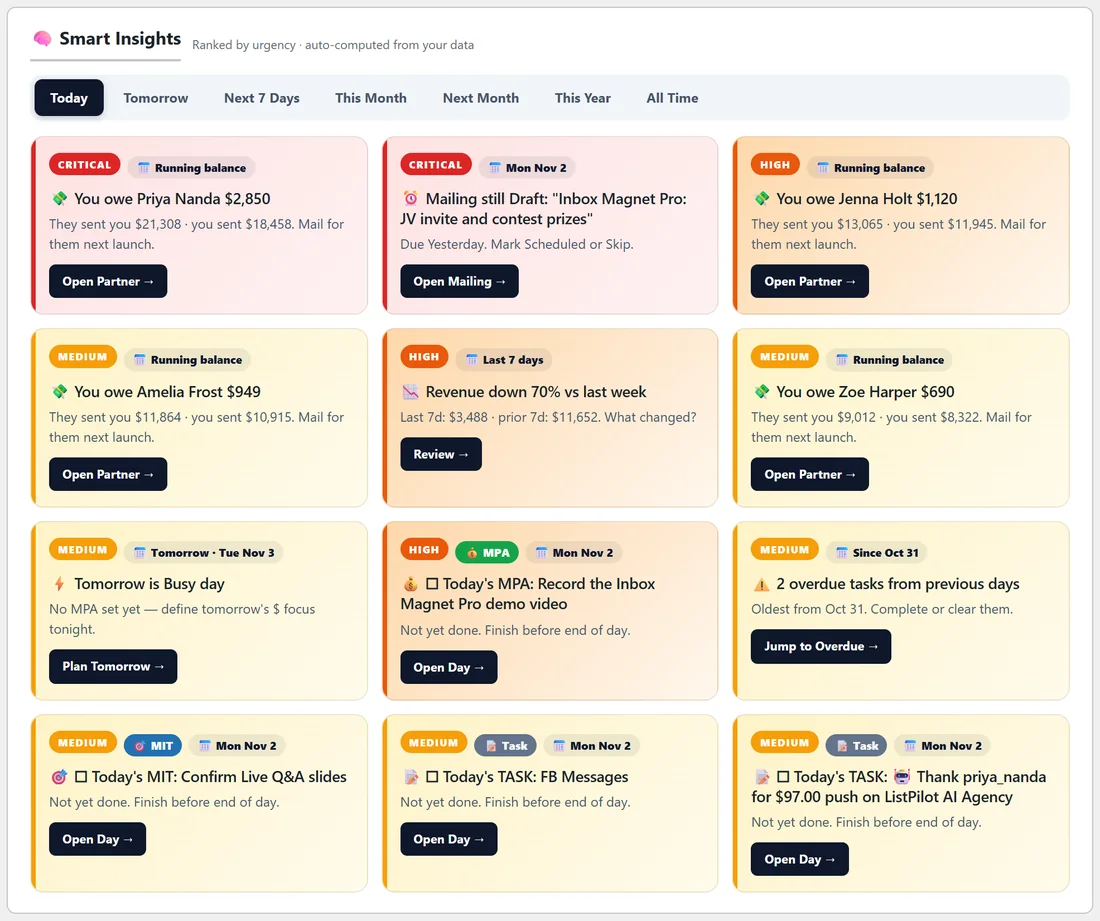
Open Today. Smart Insights sits under the Income card. Up to 12 cards show at a time.
Range tabs:
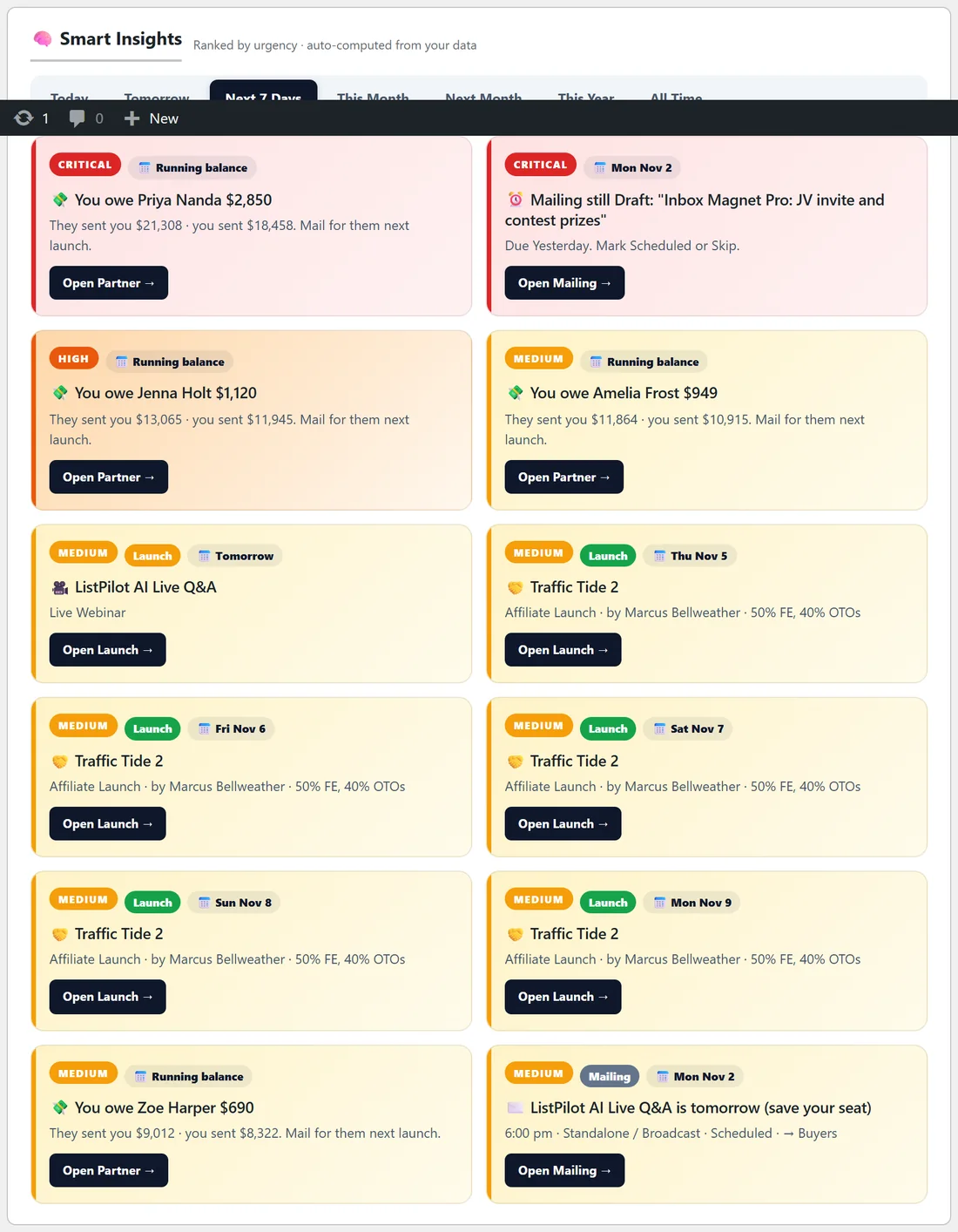
Above the cards are seven tabs: Today, Tomorrow, Next 7 Days, This Month, Next Month, This Year and All Time. Each tab works the insights out again for that range. Today is selected when the page opens. When nothing needs attention, the panel says it is all clear for that range.
The kinds of insight:
- You owe a partner: a partner has sent you at least $500 more in sales than you have sent them. The card shows both totals, using the same numbers as their Partner page.
- Launch without a mailing: a launch in the range has no mailing planned yet.
- Stale drafts: mailings dated before today that are still in Draft.
- Mailing still in Draft: a mailing in the range has not been marked Scheduled.
- Partner went quiet: a partner with $1,000 or more in lifetime sales to you has had no sale in 60 days.
- Partner launches: an affiliate or JV partner launch coming up, worded for the situation (see below).
- Low readiness: a launch coming up that is not ready yet. The urgency is higher when you owe that partner.
- Overdue tasks: items left unticked on earlier days.
- Today's tasks: each MPA, MIT or task for the day that is not done yet.
- Best day in 30 days: today's income is the highest in the last 30 days.
- Revenue down: the last 7 days earned less than 60% of the 7 days before, when that week made at least $500.
- Clean day: every MIT is done before 6pm.
- No MPA today: nothing on the calendar and no manual MPA.
- Tomorrow is busy: tomorrow has a lot of launches or mailings, and the card tells you whether tomorrow's MPA is set.
- Time off coming up: warns when days away clash with launches or mailings.
Partner launch wording:
When a partner's launch is coming up, the card reads differently depending on your balance with them and your plans:
- You owe them $500 or more: the card says so and asks you to mail for them.
- They owe you $500 or more: the card tells you, and marks the mailing as optional.
- Ready and a mailing is scheduled: everything is lined up.
- No mailing scheduled yet: the card asks you to book your mail slot.
- Otherwise it shows how many mailings you have and the prep percentage.
Launch cards carry a coloured type chip: My Launch, Affiliate, JV Partner or Internal Promo. Readiness, no-mailing and partner launch cards never appear for launches that are already over, except on the All Time tab.
Step by step:
- Open Today and read the cards from left to right, top to bottom.
- Click the button on the first card. It takes you to the exact place to act.
- Come back and work down the list.
- Switch to Next 7 Days on Monday mornings to plan the week.
A real example:
On Monday Dana's Today tab shows a CRITICAL card: You owe Priya Nanda $2,850. Priya has sent far more sales than Dana has returned. Next to it, another CRITICAL card says the Inbox Magnet Pro JV invite mailing is still a draft. Dana clicks Open Mailing, finishes the email and marks it Scheduled. Then she switches to Next 7 Days and sees Traffic Tide 2 by Marcus Bellweather launching on Thursday with her mailing already scheduled.
Tips:
- The You owe cards are the fastest way to strengthen your partner relationships. Mail for those partners first.
- Revenue cards only show on the Today tab, because they compare today with recent days.
- Insights are worked out fresh every time you open the page, so they always match your latest data.