Many JV partners have more than one account: a WarriorPlus username, a JVZoo account or two, sometimes an old username they no longer use. Launch Manager can merge all of them into one partner, so you see the whole relationship on one page.
Why merge:
- One person, many accounts: someone might be marcusbellweather on WarriorPlus, JVZoo user 1184302, and also have a second JVZoo account under a company name.
- Accurate reciprocity: without merging, their sales are split across separate records and your balances are wrong.
- Complete history: every sale from every platform and account on one profile.
- A better Value Score: the score is worked out from the combined totals.
How to merge:

- Open the partner you want to keep. This is the primary record.
- Click Merge under the contact form.
- The Merge Another Partner Into This One box opens. Type part of the other account's username, name or email.
- The results show each match with its username, platform, name and email.
- Click Merge Into This Partner on the right one.
- All its data moves to this partner and the duplicate record is deleted.
Afterwards the Connected Accounts box lists both accounts, one marked PRIMARY and the other MERGED, with the date of the merge.
What gets merged:
- All sales: W+ CSV data, JVZoo API data, IPN sales and recurring payments
- Profile data: the W+ and JVZoo profiles, photos, bios, badges and stats
- Contact details: Facebook, email and WhatsApp fill in blanks and never overwrite what you already have
- Launch pipeline entries
- Notes and tags, combined
Unmerge:
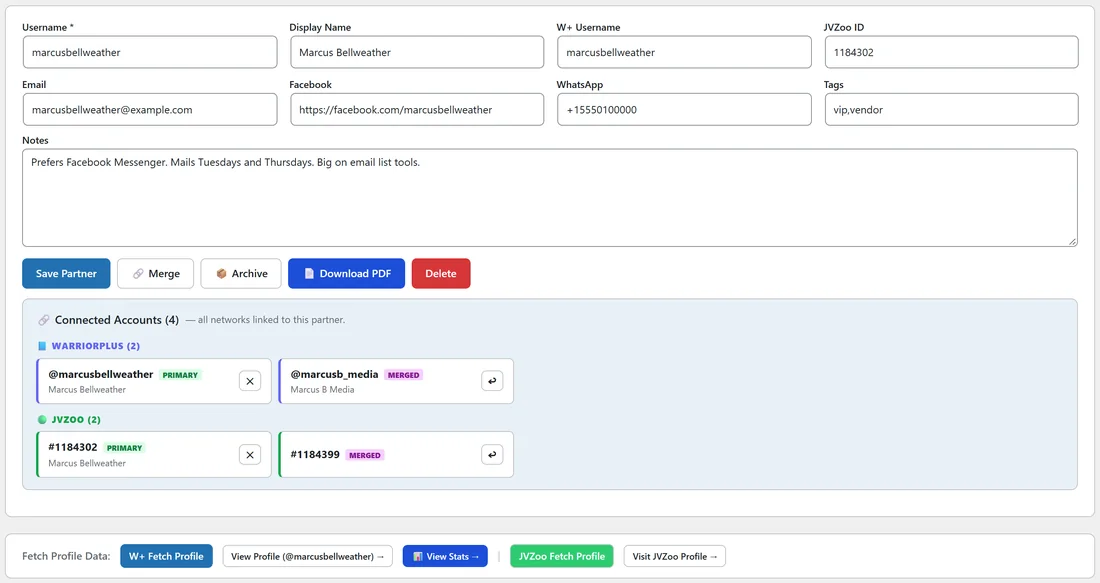
If you merged the wrong account, find it in Connected Accounts and click the Unmerge button next to it. The account is restored as a separate partner and its data moves back.
Disconnect a network:
To remove only the WarriorPlus side or only the JVZoo side of a partner without splitting them, click the cross on the PRIMARY account in Connected Accounts. This clears that network's profile fields. All sales data stays.
A real example:
A partner called kelsoreed was created automatically when his first ListPilot AI sale arrived through IPN. Dana knows Kelso also promotes under his main account. She opens the main partner, clicks Merge, types kelso, and clicks Merge Into This Partner. His ListPilot AI sales now count on one profile.
Tips:
- Merge first, then analyze. Balances and Value Scores are only accurate when each person is one partner.
- After scraping a JVZoo contest, create the new affiliates, then merge them into their existing W+ records. See Leaderboard Scraper.
- Use Partner Diagnostics to find a person split across several records. See W+ Stats Scraper And Partner Diagnostics.