ResultsAiX Video works without any AI key: you can paste a script, narrate it, style it and export it. When you connect your own AI key, the smart tools switch on. Your key is stored encrypted on your own site and your requests go to your AI provider, who bills you directly.
What an AI key unlocks:
- The AI Script Writer box above your script on Create Video.
- The AI Image Director, which reads your whole script and writes a picture idea for every slide.
- Fill Fields in the Direct The AI Images panel, which turns one sentence into an image style, a cast and a mood.
- Recolour The Theme With AI, which turns a plain description of colours into a full colour theme.
- Animated Story, where the AI writes the conversation and a Gemini or ChatGPT key draws the scenes.
- Slide pictures from Google Gemini or OpenAI, if you pick them as your picture engine.
Where to find it:
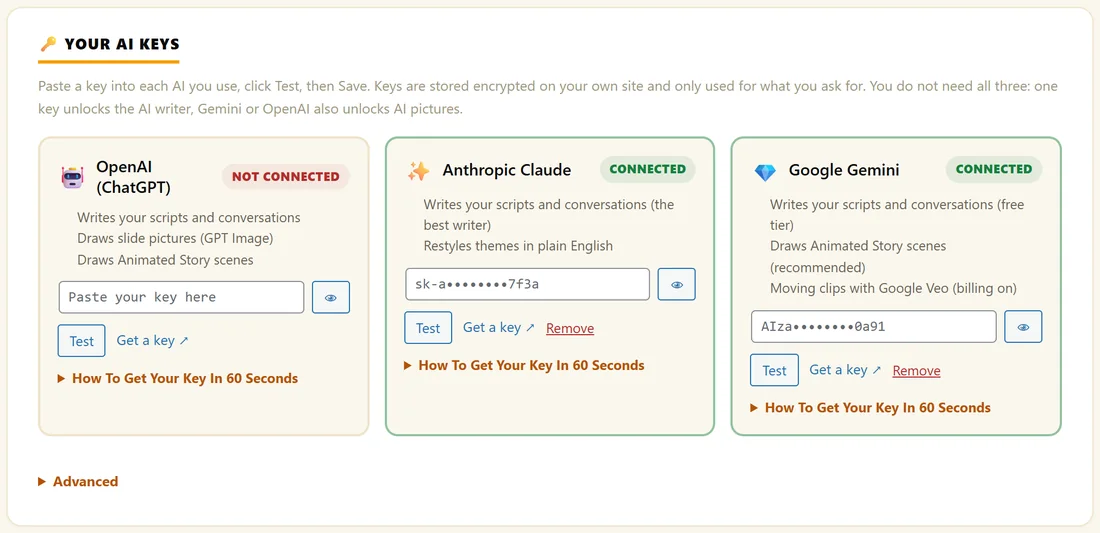
Open AI Video, then Settings. The first section is Your AI keys, with one card each for OpenAI (ChatGPT), Anthropic Claude and Google Gemini. The small status line at the top of Settings shows how many keys are connected, for example 2/3 AI keys connected.
Step by step:
- On the card of the AI you want, click Get a key. It opens the provider's key page in a new tab.
- Open How To Get Your Key In 60 Seconds on the same card if you want the exact clicks for that provider.
- Copy your new key and paste it into the box on the card. The eye button shows or hides what you typed.
- Click Test. When the key works, it is saved straight away and the card shows Connected. The first AI you connect also becomes your script writer, so it works at once.
- Go to What each AI does to choose the Main AI, the Model and a Backup AI. See AI Usage, Fallback Provider And Monthly Budget.
- Click Save Settings at the bottom of the page for any other change.
What each card does:
- OpenAI (ChatGPT): writes your scripts and conversations, draws slide pictures (GPT Image) and draws Animated Story scenes. The key starts with sk-.
- Anthropic Claude: writes your scripts and conversations and restyles themes in plain English. The key starts with sk-ant.
- Google Gemini: writes your scripts and conversations on Google's free tier, draws Animated Story scenes and makes moving clips with Google Veo. The key starts with AIza.
You do not need all three. One key unlocks the AI writer. Gemini or OpenAI also draws pictures.
Google Gemini and billing:
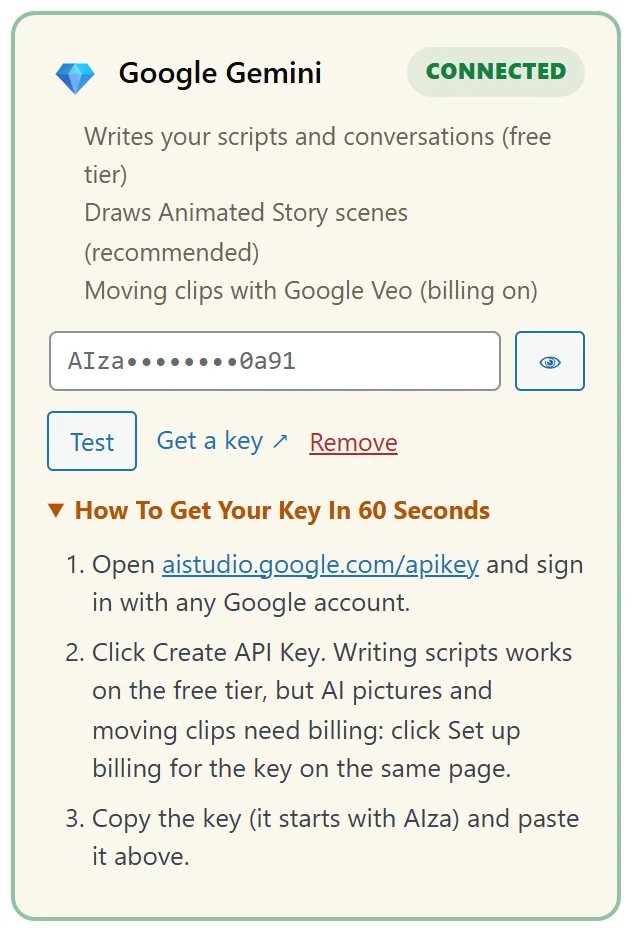
A Gemini key is free to create and writing scripts works on Google's free tier. Pictures and moving clips need billing switched on for the key. On the page where you created the key, click Set up billing. When you click Test on the Gemini card, the result line tells you whether pictures and Veo moving clips are offered to that key.
The Advanced box:
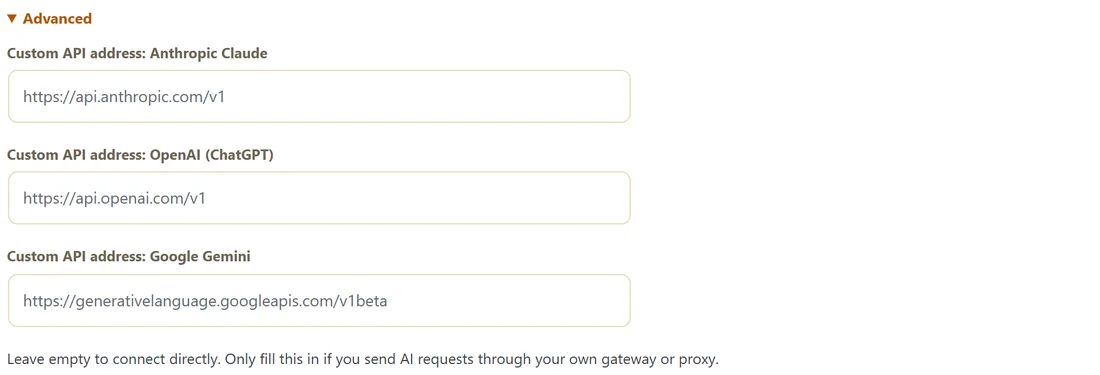
Under the three cards, Advanced holds one Custom API address per AI. Leave them empty to connect directly. Fill one in only if you send AI requests through your own gateway or proxy.
Getting a free Gemini key, step by step:
- On the Google Gemini card, click Get a key. Google AI Studio opens.
- Sign in with any Google account.
- Click Create API Key.
- Copy the key. It starts with AIza.
- Paste it into the Google Gemini card and click Test. The result line says how many models are available, and whether pictures and moving clips are offered to this key.
- For Animated Story pictures, click Set up billing for the key on the same Google page.
A real example:
Yoursite Studio connects a Claude key for writing and a Gemini key for Animated Story pictures. The status line now reads 2/3 AI keys connected and Script writer: Anthropic Claude. On Create Video the AI Script Writer and Recolour boxes appear, and the Animated Story panel shows Pictures: Google Gemini.
Which AI should I pick?
- Want to spend nothing? Start with Google Gemini. The key is free and writing scripts works on Google's free tier.
- Want the strongest writing? Anthropic Claude is marked as the best writer on its card and also restyles themes in plain English.
- Want AI pictures for Animated Story? Use Google Gemini with billing on (recommended, it keeps several characters alike) or OpenAI.
- Want a safety net? Connect two and set one as the Backup AI.
How your keys are kept:
- Keys are encrypted before they are saved in your own WordPress database.
- They are only used for the jobs you start, such as Write Script With AI or Recolour.
- Each AI keeps its own key, so switching the Main AI never overwrites another key.
- The Test button checks a key against the provider's list of models, so a wrong key is caught now, not in the middle of a video. A key that is refused shows the provider's own reason.
Tips:
- To take a key off, click Remove on its card.
- Keys never show in full again after saving. The box shows a masked version, such as AIza followed by dots and the last four characters.
- If no key is connected, the AI boxes simply stay hidden and every other feature keeps working.