Slide images are made by an image engine you choose in Settings. You never need a paid key for images: one free key gives the best results, and a no key option is always there as a safety net.
Where to find it:
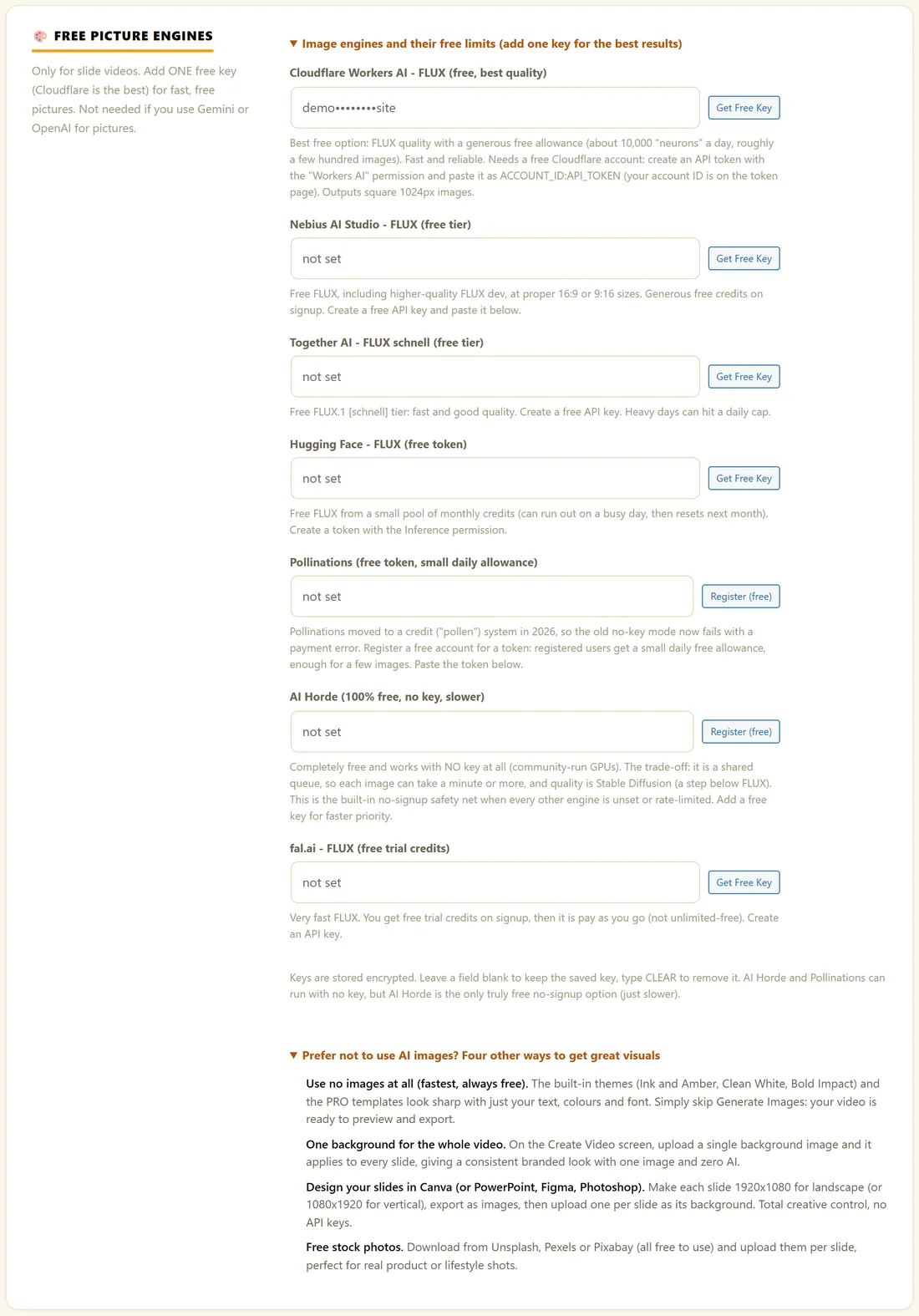
- Open Settings, then What each AI does. Under Draws pictures for slide videos you pick the Picture engine and the Picture style (added to every picture).
- Further down, Free picture engines holds one key box per free engine. Open Image engines and their free limits (add one key for the best results) to see them.
- Image fit is on Create Video, next to Format.
The engines:
- Cloudflare Workers AI, FLUX (free, best quality): the recommended free choice. Needs a free Cloudflare account and an API token with the Workers AI permission, pasted as your account ID, a colon, then the token.
- Nebius AI Studio, FLUX (free tier): free FLUX at proper 16:9 and 9:16 sizes.
- Together AI, FLUX schnell (free tier): fast and good, with a daily cap on busy days.
- Hugging Face, FLUX (free token): a small pool of free monthly credits. The token needs the Inference permission.
- Pollinations (free token, small daily allowance): register for a free token for a few images a day.
- AI Horde (100% free, no key, slower): works with no key at all on community computers. Each image can take a minute or more.
- fal.ai, FLUX (free trial credits): very fast, with trial credits and then pay as you go.
- Google Gemini image: uses the Gemini key from Your AI keys, with billing switched on at Google.
- OpenAI image: uses the OpenAI key from Your AI keys, billed per image by OpenAI.
Free allowances are set by each provider, so check their site for today's numbers.
Step by step:
- Under Free picture engines, open the engines list and click Get Free Key (or Register (free)) beside the engine you want.
- Create the key on the provider's site and paste it into that engine's box.
- Under What each AI does, set Picture engine to the same engine.
- Type a Picture style, such as warm lifestyle photography, golden hour light.
- Click Save Settings, then try Test Style (1 Image) on Create Video.
How the keys work:
- Keys are stored encrypted. A saved key shows as a masked hint in its box.
- Leave a box blank to keep the saved key. Type CLEAR to remove it.
- Gemini and OpenAI reuse the keys you connected under Your AI keys, so you never enter them twice.
- If your chosen engine fails or reaches its limit, the plugin tries Pollinations (if you added a token) and then AI Horde by itself, so images keep coming.
Image fit:
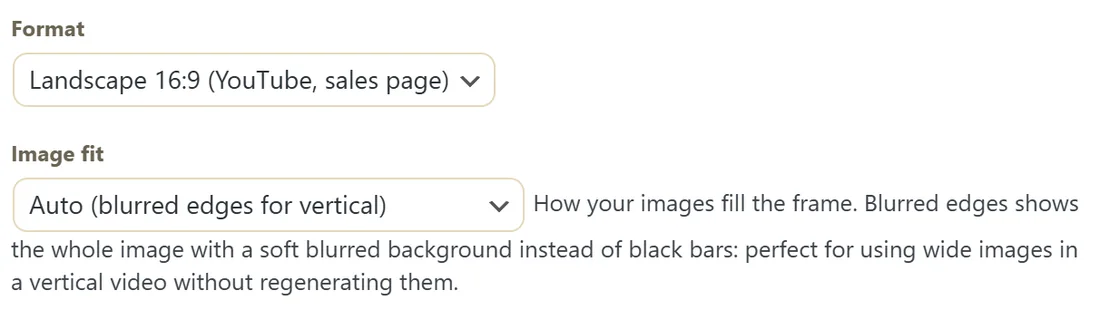
Image fit decides how a picture fills the frame.
- Auto (blurred edges for vertical): the plugin chooses.
- Fit with blurred edges (reuse any image): the whole image, with a soft blurred copy behind it instead of bars.
- Fill the frame (crops to fit): the image covers the frame and the edges are cropped.
- Fit with plain bars: the whole image with plain bars.
Blurred edges is the easy way to reuse wide images in a vertical video, or the other way round, without making them again.
Prefer no AI images?
Open Prefer not to use AI images? Four other ways to get great visuals, under Free picture engines.
- Use no images at all. The built in themes and the PRO templates look sharp with text, colours and a font. Skip Generate Images.
- Upload one Custom Background for the whole video on Create Video.
- Design slides in Canva, PowerPoint, Figma or Photoshop at 1920 by 1080 (landscape) or 1080 by 1920 (vertical) and upload one per slide.
- Use free stock photos from Unsplash, Pexels or Pixabay and upload them per slide.
A real example:
Yoursite Studio creates a free Cloudflare token, pastes it into the Cloudflare Workers AI box, and sets Picture engine to Cloudflare Workers AI. The status line at the top of Settings now reads Slide pictures: Cloudflare Workers AI. For a vertical Morning Stretch Reel she reuses two landscape images with Fit with blurred edges.
Which engine should I choose?
- Most people: Cloudflare Workers AI with a free token. FLUX quality and a generous daily allowance.
- Vertical videos with sharp framing: Nebius AI Studio, which makes proper 16:9 and 9:16 sizes.
- No sign up at all: AI Horde. Free and slower.
- Already paying for Gemini or OpenAI: pick them, and your existing key is used.
Tips:
- One free key is plenty for most people. Cloudflare is the best place to start.
- AI Horde is slower because it is a shared queue. Let it run in the background.
- The Diagnostics tab shows which Image engine is selected.