ResultsAiX Hub is one of the free ResultsAiX plugins, and one free sign-up gets you all of them. There is no trial and no key: the Hub you download is the whole Hub, with every tab and every update.
This article shows where to get it, what you receive, and how the Hub then points you to the other free plugins.
How to get it:
- Go to https://resultsaix.com/free-plugins/ and sign up. It costs nothing.
- Open the free members area at https://resultswithkevin.com/members/free-plugins/
- Download the ResultsAiX Hub zip, plus any of the other free plugins you want.
- In WordPress go to Plugins, then Add New Plugin, then Upload Plugin, choose the zip and click Install Now, then Activate. Installing The Hub And Finding It In WordPress walks you through it.
Do I need a licence key?
No. The Hub has no licence key and no activation step. As soon as it is switched on, every screen works. Its updates arrive through your normal WordPress Plugins screen, and no key is needed for those either.
What is free?
The whole Hub: every tab, every screen and every update. That includes the Overview, My Plugins, Get More, Licenses, Settings, Diagnostics and Support. The AI bots listed on the Results With Kevin AI tab are hosted separately on resultswithkevin.com and use your Results With Kevin members account.
Where do the other free plugins show up?
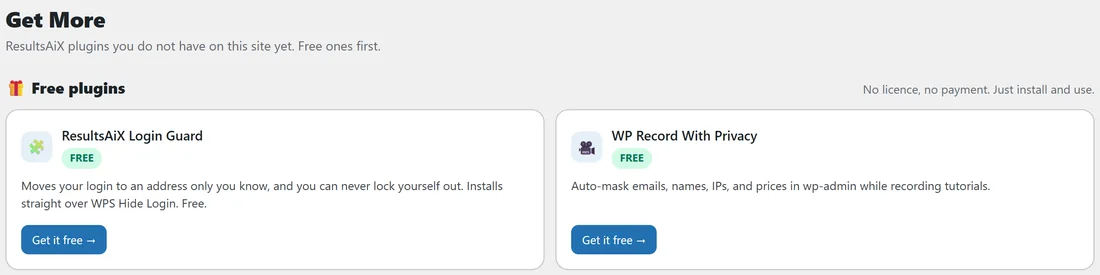
Once the Hub is installed, open it and click the Get More tab. The first section, Free plugins, lists the free ResultsAiX plugins this site does not have yet, each with a FREE label and a Get it free button. A free plugin you already have on the site, switched on or off, is not listed there.
A real example:
Jamie installs the Hub on yoursite.com, which already runs Free HTML Pages and ResultsAiX Accessibility. Get More now shows two free plugins under Free plugins: ResultsAiX Login Guard and WP Record With Privacy. Jamie clicks Get it free on Login Guard, downloads it from the free members area, installs it, and it moves off Get More and onto My Plugins with a Free label in its Licence column.
Can I install it on more than one site?
Yes. Install it on every WordPress site where you run ResultsAiX plugins. Each copy works on its own. If you run more than one site, you can link them so your main Hub shows the others too. See Linked Sites: Show Another Site On Your Main Hub.
What does the Hub need from my site?
A normal WordPress install with administrator access. The Hub adds two small database tables and a few settings, loads its styles only on its own screens, and adds nothing to the pages your visitors see.
Step by step: your first free plugin from the Hub:
- Open ResultsAiX Hub and click the Get More tab.
- Under Free plugins, press Get it free on the plugin you want. Its page opens in a new tab.
- Download it, then install it from Plugins, Add New Plugin, Upload Plugin.
- Back in the Hub, the plugin now shows on My Plugins with a Free label.
Tips:
- Install the Hub first on a new site. Every ResultsAiX plugin you add later is picked up the next time you open a Hub screen.
- Keep your free members area login handy: it is where you download updated zips of any free plugin if you ever need a fresh copy.
- Next, read Your First Ten Minutes With The Hub.