Most of what your plugins do happens without you. Needs You Today is the short list of what does not: the decisions, replies and fixes that wait until you act. Every item has one button that opens the screen where you deal with it, so you can clear the list in a few minutes.
Where to find it:
Open ResultsAiX Hub. The Needs you today card sits on the Overview beside Best performers, under the plugin sections.
What can appear:
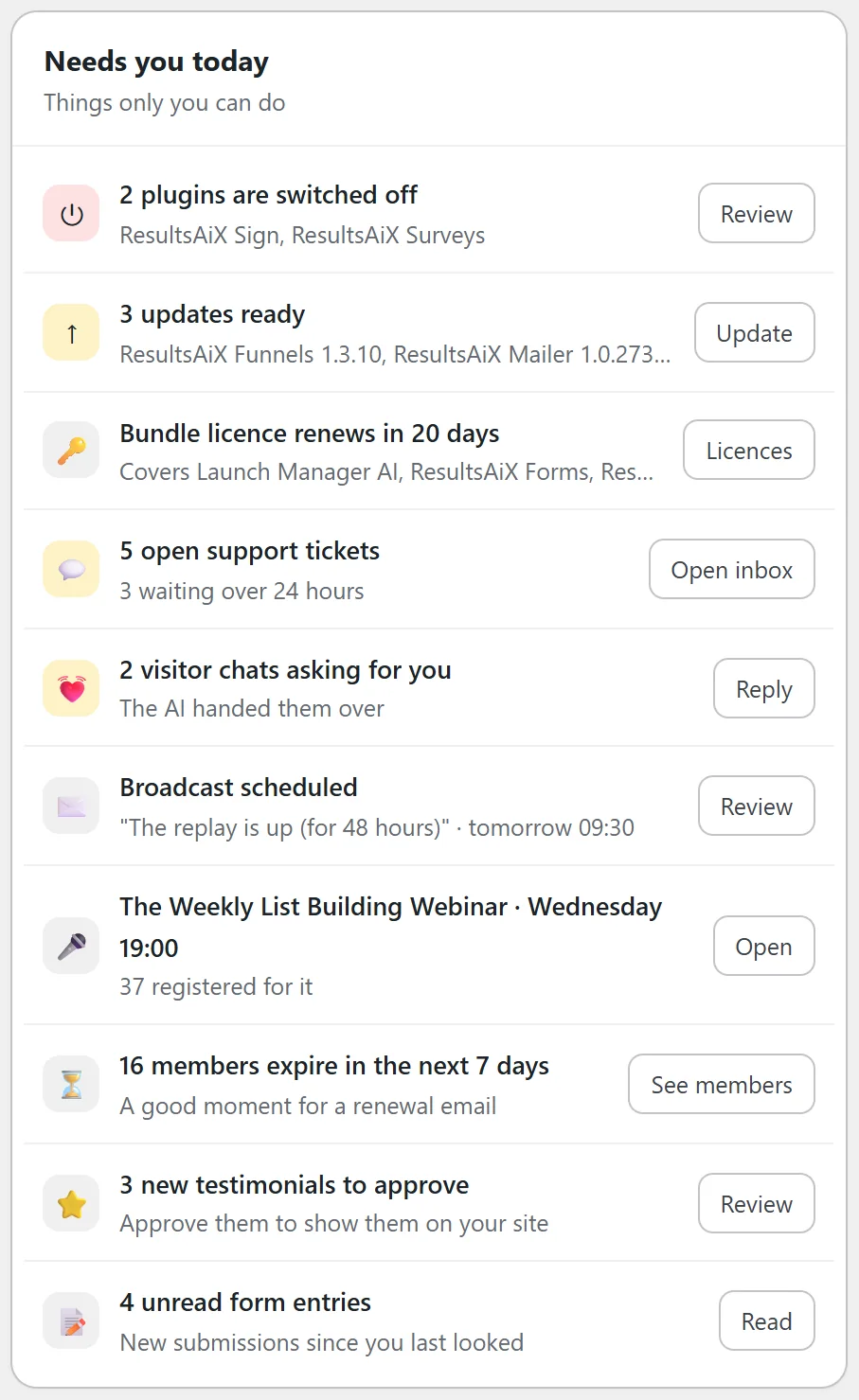
- Plugins switched off: how many ResultsAiX plugins are installed but switched off, naming the first three, with a Review button that opens My Plugins showing just those
- Updates ready: how many updates are waiting and for which plugins, with an Update button that opens My Plugins showing just those
- A licence renewing soon: one line per key that renews within the next 30 days, with the number of days left. A Bundle key that covers many plugins is one line that names the first three it covers. The Licences button opens the Licenses tab
- Open support tickets: how many tickets are open in ResultsAiX Support Desk, and how many have gone more than 24 hours without an update, with an Open inbox button
- Visitor chats asking for you: ResultsAiX Pulse chats where the AI handed the visitor over to a person, with a Reply button
- A scheduled broadcast: the subject of the next scheduled ResultsAiX Mailer broadcast and when it goes out, with a Review button, so you can check it before it sends
- The next webinar: the next session in ResultsAiX Webinars, when it starts and how many people registered for it, with an Open button
- Membership sales that could not be placed: sales ResultsAiX Membership received in the last 7 days but could not attach to a membership level, which usually means a product code is not mapped to a level. The Fix mapping button opens Membership's Integrations tab
- Members expiring soon: members whose access expires in the next 7 days, a good moment for a renewal email, with a See members button
- Contracts waiting to be signed: documents sent from ResultsAiX Sign that have not been signed yet
- Testimonials to approve: new testimonials in ResultsAiX Testimonials waiting for your approval before they show on your site
- Unread form entries: ResultsAiX Forms submissions you have not read yet, with a Read button
- Funnel leads that did not reach your email list: ResultsAiX Funnels leads from the last 7 days that did not reach your list, which usually means a connection needs checking
- Failed WP Sync deliveries: deliveries that failed in the last 24 hours because a bridge could not reach its destination, with a See the log button
An item only appears when there is something to do and the plugin behind it is switched on. There are no empty rows and no zeroes.
Step by step: clearing the list:
- Start at the top. Items are listed in the order above, with Hub items such as updates and licences first.
- Press the button on the first item. The right screen opens in that plugin.
- Deal with it, then come back with the Overview tab or the admin bar shortcut.
- Press Refresh at the top of the Overview to count again straight away. The item disappears once there is nothing left to do.
How urgent is each item?
The small icon tile on the left of each row shows how urgent it is:
- Amber: updates ready, tickets that have gone over 24 hours without an update, and chats asking for a person
- Red: things that are not running or not arriving, such as switched off plugins, membership sales that could not be placed, funnel leads that went nowhere and failed WP Sync deliveries
- Plain: everything else, such as a scheduled broadcast or the next webinar
A real example:
On yoursite.com this morning the card lists ten items. Jamie presses Review on 2 plugins are switched off and decides Sign and Surveys can stay off for now. Update installs the three waiting updates. The Bundle licence renews in 20 days, which is noted. 5 open support tickets, 3 waiting over 24 hours, gets Open inbox first. Then two visitor chats asking for a person, a quick look at tomorrow's 09:30 broadcast, The Weekly List Building Webinar on Wednesday with 37 registered, 16 members whose access ends this week, 3 new testimonials to approve and 4 unread form entries.
All clear:
When nothing is waiting, the card shows All clear and says nothing is waiting for you right now.
How fresh is the list?
Switched off plugins, updates and licences are checked every time you open the Overview. Everything else comes from the Overview's background count, which is refreshed whenever it is more than 10 minutes old. Press Refresh on the Overview to check everything again right now.
It is a list, not a notification system:
Nothing here sends you an email or pops up elsewhere in WordPress. It is a list you look at when you open the Hub. Each plugin keeps its own notifications, if it has any, exactly as before.
Who sees the list?
Only administrators, like every Hub screen. Each item is worked out for the whole site, so every administrator sees the same list.
Tips:
- Clear the amber and red items first, then the plain ones.
- Members expiring this week is a good prompt for a short renewal email from the Mailer.
- More about the other Overview cards in The Overview: Your Whole Business On One Screen.