Several ResultsAiX plugins keep their own copy of the same event. A marketplace sale lands in WP Conversion Tracker, Launch Manager can record the same sale, and your Mailer, Pulse and Support Desk can each keep a note of the buyer. A new subscriber might fill in a form, join a webinar and opt in on a funnel in the same week. Add all of that up naively and your numbers double or triple. The Overview is built around one rule instead: one sale, one person, counted once.
This article is the reference for every number on the Overview. You do not need to set anything: the rules apply on their own.
Where to see the sources:
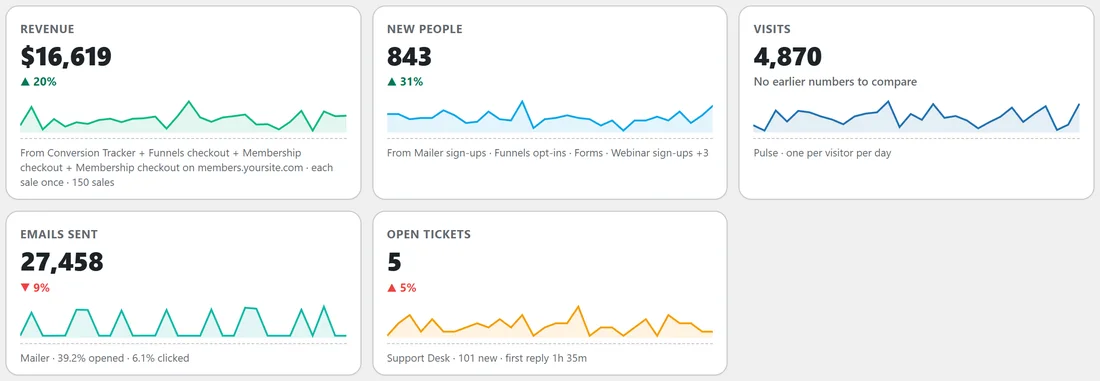
Each headline tile on the Overview has a line at the bottom saying where its number comes from. The Revenue tile, for example, names every plugin its figure came from and ends with each sale once and the number of sales. The New people tile names your lead sources.
Revenue and sales:
- Marketplace sales come from WP Conversion Tracker. When WP Conversion Tracker is not running, they come from Launch Manager instead. The two are never added together, because they record the same sales
- When WP Conversion Tracker records a sale with its gross amount, the gross amount is used, the same rule as its own dashboard. Sales you earned as an affiliate keep the commission amount
- Sales through ResultsAiX Funnels' own checkout are added on top, because nothing else records them. Only live orders count, so trying your own checkout in test mode never inflates your revenue
- Sales through ResultsAiX Membership's own checkout are added too, for the same reason. Only live orders count
- ResultsAiX Membership's marketplace orders are the same sales WP Conversion Tracker or Launch Manager record, so they only count when neither of those is running
- Membership orders passed in from the licence server are never added. They are copies of sales made off your site
- Copies of sales kept by other plugins, such as Mailer, Pulse or Support Desk, are never added
- Sales that were later reversed are taken off, so Revenue is what you kept
- Membership's own checkout on a linked site is added to your Revenue too, and the source line names that site
New people:
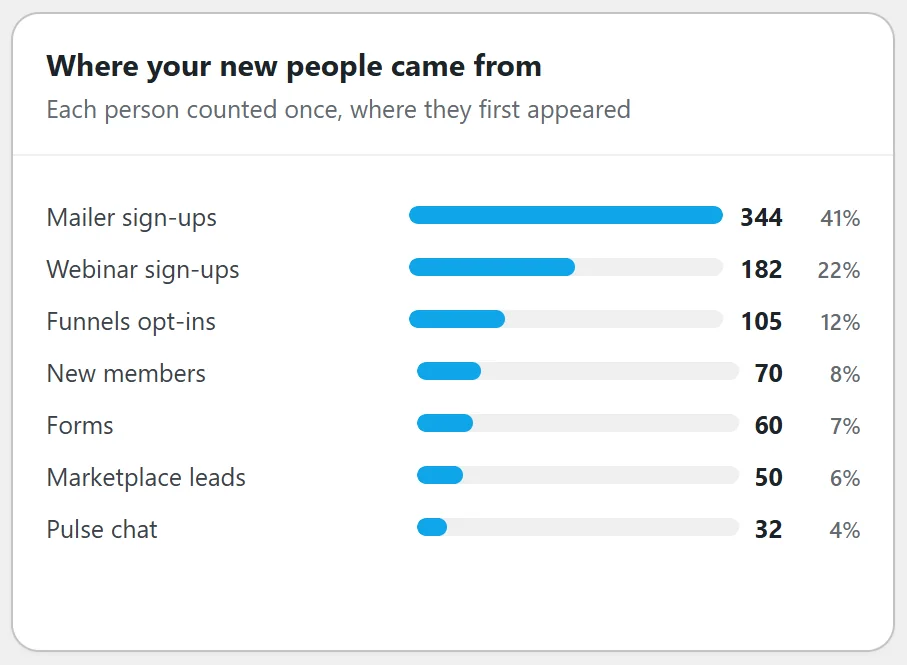
- Every lead source you run is read: Mailer sign-ups, Funnels opt-ins, Forms, Surveys, Engage popups, Webinar sign-ups, Pulse chat, the marketplace leads WP Conversion Tracker records, and new members in ResultsAiX Membership
- People are matched by email address, ignoring capital letters, so the same person arriving through three plugins is one person
- Each person is counted once, on the day and in the plugin where they first appeared. That is also the source they are credited to in the Where your new people came from chart. Someone who comes back later through another form is not new again
- Someone who was already a Mailer subscriber before the range started is not new, whatever they filled in since
- Contacts you imported into Mailer are not new people. An import moves people you already had. The same goes for members imported into ResultsAiX Membership from another membership plugin or a CSV file
- Pulse keeps copies of leads that other plugins captured. Those copies are ignored; only email addresses given in a Pulse chat count
- A lead that arrives with no email address at all has nothing to match on, so it is counted on its own
A real example:
Maya Clarke reads a blog post on yoursite.com, downloads the free checklist through the Checklist Funnel on Monday, registers for the Wednesday webinar, and on Friday joins the Academy through Membership. Without the rules she would be four new people. On the Overview she is one new person, counted on Monday under Funnels opt-ins. If she then buys the Blueprint through a WP Conversion Tracker link, that is one sale in Revenue, even though Launch Manager and the Mailer also keep a note of it.
How far back:
The Overview holds at least two years of days, so This Year always has a period before it to compare with. Lifetime reaches back to the oldest record your ResultsAiX plugins hold, up to ten years.
Visits and clicks:
- Visits come from ResultsAiX Pulse. Each visitor counts once per day, however many pages they view, and Pulse's own records of leads and buyers are not counted as visits
- Pulse only keeps visits for as long as its own retention setting allows, so older days can be empty. That is one reason the Visits tile may say No earlier numbers to compare
- When Pulse is not running, the tile shows Clicks from WP Conversion Tracker instead: every tracked click, the same rule WP Conversion Tracker uses on its own dashboard
Emails:
- Emails sent counts every email ResultsAiX Mailer actually sent, on the day it went out
- The open rate is the share of those emails that were opened, counting each email once however many times it was opened. The click rate works the same way, and unsubscribe, view in browser and confirm links are not clicks
- For the named ranges, the Mailer figures use the Mailer dashboard's own windows, so the two screens show the same numbers
Support tickets:
- Open tickets is the number of tickets open or pending right now in ResultsAiX Support Desk
- New tickets are counted day by day. Spam is left out, and so are tickets imported from another help desk, so moving your history across never looks like a flood of new work
- First reply time is the median over the last 30 days: the time from a ticket arriving to the first reply sent to the customer. Private notes do not count as a reply
- On the tickets tile the comparison is on new tickets, and fewer is shown as the good direction
WP Sync and Membership:
- WP Sync counts a contact as delivered when it reached its destination, including partly delivered, and failed when it did not. A delay that is only scheduled is not a delivery; those contacts are shown as waiting on a delay instead
- Active members follows the same rule as ResultsAiX Membership's own access check: a member who is active and not past their expiry date. Each member counts once, however many levels they hold
- Joined counts members who joined in the range. Imported members are left out, and so are members still pending or since removed
- Left counts memberships that were cancelled or expired in the range
Days and time zones:
Each plugin stores its dates its own way: some in your site's time, some in UTC, and WP Conversion Tracker by your database server's clock. The Overview converts every one of them and puts each event on the right day in the time zone set in your WordPress settings, under Settings, General. A sale at eleven at night lands on the day you would expect.
Comparisons:
Every change compares the range you picked with the same number of days just before it. If the earlier period has data on fewer than half as many days as the current one, a percentage would mislead you, so the tile says No earlier numbers to compare. When both numbers are under 20, the tile shows the earlier number instead of a percentage.
Read only, always:
To count all this the Hub reads each plugin's own records directly, and it only ever reads. It checks that a plugin is switched on and that the records it needs are there before looking, and it never writes to, changes or deletes anything in another plugin while counting. The article The Weekly Stats Channel And How The Overview Reads Your Plugins explains why the Overview works this way.
The Lifetime range:
Lifetime covers every day the Hub holds, back to the oldest record any ResultsAiX plugin has. It has no period before it, so its tiles say All time, and the line under the greeting says how many days the Hub holds and when your oldest numbers start.
Tips:
- Set your time zone in Settings, General before you compare days. Every Overview day follows it.
- A plugin's own dashboard counts only its own records, so small differences from the Overview are expected. The Mailer section is counted exactly the way the Mailer counts.