There are two kinds of updates: the Hub's own, and the updates for your other ResultsAiX plugins. Both use WordPress's own updater, so every safety net you rely on still applies, and the Hub makes sure every plugin that was on is still on afterwards.
Updating the Hub itself:
The Hub updates through the normal WordPress plugin updater. When a new version is out, it is offered on your Plugins screen and on Dashboard, Updates, like any other plugin, and you update it there. It does not appear in My Plugins, which lists your other ResultsAiX plugins. No licence key is needed.
When does the Hub check for its own updates?
To keep ordinary admin pages fast, the Hub only asks its update server when somebody is looking for updates: the Plugins screen, Dashboard, Updates, any Hub screen, and WordPress's own regular update check. On those screens its answer is never more than a minute old. Everywhere else it reuses the last answer. Check for updates on My Plugins, or Check again on Dashboard, Updates, asks straight away.
After the Hub updates:
The Hub stays switched on. It throws away its saved copy of the catalogue so any new products show at once, and it checks its database tables once more.
Updating your ResultsAiX plugins:

- Watch the Overview: the Updates panel in the health row and Needs you today both tell you when updates are ready, with a button straight to the filtered list.
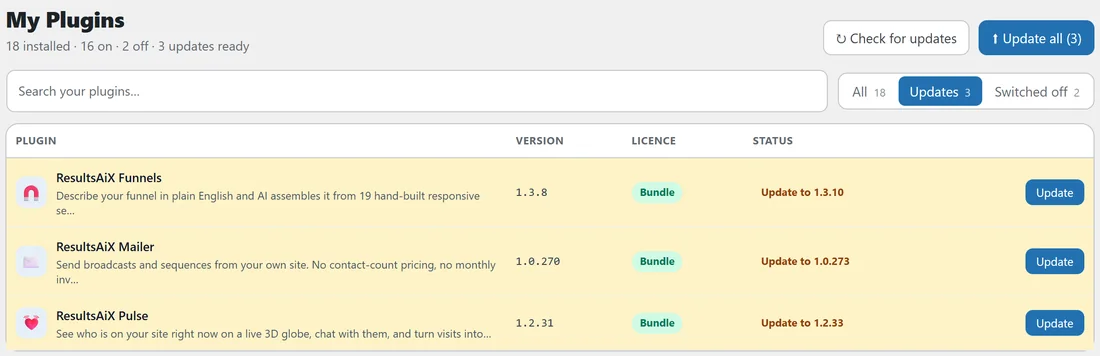
- Open My Plugins. Each plugin with an update shows Update to and the new version, with an Update button.
- Press Check for updates first if you know a fix was released recently. It asks every plugin's update server again right now.
- Press Update on one plugin, or Update all for every plugin that has an update, then click again within five seconds to confirm.
- Read the message at the top: Updated successfully for one plugin, or for example 3 of 3 plugins updated.
Update all updates every plugin that has an update, switched on or off, one at a time.
Every plugin stays switched on:
The Hub hands each update to WordPress's own plugin updater, the same one Dashboard, Updates uses. If anything leaves a plugin that was on switched off after its update, the Hub switches it straight back on and the message says It was switched back on. A plugin you switched off on purpose is updated and stays off.
A real example:
On Monday the Overview on yoursite.com says 3 updates ready: ResultsAiX Funnels 1.3.10, ResultsAiX Mailer 1.0.273 and ResultsAiX Pulse 1.2.33. Jamie presses Update in the health row, which opens My Plugins showing just those three, then Update all and Click again to confirm. The message says 3 of 3 plugins updated, all three still show On, and Recent activity on the Licenses tab lists each update as Done.
Permissions:
The Update and Update all buttons need permission to update plugins, the same permission WordPress itself asks for. Without it, they are not shown.
If an update does not finish:
The message at the top of My Plugins says why, for example that the plugins folder could not be written to, which your host can fix. Every attempt is listed in Recent activity on the Licenses tab. If it happens again, see Troubleshooting The Hub.
Why does a new release not show straight away?
WordPress and each plugin keep their last answer about updates for a while, so a fix published minutes ago may not appear on its own. Press Check for updates on My Plugins and it is asked for again.
Tips:
- Make updating a weekly habit: the Overview tells you the moment something is waiting.
- Updating a plugin that is switched off keeps it off, so you can update everything without changing what runs.
- The Hub itself is on your WordPress Plugins screen, not on My Plugins.