Drafts are the safety net. Where auto-resolve does not act, a draft is still written, so you never start from an empty reply box. You read it, change what you like, and press Send.
Where to find it:
Settings, AI, What the AI does by itself, Draft a reply for every ticket. On a ticket, drafts appear in the thread as a private AI Draft note, and the reply box has Generate AI Draft and Draft With Hard Model.
When a draft is written:
- By itself on a new ticket, when Draft a reply for every ticket is on and auto-resolve did not already answer it.
- When you press Generate AI Draft or Draft With Hard Model on a ticket.
What the AI reads first:
- Your brand name and signature, with standing instructions never to invent features or licence keys, and to hand over what it does not know.
- Up to four matching knowledge base articles.
- Up to three earlier tickets from the same customer, by number, subject and status.
- The whole thread so far.
- What the desk knows about the customer from Customer 360, such as what they bought and their keys.
Using a draft:
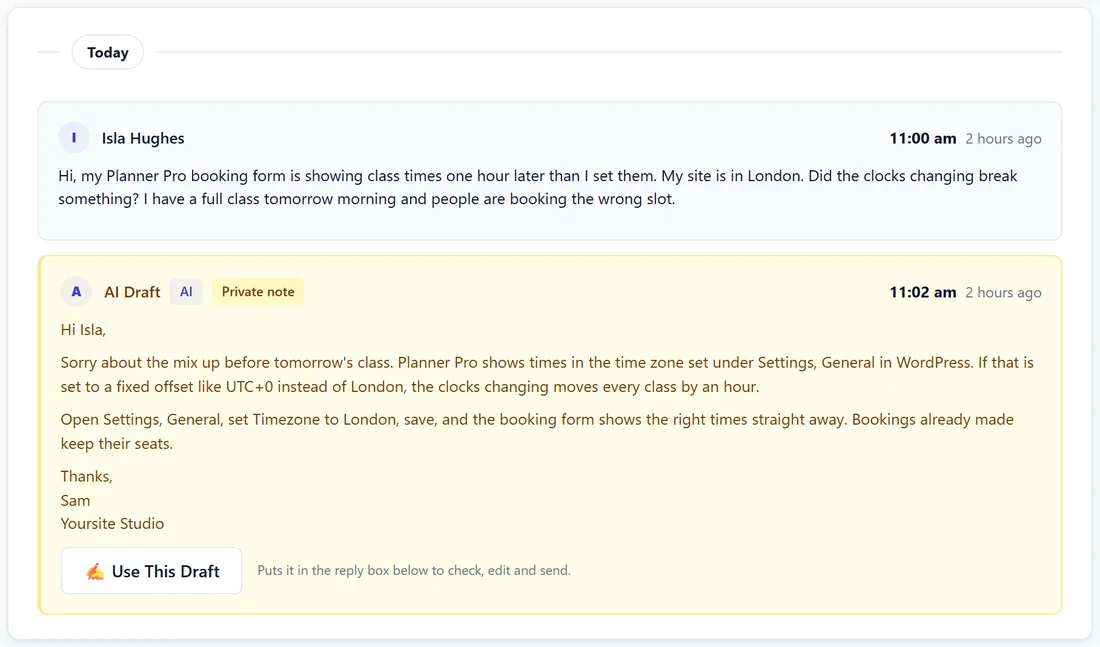
- Open the ticket. A draft written by itself shows in the thread as a private note from AI Draft.
- Press Use This Draft. It goes into the reply box, links and all, and The AI wrote this reply ticks itself.
- Change anything you like. If you rewrote most of it, untick The AI wrote this reply.
- Press Send Reply.
A draft from Generate AI Draft goes straight into the reply box and is not saved until you send it.
The Dashboard's Replies drafted number counts open tickets with a draft waiting, so you can work through them in one go.
How replies read:
Replies are written the way a person types an email. They name products, dates, licence keys and order status, but never state an amount, a total or what the customer has spent. Payment questions are handed to a person instead of the AI guessing a number. The reply the customer gets wears your email design, with your logo, colour and one clear button, ends with your standard message if you set one, and the line you set under Line under AI-written replies on Settings, General.
The hard model:
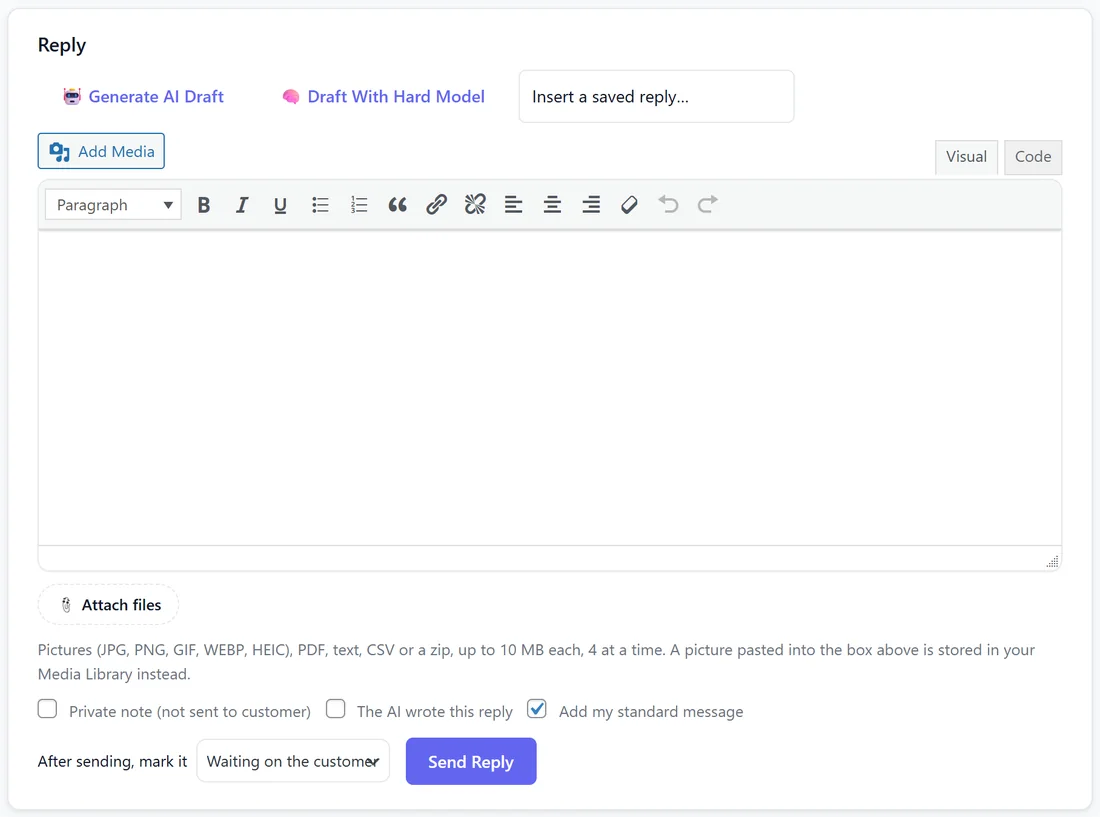
Draft With Hard Model uses your Hard tickets model from Settings, AI. Drafts written by themselves use it too when a ticket is urgent, angry, about payment, long, or when sorting was unsure.
Good drafts start with good knowledge:
A draft is only as good as what the AI can read. If drafts on one topic keep needing the same fix, write that fix once as a help article or a pasted text source, and the next draft uses it.
When to use the hard model:
- A long, tangled thread.
- A customer who is upset.
- A technical problem the everyday model answered too simply.
Draft With Hard Model costs more per draft, so keep it for the few tickets that need it.
What a draft never does:
It is never emailed by itself unless auto-resolve sent it under your rules. It never states an amount. It never invents a feature or a key; where it lacks a fact it says the team will follow up, which keeps it waiting for you.
A real example:
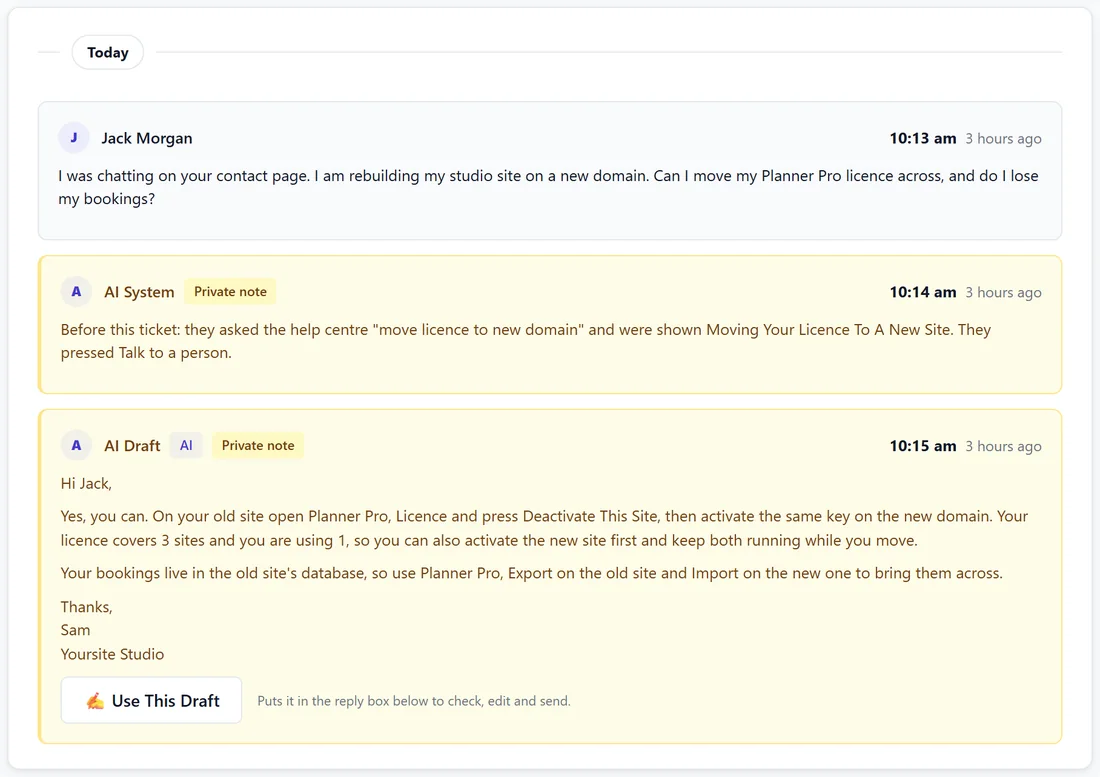
Jack chats on the contact page about moving his licence to a new domain and presses Talk to a person. Ticket 1002 arrives with a note of what he read and an AI Draft that explains deactivating the old site and how to move bookings across. Sam presses Use This Draft and Send Reply in under a minute.
Tips:
- Read a week of drafts before you switch on Send drafts without me when confidence is high.
- If drafts keep missing the same fact, write it into your knowledge base once.
- See How Auto-Resolve Decides To Answer for which answers can go out by themselves.