Analytics tells you how your desk is doing and what your customers keep asking about. Every number comes straight from your own tickets and your own AI log.
Where to find it:
Open Analytics on the desk's menu bar.
Picking dates:
The heading says which dates you are looking at, for example How your desk is doing, last 30 days. Use the date picker: Today, Yesterday, 7 days, 30 days, 90 days, This year, Lifetime, or Custom with your own two dates and Show. Analytics remembers the dates you last picked. A line says how fresh the figures are; press Refresh to work them out again straight away.
The six numbers:
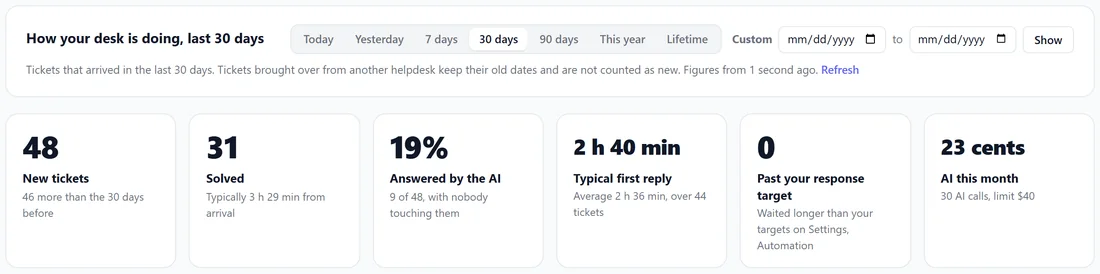
- New tickets, with how many more or fewer than the same length of time just before.
- Solved, with the typical time from a ticket arriving to it being solved.
- Answered by the AI: the share of new tickets the AI answered with nobody touching them.
- Typical first reply: the middle value, not the average, so one slow ticket does not make a fast desk look slow.
- Past your response target: tickets that waited longer than your targets on Settings, Automation.
- AI this month: what the AI has cost since the first of the month, with how many AI calls and your monthly limit.
Right now, every ticket on the desk:

Whatever the dates, this row shows the desk as it stands today: Total tickets, Needs you, Waiting on the customer, Solved or closed, Brought over from another helpdesk, and Spam. Open the inbox goes to the list.
Where the load is:
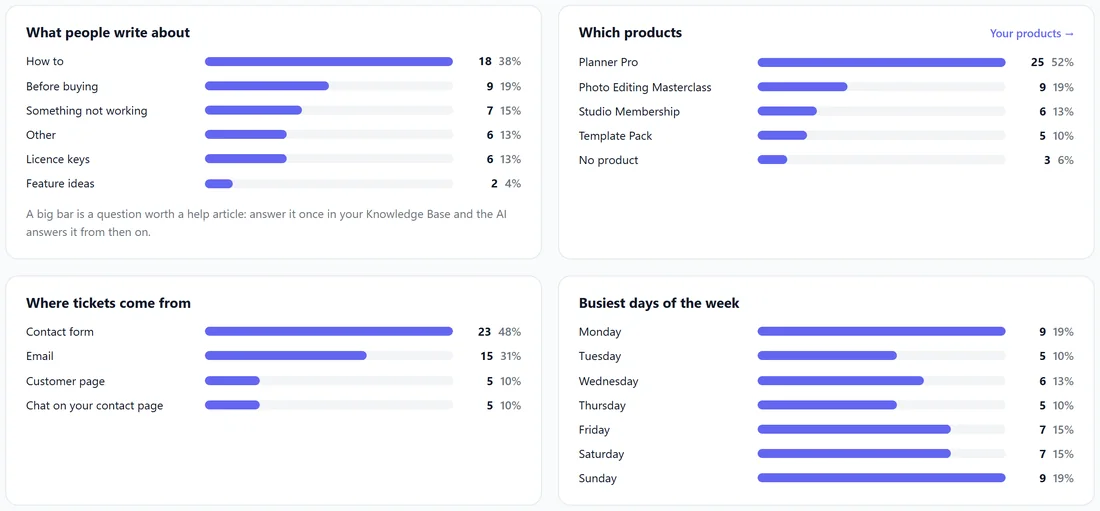
- What people write about: counted from the triage category. A big bar is a question worth one help article; answer it once in your Knowledge Base and the AI answers it from then on.
- Which products: counted from the product on each ticket. It is only as good as your list on Settings, Products; Your products opens it.
- Where tickets come from: Contact form, Email, Customer page, Chat on your contact page, Homepage chat, Added by you or From another app.
- Busiest days of the week.
Each bar shows the count and the share.
How things are counted:
Tickets brought over from another helpdesk keep their old dates and are not counted as new. Spam is left out. AI costs are worked out per model at each service's own rates from the tokens actually used, as on Settings, AI. For the time the AI saved you and who wrote your replies, see What your AI did on the Dashboard.
Step by step, a weekly look:
- Open Analytics and pick 7 days.
- Compare New tickets and Solved with the week before.
- Read What people write about and pick the biggest bar.
- Write one help article that answers it.
- Next week, see whether that bar shrank and Answered by the AI grew.
A real example:
Over 30 days Yoursite Studio had 48 new tickets and 31 solved, a typical first reply of 2 hours 40 minutes, and 19 percent answered by the AI with nobody touching them. What people write about shows How to first and Before buying second, and Which products shows Planner Pro with over half the tickets. Sam writes two more Planner Pro help articles.
Tips:
- Check Analytics weekly, not daily. The trend matters more than one day.
- If Past your response target is above zero, open the inbox and sort by Who has waited longest on the Dashboard.