If you sell on WarriorPlus, JVZoo or ClickBank, each marketplace can tell your desk about every sale the moment it happens. The desk records the buyer, the product and any licence key, so the AI can answer "where is my key?" with the real key and you see every purchase on the ticket.
Where to find it:
Open Settings, Integrations. The marketplaces are rows called WarriorPlus sales, JVZoo sales and ClickBank sales, under Add something else until you set one up, then under Working now. Press Set Up or Manage to open a row.
WarriorPlus:
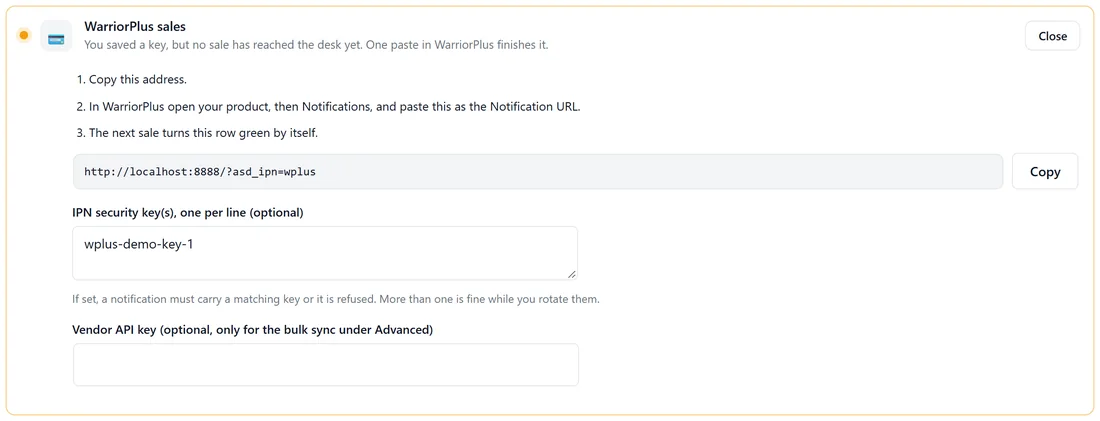
- Press Copy beside the address in the row.
- In WarriorPlus open your product, then Notifications, and paste it as the Notification URL.
- The next sale turns the row green by itself.
IPN security key(s), one per line (optional): paste one or more security keys and anything without a matching key is refused. More than one is fine while you change keys. Vendor API key (optional, only for the bulk sync under Advanced): with it saved, Bring in recent WarriorPlus sales and Bring Them In Now pull your latest sales in one go.
JVZoo:
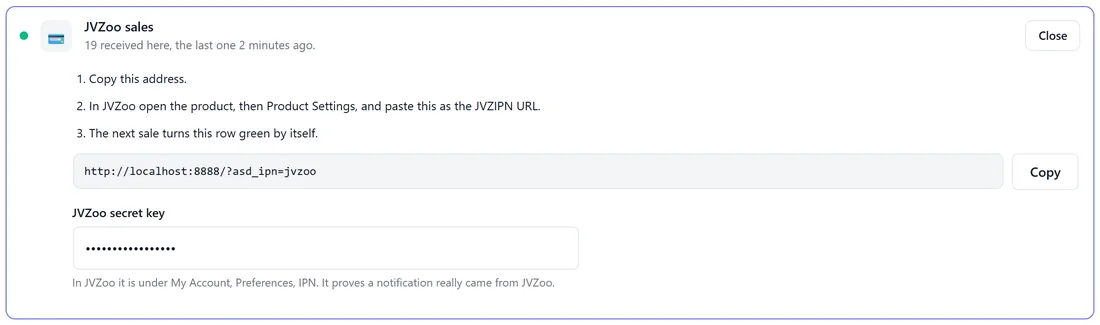
- Press Copy beside the address.
- In JVZoo open the product, then Product Settings, and paste it as the JVZIPN URL.
- Paste your JVZoo secret key, found in JVZoo under My Account, Preferences, IPN. It proves a notification really came from JVZoo. If WP Conversion Tracker on this site already holds it, the row says so and you can leave the box empty.
Sales and rebills are recorded, and amounts are converted for you.
ClickBank:
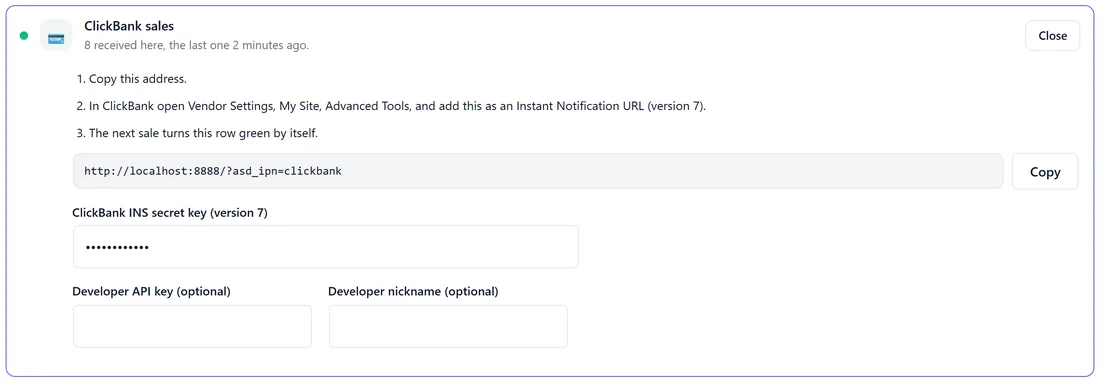
- Press Copy beside the address.
- In ClickBank open Vendor Settings, My Site, Advanced Tools, and add it as an Instant Notification URL (version 7).
- Paste your ClickBank INS secret key (version 7) so each notification is checked.
Developer API key and Developer nickname are optional. Test sales are accepted, so you can check the wiring safely.
The row's status:
Each row says how many notifications have been received and when the last one came, for example "19 received here, the last one 2 minutes ago". A row with a key saved but no sale yet sits under Needs one thing from you until the first sale arrives.
What gets stored:
The source, transaction id, buyer email and name, product name and id, amount, currency, status, the licence key where the marketplace sends one, and the raw notification. A notification sent twice updates the same row instead of adding a second one.
How the checks keep fakes out:
- WarriorPlus: with security keys saved, a notification without a matching key is refused.
- JVZoo: every notification is checked against your secret key before it is accepted.
- ClickBank: with your INS secret saved, each notification's signature is checked.
A refused notification is never recorded. Clear the key box while you test the wiring if you need to, and put it back after.
Where sales show:
- Customer 360 on every ticket, under Purchases, with the marketplace named.
- The customer's My Tickets page, under What you own, and their keys under Your license keys.
- The Spent column in your Inbox, counted once per sale.
- Auto-resolve's licence answers.
A real example:
Yoursite Studio sells Planner Pro on JVZoo and the Masterclass on ClickBank. Sam pastes both addresses and both secret keys. When Lucas later asks for his Planner Pro key, the AI finds his JVZoo sale and key and answers in two minutes.
Tips:
- Put the addresses in place before the tickets arrive. Lookups read the sales already recorded on your site.
- Already receiving these sales through WP Conversion Tracker or Launch Manager? The desk reads those too, so you may not need a second address.
- Check Connected Feeds on the Diagnostics screen to see when each feed last delivered.