You sell products on their own and you also sell them together. Each product has its own level, its own protected pages and its own downloads. A bundle lets one level open all of them at once, without giving the customer a pile of extra memberships.
Open the bundle level, tick the levels it contains, and save. Anybody holding the bundle can now open everything those levels open: their pages, posts, categories, downloads, protected folders and menu items.
Where to find it:
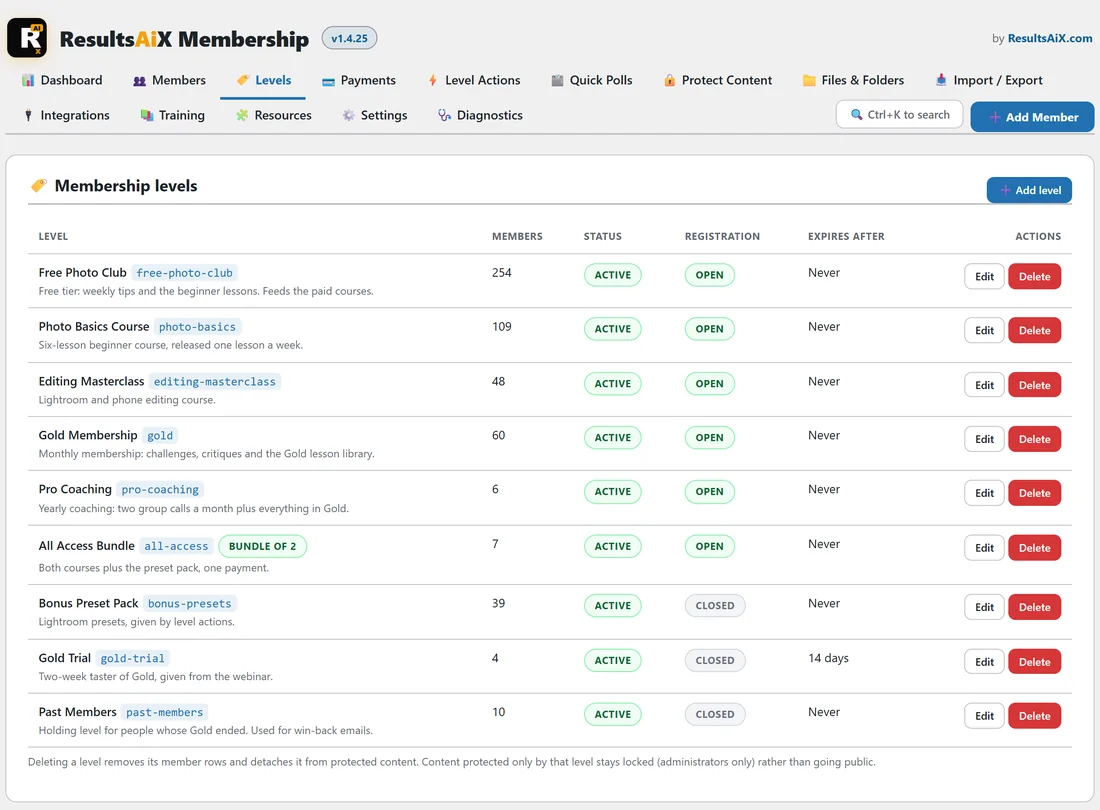
Open AiX Membership, then the Levels tab, and press Edit on the bundle level. Scroll to This level also opens. On the Levels list, a bundle shows a Bundle of badge with the number of levels it includes; hover over it to see their names.
Making a bundle:
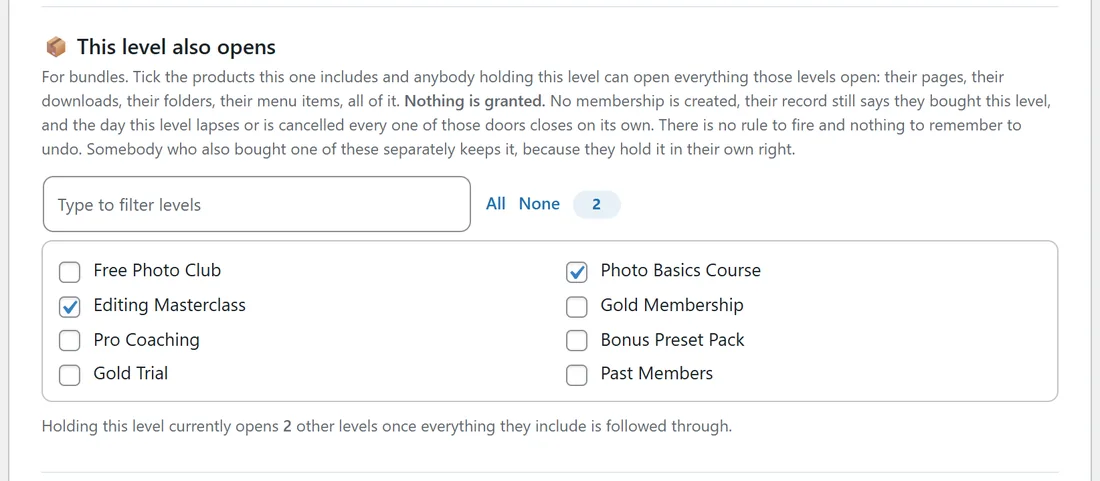
- Create the bundle level first, for example All Access Bundle, and press Save level. The This level also opens section asks you to save the level first, then come back.
- Press Edit on the new level and scroll to This level also opens.
- Tick each level the bundle contains. Type to filter levels narrows a long list, and the number beside All and None counts your ticks.
- Press Save level.
The line under the list tells you how many other levels the bundle opens once everything it includes is followed through. Each included level's edit screen also says which bundles include it.
Why nothing is granted:
No membership is created. The member's record still says they bought the bundle, which is the truth, and access is worked out live from what they hold right now.
- When the bundle lapses, is cancelled, expires or is removed, every door it opened closes that moment. There is no rule to fire and nothing to undo.
- Add a new product to the bundle later, tick it once, and every existing bundle customer can open it straight away.
- Member counts stay honest: a bundle buyer is not counted as a member of each product inside it.
The case that matters:
Somebody buys Photo Basics Course on its own in March, buys All Access Bundle in June, then the bundle ends in December. They keep Photo Basics Course, because they hold that membership in their own right. Only what the bundle was lending them goes away.
Details worth knowing:
- A bundle can include another bundle, and it is followed all the way down. A level cannot include itself, and a level that already leads back to it cannot be ticked: that choice is dropped when you save.
- Drip content inside a bundle counts from the day the member got the bundle, because that is the clock that actually started.
- The member's profile page lists the bundle as their membership, and the pages it opens appear under it.
- The bundle can have its own price, its own buy link and its own redirects, like any level.
When something asks which levels a member holds:
Other systems, a licence server for example, may ask this plugin which levels a person holds. On the Settings tab, Tell the API that a bundle holder holds the levels inside it decides the answer. Off, the default, and only the bundle is reported, while the bundle still opens everything on this site. On, and a bundle holder is reported as holding everything inside it, which stops when the bundle does.
Bundles or level actions?
Both are useful, and you can use them together.
- Use This level also opens when the parts should belong to the bundle and end with it.
- Use a level action when a part should stay after the bundle ends, or when joining that part should start its own welcome emails and mailing list.
A worked example:
Yoursite Academy sells Photo Basics Course and Editing Masterclass separately, and together as All Access Bundle.
- On the All Access Bundle edit screen, under This level also opens, tick Photo Basics Course and Editing Masterclass.
- Press Save level. The line reads that holding this level opens 2 other levels.
- The Levels list now shows a Bundle of 2 badge beside All Access Bundle.
- A level action adds the Bonus Preset Pack to bundle buyers as well, because the presets are theirs to keep.
- Use View as on the Members tab with a bundle buyer and open a Photo Basics lesson to see it open.
Tips:
- Give the bundle its own protected welcome page that links to each course.
- Check the bundle after adding a new product: one tick on its edit screen is all it takes.
- Keep products as separate levels even if you only sell the bundle today. It keeps every option open.
Related: Level Actions And Bundles, Levels: Your Access Groups, and Paid Levels: Putting A Price On Access.