Shortcodes put membership features on any page: a login form, a join form, a members only block, a download button, a greeting with the member's name. Type them into a Shortcode block, a paragraph, or any page builder text area.
This page lists every shortcode the plugin provides, with each option and a short example from Yoursite Academy.
Where to find them in the plugin:
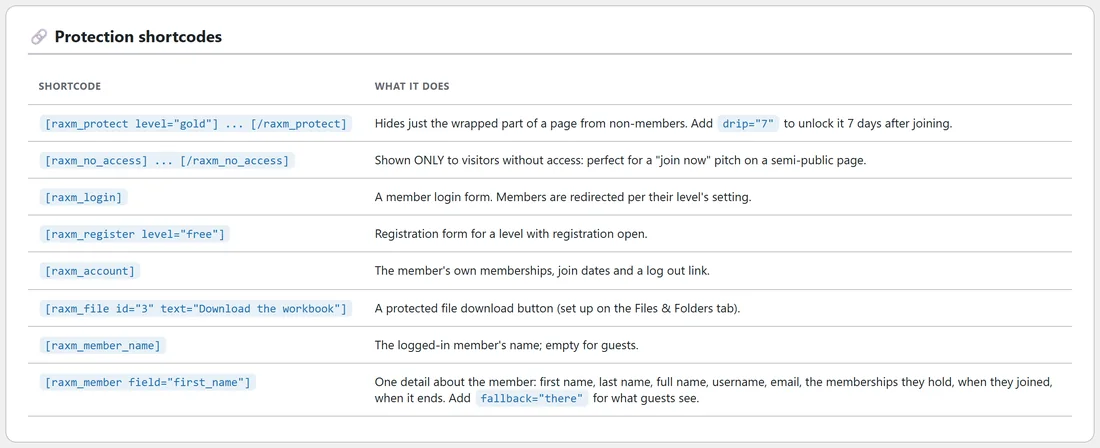
The Protect Content tab ends with a Protection shortcodes table. The Levels tab lists a ready made [raxm_register] shortcode for each level with registration open. Each file on the Files & Folders tab shows its own [raxm_file] shortcode, and each level's edit screen shows its [raxm_buy] shortcode.
Giving levels:
Wherever a shortcode takes a level, you can give the level's slug, its numeric id, or its name. Separate several with commas. Slugs are the safest choice, because they do not change when you rename a level.
Members only block, [raxm_protect]:
A members only block inside a page. Wrap the content: [raxm_protect level="gold"] your content [/raxm_protect].
- level: the levels allowed, comma separated. Leave it out and any logged in member can see the content.
- drip: days after joining before it opens, for example drip="7".
- message: your own locked text for this one block.
- hide: hide="1" shows nothing at all to people without access, hide="0" always shows the box. Without it, the block follows A locked block inside a page on the Settings tab.
Shown to people without access, [raxm_no_access]:
The exact opposite: shown only to people without access. Wrap your offer in it. It takes the same level option, for example [raxm_no_access level="gold"] Join Gold to see this lesson [/raxm_no_access].
Login form, [raxm_login]:
The login form with a Forgot your password? link. Members are sent on by their level's after login setting, or the global one. Add redirect="..." to send them somewhere specific. A member who is already logged in sees "You are logged in as" their name, with a Log out link.
Sign up form, [raxm_register]:
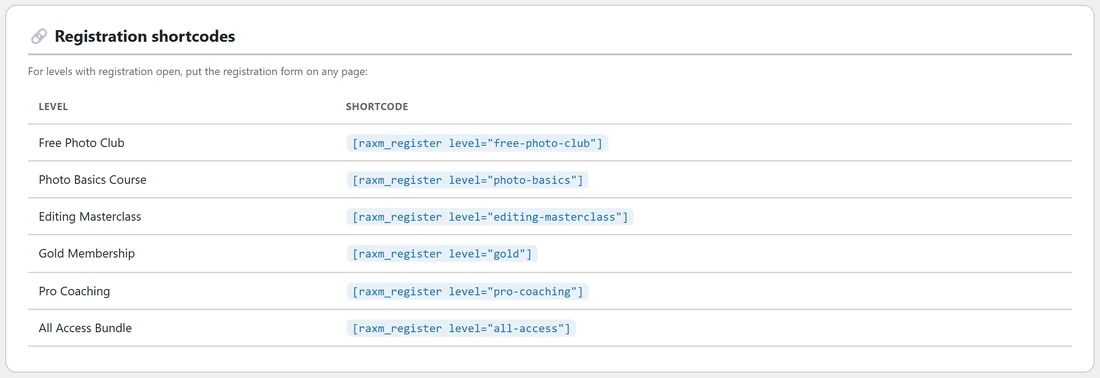
The sign up form for a level with registration open, for example [raxm_register level="free-photo-club"].
- level: the level to join.
- redirect: where they go after joining.
- button: the button text, Create my account by default.
On a paid level the button names the price, such as Join for followed by the price, and the member pays on Stripe's checkout before access starts. A logged in visitor gets a one click join button instead of the form.
Account table, [raxm_account]:
A table of the member's memberships with status, joined and expiry dates, plus a Log out link. A member with a live subscription also sees Manage billing, update your card or cancel, which opens their own Stripe billing page. Guests see the login form.
Download button, [raxm_file]:
A protected download button for a file in your library: [raxm_file id="3" text="Download the workbook"]. id is the file's number on the Files & Folders tab, and text is the button label, Download by default.
Member name, [raxm_member_name]:
The logged in member's display name, and nothing for guests. Good for a greeting: Welcome back, [raxm_member_name].
Any member detail, [raxm_member]:
One detail about the member reading the page: [raxm_member field="first_name" fallback="there"].
- field: first_name, last_name, full_name, display_name, username, email, levels (the memberships they hold), level_count, joined or expires. Any other name is read from their user record, so a detail carried over from another membership plugin still prints. Affiliate fields such as affiliate or affiliate_warriorplus_name print who referred them.
- fallback: shown to guests and whenever the field is empty, so "Hi [raxm_member field="first_name" fallback="there"]" always reads well.
- format: for joined and expires, any WordPress date format such as j F Y. Without it, your site's own date format is used.
- level: for joined and expires, read one membership instead of all of them.
Member profile page, [raxm_profile]:
The member's own page. It shows, in order: where they left off, four number tiles, everything they can open grouped by membership, anything ending soon, their memberships, your offers, their downloads and their recent activity. Money is never shown, and guests get the login form.
- show: the sections and their order, from recent, stats, unlocked, ending, levels, offers, files, activity.
- greeting: the words before the first name, Welcome back, by default.
- recent, unlocked_limit, groups, levels_limit, files_limit, activity_limit, offers_limit: how many of each to list.
- ending_days: how far ahead counts as ending soon, 30 by default.
- search: yes or no for the search boxes.
- columns: 2, 3 or 4 offer columns.
- login: form (the default) or message for what guests see.
- recent_title, unlocked_title, ending_title, levels_title, offers_title, files_title, activity_title: your own section headings.
See The Member Profile Page And The Side Panel for the full story.
Quick Poll, [raxm_poll]:
A Quick Poll for logged in members. On its own it shows the next live poll each member has not answered, and nothing at all when there is none. id="..." shows one poll only, and max="2" shows up to two together (three at most). See Quick Polls: One-Click Questions On The Members Dashboard.
Buy or join button, [raxm_buy]:
A buy or join button for a level, for example [raxm_buy level="gold"]. Add text="Start my Gold membership" for your own words, or color="#16a34a" for another colour. The button opens the checkout page for a paid level or the sign up page for a free one. Until the level can be sold, visitors see nothing and only administrators see a note saying why.
Affiliate link, [raxm_affiliate_link]:
A link that credits the affiliate who referred the member, for upgrade offers on marketplaces: [raxm_affiliate_link url="https://warriorplus.com/o2/a/YOUR-OFFER/{id}" fallback="0"]Upgrade now[/raxm_affiliate_link]. {id} becomes the member's affiliate id and {name} their name. marketplace picks warriorplus, clickbank, jvzoo or gumroad, fallback is used for guests and members nobody referred, and text, class and target="_blank" shape the link.
Shortcodes from your old plugin:
After a move, older shortcodes keep working.
- WishList Member: with compatibility mode on, the old member tags (first name, last name, username, email, member level, login form), the is member and non member tags, and the smart shortcode tags that show or hide content by level are answered by this plugin. See Compatibility Mode, API Keys And Retiring The Old Tables.
- Paid Memberships Pro: after an import, their membership shortcode and their account, login, member profile and member field shortcodes are answered here; their checkout and billing shortcodes print nothing. See Migrating From Paid Memberships Pro.
Patterns worth copying:
- One page for two audiences: put [raxm_no_access level="gold"] with your offer, then [raxm_protect level="gold"] with the lesson. Strangers see the offer, Gold members see the lesson.
- A personal members home: Welcome back, [raxm_member field="first_name" fallback="there"], then [raxm_poll], then [raxm_account].
- A course that fills in over time: one page with weekly sections, each wrapped in [raxm_protect level="photo-basics" drip="7"], drip="14" and so on.
A worked example:
Yoursite Academy's Members Home page holds three lines:
- Welcome back, [raxm_member_name].
- [raxm_poll]
- [raxm_account]
Its Join The Free Photo Club page holds [raxm_register level="free-photo-club"] followed by "Already a member? [raxm_login]", and its My Membership page holds [raxm_profile].
Related: Protecting Pages, Posts And Categories, Login, Registration And Account Pages, Drip Content: Releasing A Course Over Time, and Protected Files And Whole Folders.