A shortcode only works on a page inside WordPress. A buy link works anywhere. Every level in ResultsAiX Membership has its own address that opens a small, clean sign up page for that level, drawn by the plugin itself, so it looks the same on every theme and works even when the page linking to it is a plain HTML page, another website, an email or a social post.
For a paid level the page is a checkout: the buyer creates their login, pays on Stripe, and gets access as soon as the payment goes through. For a free level it is a join page, and people get access straight away.
Where to find it:
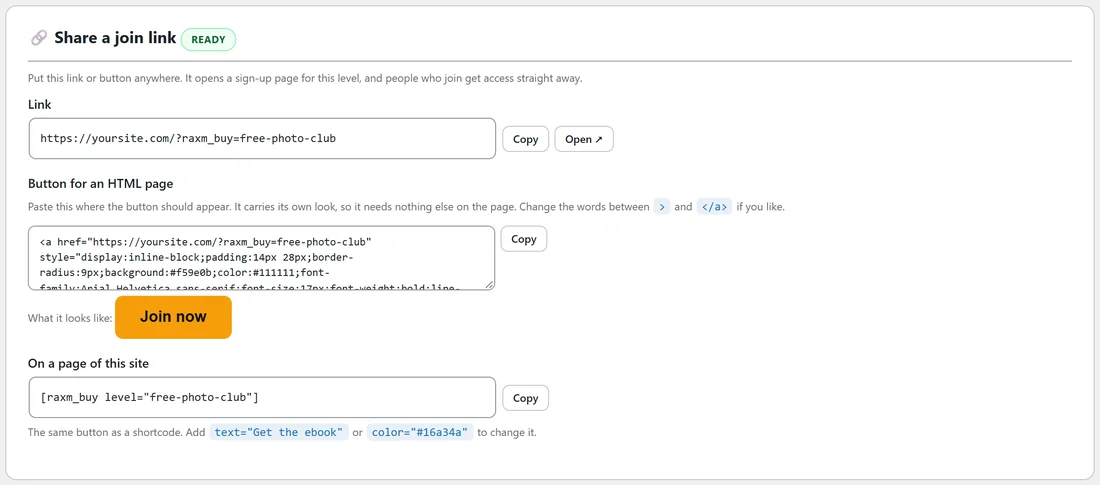
Open AiX Membership, Levels, and click Edit on a level. Below the level form there is a card. For a paid level it is called Sell this level anywhere. For a free level it is called Share a join link. The badge beside the title says Ready when the link can take sign ups, or Not open yet when something still needs doing.
What the card gives you:
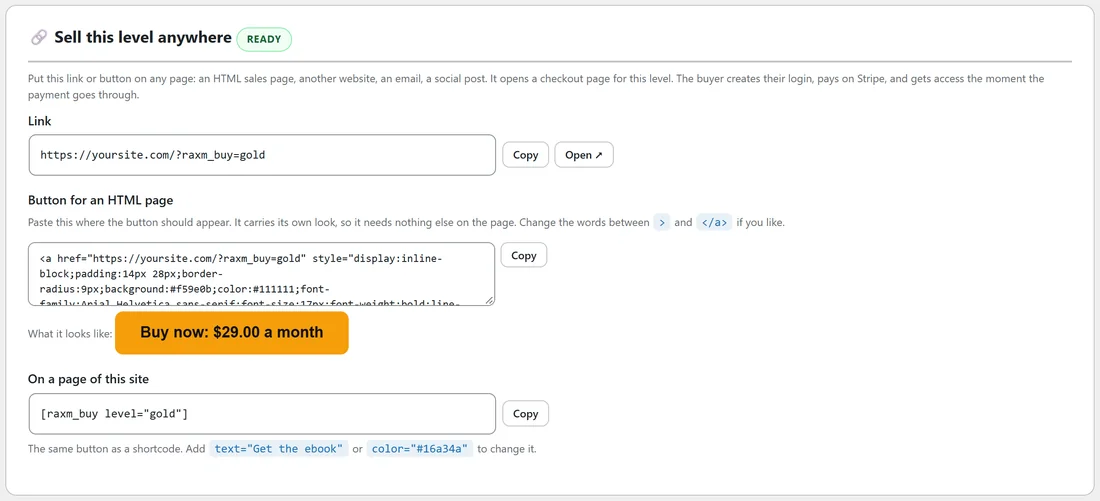
- Link: the plain address, for example https://yoursite.com/?raxm_buy=gold. Use Copy to copy it, or Open to see the page.
- Button for an HTML page: a ready made button as one line of HTML. It carries its own look, so it needs nothing else on the page. Paste it where the button should appear.
- What it looks like: a preview of the button. A paid level's button reads Buy now: and the price, a free level's reads Join now.
- On a page of this site: the same button as a shortcode, [raxm_buy level="gold"], for pages inside WordPress.
Sharing a level, step by step:
- Open Levels, Edit on the level.
- Make sure the badge on the card says Ready. If it says Not open yet, the card tells you why, for example that Allow free registration into this level needs ticking.
- Click Copy beside the Link, or beside the button code.
- Paste it into your sales page, email or post.
- Click Open to check the page as a buyer sees it.
The link is safe to share before the level is ready. Until it is, the link shows a polite page saying the membership is not open right now.
Changing the button:
- In the HTML button, change the words between the closing > of the opening tag and </a> to say anything you like.
- In the shortcode, add text="Get the course" for your own words, or color="#16a34a" for a different colour. The words switch between dark and white by themselves so they stay readable on any colour.
What the buyer sees:
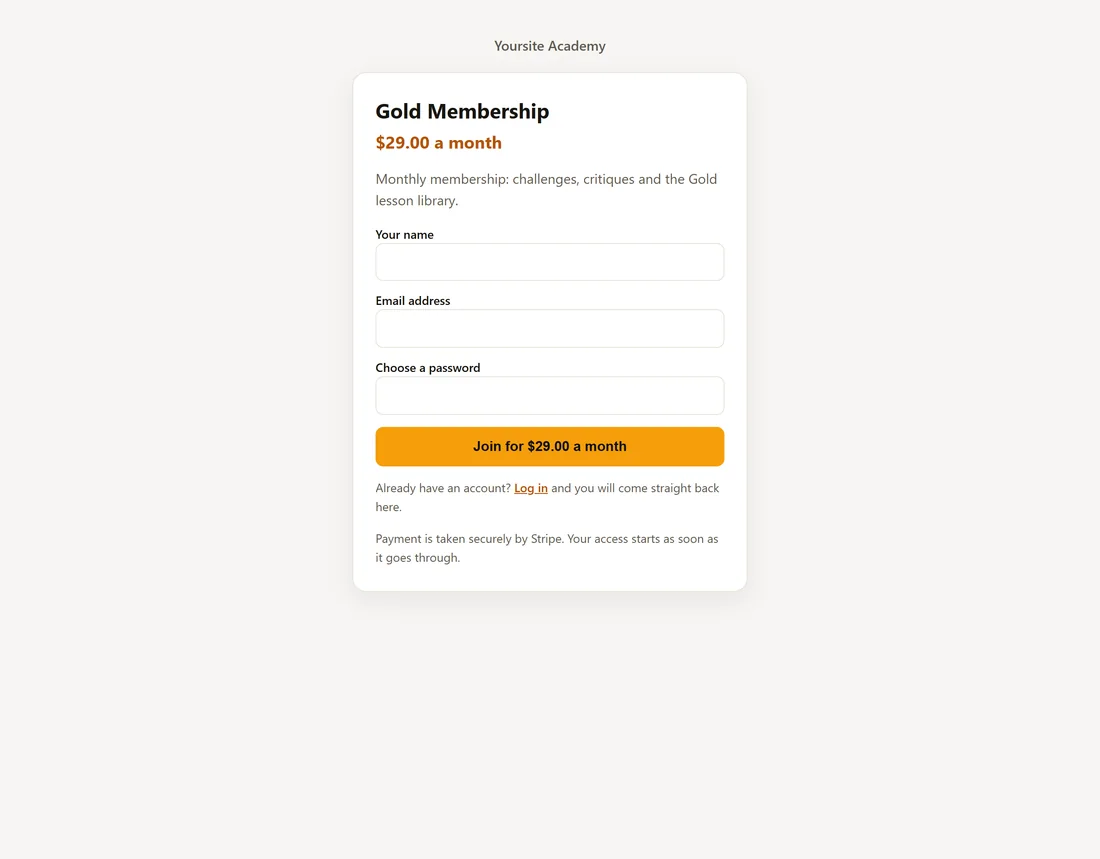
The page shows your site name, the level's name, its price and how often it is charged, and the level's description, then the join form with Your name, Email address and Choose a password. For a paid level the button names the price, and two short lines underneath say Already have an account? Log in, and that payment is taken securely by Stripe.
The description shown here is the level's Description field, so write it for buyers, for example one sentence on what the membership includes.
A visitor who is already logged in sees a single join button, with no form. Somebody who already holds the level sees "You already have this membership" and a Go to the members area button.
When a link is open:
A buy link takes sign ups when all of these are true:
- The level's Status is Active.
- Allow free registration into this level is ticked on the level. For a paid level, this is what opens the checkout.
- For a paid level, Stripe is connected.
The link uses the level's slug, so keep the slug the same once you have shared the link.
An example from Yoursite Academy:
Yoursite Academy's sales page for Gold is a plain HTML page on another part of the site. They copied the Gold Membership button code from the Sell this level anywhere card and pasted it under the price section. Clicking it opens the Gold checkout page, where the button names the monthly price.
For the free club they put the Free Photo Club link, https://yoursite.com/?raxm_buy=free-photo-club, at the end of every weekly tips email and in their social profiles. New readers join with three fields and land straight in the members area.
Tips:
- Put the buy link behind every Upgrade button in your emails, so a reader is one click from checkout.
- Inside WordPress, [raxm_register] on your own page gives you more room for words around the form. Use whichever suits the page. See Login, Registration And Account Pages.
- Test a paid link in test mode first. See Testing A Sale Without Spending Money.
- To sell through a marketplace instead, see Selling On JVZoo, Warrior Plus, ClickBank And PayPal.