Many sellers take payment through a cart or a creator platform rather than a marketplace. ResultsAiX Membership listens to ThriveCart, Lemon Squeezy, Gumroad and Ko-fi the same way it listens to JVZoo or Warrior Plus: the cart tells your site about each sale, and the buyer gets their account and their levels straight away.
Everything after the notification works exactly as for the marketplaces: the product mapping, account creation, the order record, the member's timeline, refunds, the log, Process again, level actions, AI Mailer and WP Sync.
Where to find it:
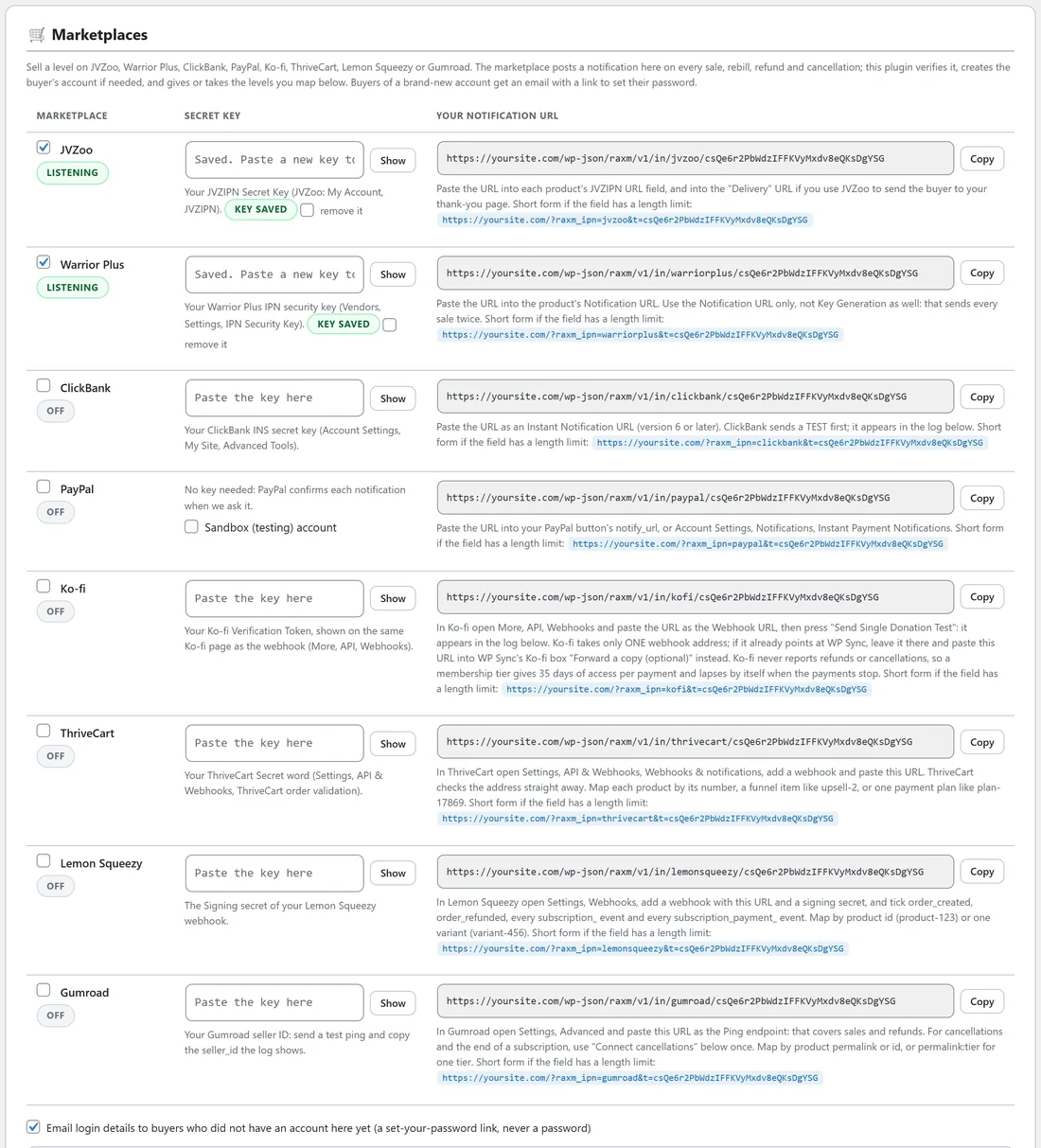
Open AiX Membership, then the Integrations tab. ThriveCart, Lemon Squeezy, Gumroad and Ko-fi each have a row in the Marketplaces box, with a tick box to switch it on, a Secret key box and Your notification URL with a Copy button. Products are mapped under What each product delivers, just below.
The steps for any cart:
- Tick the cart's row and paste its key into Secret key.
- Press Save marketplace settings.
- Copy Your notification URL into the cart, as described below.
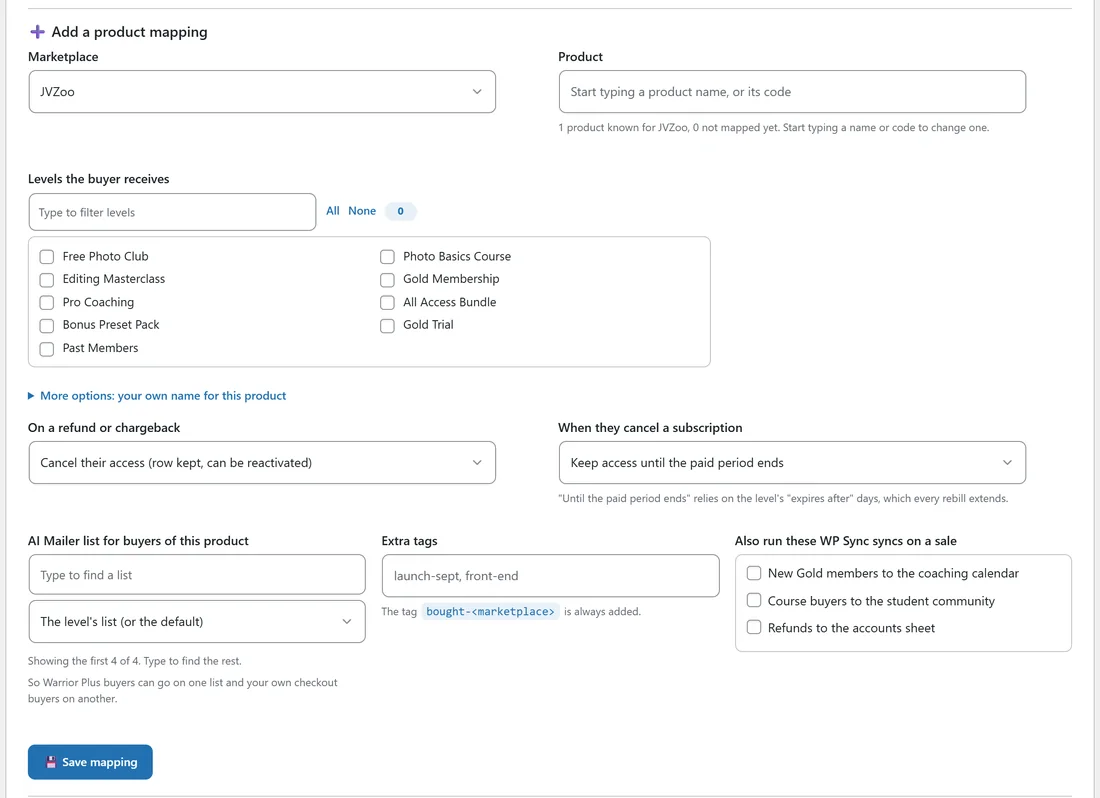
- Map each product to the levels a buyer receives under Add a product mapping.
- Send a test from the cart and check it in Recent marketplace notifications at the bottom of the tab.
ThriveCart:
- Key: your ThriveCart Secret word, from Settings, API and Webhooks, ThriveCart order validation.
- URL: in ThriveCart open Settings, API and Webhooks, Webhooks and notifications, add a webhook and paste the URL. ThriveCart checks the address straight away, and the plugin answers that check.
- Product codes: map by the product number, by a funnel item such as upsell-2, bump-3 or downsell-5, or by one payment plan such as plan-17869. So a Monthly and a Yearly plan can share one level or have a level each.
- A refund or cancellation names the one item it is about, so refunding an order bump never takes away the main product bought in the same order.
Lemon Squeezy:
- Key: the Signing secret you give the webhook in Lemon Squeezy.
- URL: in Lemon Squeezy open Settings, Webhooks, add a webhook with this URL and a signing secret, and tick order_created, order_refunded, every subscription_ event and every subscription_payment_ event.
- Product codes: map by product id written as product-123, or by one variant written as variant-456.
- A cancelled subscription keeps its paid time under the product's cancel rule. When the subscription expires, access ends. A partial refund changes no access.
Gumroad:
- Key: your Gumroad seller ID. Send a test ping from Gumroad and copy the seller_id the log shows into the box.
- URL: in Gumroad open Settings, Advanced and paste the URL as the Ping endpoint. That covers sales and refunds.
- Product codes: map by the product permalink or its id, or by permalink:tier for one tier of a product.
Gumroad cancellations:
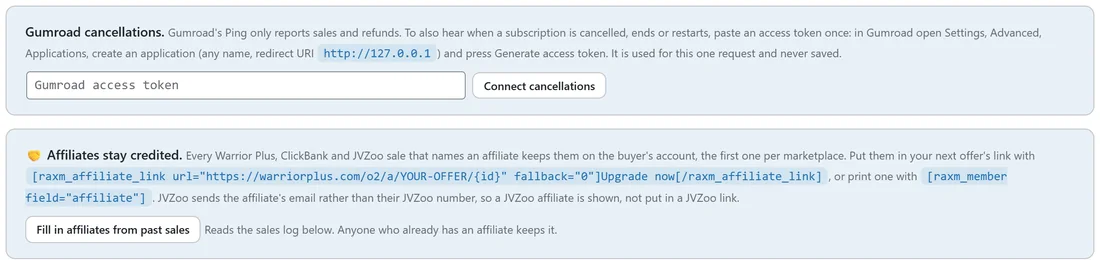
Gumroad's Ping only reports sales and refunds. To also hear when a subscription is cancelled, ends or restarts, use the Gumroad cancellations box under the Marketplaces table, once.
- In Gumroad open Settings, Advanced, Applications.
- Create an application with any name and the redirect URI http://127.0.0.1, then press Generate access token.
- Paste the token into the Gumroad access token box and press Connect cancellations.
The token is used for that one request and never saved. Those cancellation notices can only take access away, never give it.
Ko-fi:
- Key: your Ko-fi Verification Token, shown on the same Ko-fi page as the webhook (More, API, Webhooks).
- URL: in Ko-fi open More, API, Webhooks, paste the URL as the Webhook URL, then press Send Single Donation Test. The test shows in the log as a test.
- Ko-fi takes only one webhook address. If it already points at WP Sync, leave it there and paste this URL into WP Sync's Ko-fi box, Forward a copy (optional), instead.
What a Ko-fi product code can be:
- A Ko-fi Shop item: paste the item's link, or the code after /s/ in it. It shows in the table as Shop item and the code.
- shop: any Shop order.
- A membership tier, by its name, such as Gold. It shows as Membership tier: Gold.
- membership: any membership payment.
- donation: any donation, or donation 5 for any donation of at least that amount.
Ko-fi never reports refunds or cancellations, so a membership tier gives 35 days of access from each payment and lapses by itself when the payments stop. A Shop item or a donation level is kept for good. The table says which applies on each Ko-fi row. A donation with no mapping for its amount is simply noted and left alone.
Affiliates stay credited:
Every Warrior Plus, ClickBank and JVZoo sale that names an affiliate keeps that affiliate on the buyer's account, the first one per marketplace. Gumroad affiliates are kept too. That means an upgrade offer inside your members area can still pay the person who brought the buyer in.
Put the affiliate into your next offer's link with the shortcode:
[raxm_affiliate_link url="https://warriorplus.com/o2/a/YOUR-OFFER/{id}" fallback="0"]Upgrade now[/raxm_affiliate_link]
- url is the full link, with {id} where the affiliate goes. {name} works too.
- marketplace picks one marketplace's affiliate, for example marketplace="warriorplus". Without it, the first one kept is used.
- fallback is what a guest, or a member nobody referred, gets in place of {id}. "0" is Warrior Plus's no affiliate.
- The words between the two tags are the link text. text, class and target="_blank" are also accepted.
To print the affiliate somewhere instead, use [raxm_member field="affiliate"], or affiliate_name for their name. JVZoo sends the affiliate's email rather than their JVZoo number, so a JVZoo affiliate can be shown, but not put into a JVZoo link.
Press Fill in affiliates from past sales to read the sales log and fill in members from sales that arrived before this existed. Anyone who already has an affiliate keeps it.
A real example:
Yoursite Academy sells the Gold Membership monthly through ThriveCart, product number 12, with an Editing Masterclass upsell as upsell-2.
- Tick ThriveCart, paste the Secret word and save.
- In ThriveCart add a webhook with the ThriveCart notification URL.
- Map 12 to Gold Membership, with When they cancel a subscription set to Keep access until the paid period ends.
- Map upsell-2 to Editing Masterclass.
- Make sure Gold Membership has Membership expires after set to a month and a few days, so each renewal extends it.
A buyer who refunds only the upsell loses the Editing Masterclass and keeps Gold.
Tips:
- Watch a whole purchase before launch with the sandbox. ThriveCart, Lemon Squeezy and Gumroad test purchases go all the way through when it is on. See Testing A Sale Without Spending Money.
- On every cart, map a product before its first real sale. A sale that arrives first is logged as Unmapped, and Process again delivers it once the mapping exists.
- Give Ko-fi tiers the same name in the mapping as in Ko-fi, so a tier payment finds its level.
Related guides: Selling On JVZoo, Warrior Plus, ClickBank And PayPal, Testing A Sale Without Spending Money, Shortcode Reference.