When something does not work as you expect, the Diagnostics tab gives you, and our support team, the whole picture in one glance. It checks the plugin, its connections, your server and its own database tables, and copies everything into one report you can paste into a support ticket.
Where to find it:
Open AiX Surveys, then the Diagnostics tab. The Help / Training button on this tab opens the troubleshooting section of the Training tab.
Copy the report for support:
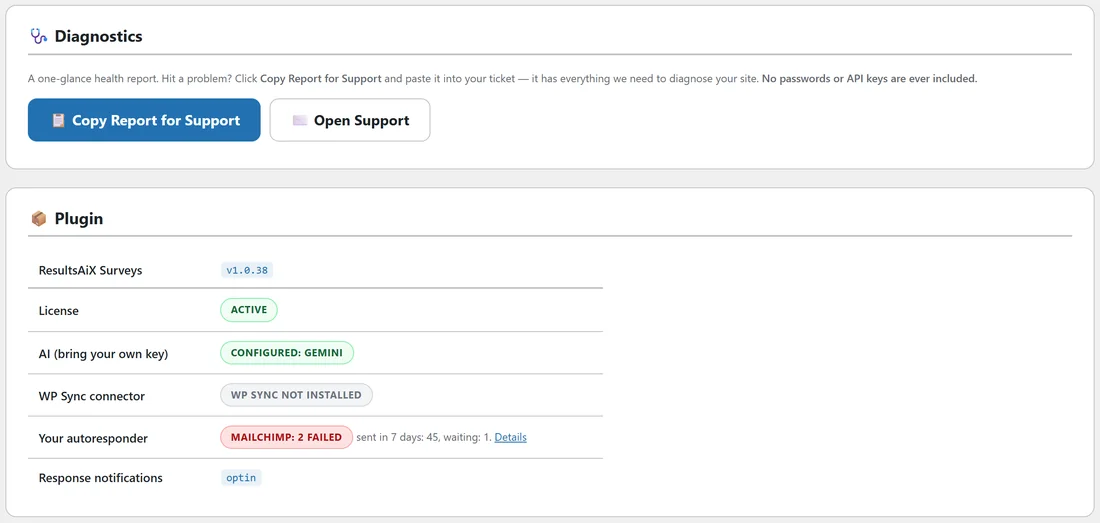
- Open the Diagnostics tab.
- Click Copy Report for Support. The whole report is copied to your clipboard.
- Click Open Support, or open your support ticket.
- Paste the report into your message, then describe what you expected and what happened.
No passwords or API keys are ever included in the report.
What the Plugin card shows:
- ResultsAiX Surveys: the version you are running.
- License: Active when your licence is active.
- AI (bring your own key): Configured with the provider in use, or Not configured (optional).
- WP Sync connector: whether WP Sync is installed and ready to receive survey opt-ins.
- Your autoresponder: the connected service, how many contacts were sent in the last 7 days and how many are waiting, with a Details link to the Your autoresponder card. If any failed, the badge says how many.
- Response notifications: off, optin or all, matching your choice on Settings.
What the Environment card shows:
WordPress, PHP and database versions, the Site URL, whether HTTPS is on, the memory limit, the maximum execution time, and the Outgoing notification email address that new response emails go to.
What the Database Tables card shows:
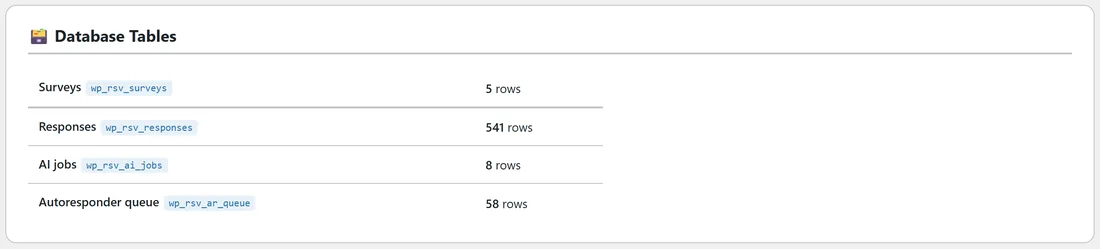
The plugin's four tables with the number of rows in each: Surveys, Responses, AI jobs and the Autoresponder queue. A table that is missing says so, with the fix: deactivate and reactivate the plugin, which creates it again without touching your data.
What the copied report adds:
The report also lists the plugin's database version against the expected one, whether AI is switched on, the AI provider, model and where the key comes from (this plugin, Mailer or the Theme, never the key itself), AI jobs and errors in the last 30 days with the last AI error, the WP Sync state, the autoresponder numbers with the last error your service gave, and whether ResultsAiX Mailer is active.
Reading it yourself:
- If notifications do not arrive, check the Outgoing notification email address first, then your site's outgoing email.
- If the autoresponder badge shows failed contacts, click Details and read what your service said under Not delivered yet. See Sending Survey Opt-Ins To AWeber, Mailchimp, ActiveCampaign And More, With Tags.
- If AI shows Not configured, add a key on Integrations & AI. See Connecting Your AI Key, And What It Costs.
- If HTTPS shows Not detected, ask your host to switch your site to https. The Talk button for spoken briefs needs it.
A real example:
The Yoursite Academy owner sees that two quiz opt-ins did not reach Mailchimp. Diagnostics shows Mailchimp: 2 failed, with 45 sent in 7 days. She clicks Details, reads that Mailchimp refused two addresses as invalid, and knows nothing is wrong with her connection.
Tips:
- Copy the report before you change anything, so support sees the state you saw.
- Paste the report as text, not a screenshot, so every line can be read.