Sometimes you want a report to use a page you built yourself, for example a long sales letter style opt-in from your page builder, or a thank you page with a video. External URL Override lets you do that without changing the address you share.
How it works:
You keep sharing the report's normal address, for example yoursite.com/reports/HealthMealPrepMadeEasy/. When a visitor arrives, the plugin counts the visit and sends them on to your page. The same works for the download page.
Where to find it:
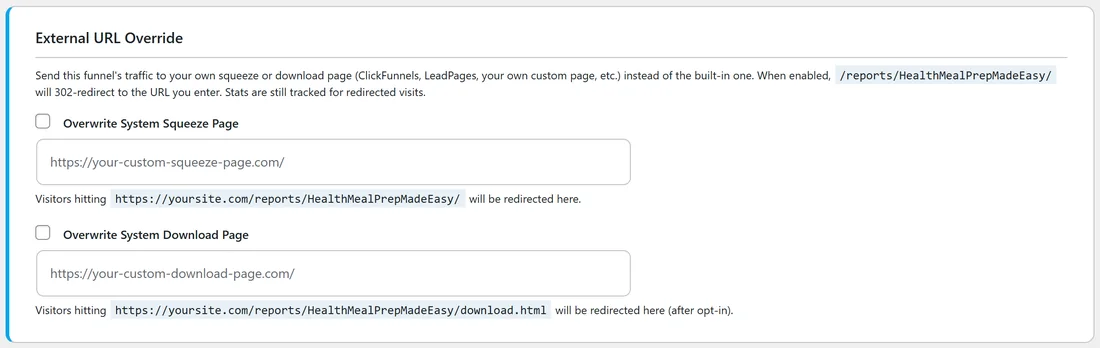
Funnels tab, then Edit on a report, then the External URL Override section near the bottom.
Use your own squeeze page:
- Tick Overwrite System Squeeze Page. The address box opens.
- Paste the full address of your page, starting with https://.
- Click Save Funnel Settings.
- In the Preview section, the squeeze page now shows an Override Active badge and "Redirects to" with your address.
Visitors to the report's address are sent to your page, and each visit still counts as a page view for the report.
Use your own download page:
- Tick Overwrite System Download Page.
- Paste the full address of your thank you page.
- Click Save Funnel Settings.
Visitors who reach the report's download address after opting in are sent to your page, and each one still counts as an opt-in.
Point your form at the report's download page:
If your own squeeze page has its own sign up form, set its thank you address to the report's download page, for example yoursite.com/reports/HealthMealPrepMadeEasy/download.html. That keeps the opt-in count and the PDF delivery in the plugin.
If you use your own download page, add the PDF link to it yourself. The report's download button lives on the built in page.
Go back to the built in pages:
Untick the box and click Save Funnel Settings. The address box clears and the report uses its own pages again.
A real example:
The owner of yoursite.com made a video thank you page for Meal Prep Made Easy at https://yoursite.com/meal-prep-welcome/, with the PDF link and a short welcome video. They ticked Overwrite System Download Page, pasted that address and saved. New subscribers now land on the video page, and the report's Opt-ins number keeps counting.
Tips:
- Test the full path once with your own email address after saving.
- Keep your page on your own domain so visitors trust the link.
- To change only the headline or colours, you do not need your own page. Use Customization on the same Edit page.