A promoted result is a page you choose to show first for certain searches. It appears at the top of the results under a Suggested heading with a star, above everything else.
Use it to send people to your plans page, your help centre, your best course or a launch page, whatever they typed.
Where to find it:
Open AiX Search, then Settings, click Rules at the top, and scroll down to Promoted Results.
How to add one:
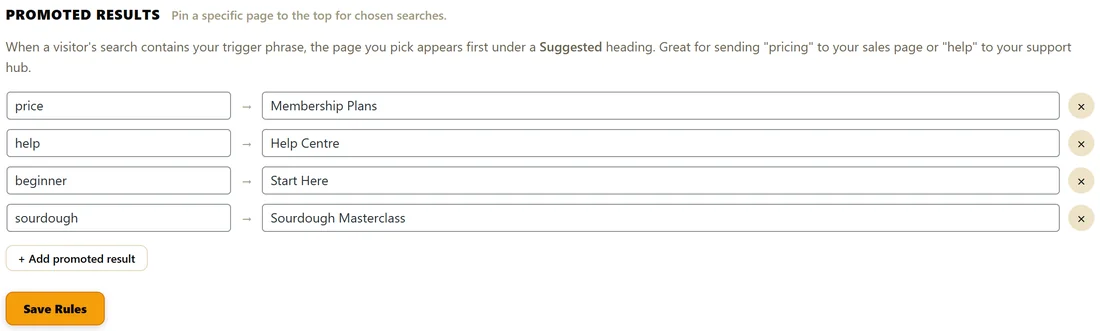
- Click Add promoted result.
- In the first box, When someone searches for..., type the trigger phrase, for example price.
- In the second box, Pin this page (type to find)..., type part of the page's title and click it in the list.
- Click Save Rules.
To remove a rule, click the cross at the end of its row, then click Save Rules.
How matching works:
The rule fires when the visitor's search contains your trigger phrase anywhere, in upper or lower case. A trigger of price matches price, prices, pricing and best price. Short, general triggers reach the most searches.
What visitors see:
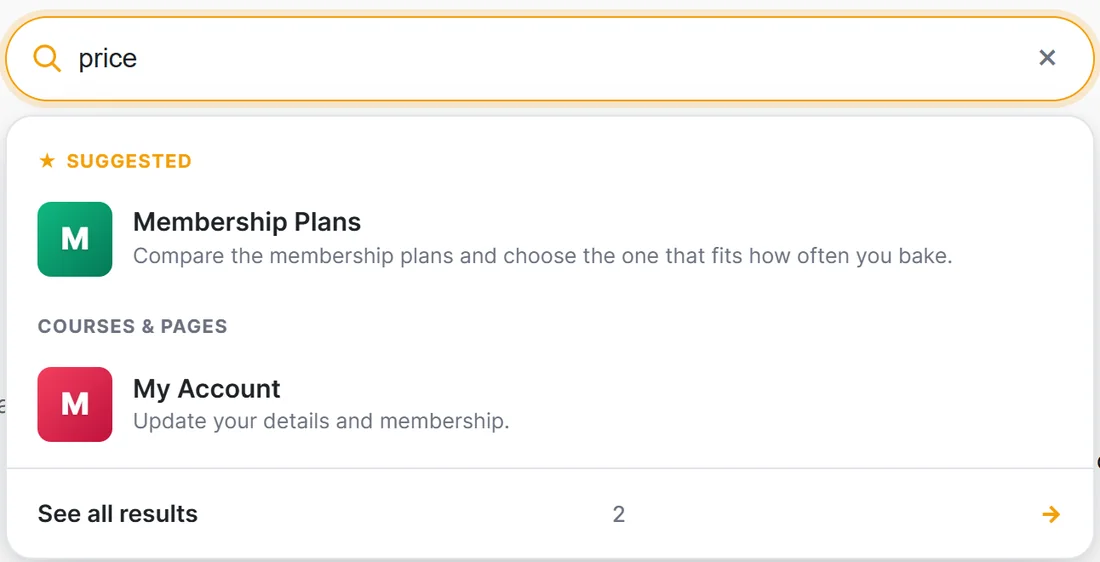
The pinned page sits under Suggested at the very top, in the dropdown, in Spotlight and on the results page. It is removed from the normal results below, so nothing appears twice. If several rules match one search, each pinned page is shown once.
Rules take effect as soon as you save. No rebuild is needed.
Some ideas:
- price, pinned to your plans page
- help, pinned to your help centre
- beginner or start, pinned to your getting started page
- the name of your main course, pinned to its sales or welcome page
A real example:
The Home Bakery Club runs four rules:
- price pins Membership Plans
- help pins Help Centre
- beginner pins Start Here
- sourdough pins Sourdough Masterclass
A visitor typing price sees Membership Plans first, with the description Compare the membership plans and choose the one that fits how often you bake.
Tips:
- Use Insights to find searches with a low click rate, then pin the right page for them. See Insights PRO.
- A promoted result pins a page. With PRO, a search-triggered offer shows a full marketing card instead. See Search-Triggered Offers.
- Give the pinned page a strong search description. See Search Listings: Images And Descriptions.