The fastest way to build a funnel is the top of the Dashboard. What Do You Want To Build? shows six ready made funnels. Pick one and the builder opens with the right pages already set up, in the right order, and a few plain questions in place of a blank brief.
Where to find it:
Open AiX Funnels, then the Dashboard tab. The card at the top is What Do You Want To Build?, marked Step 1 of 3. Each funnel has a Choose This link.
The six funnels:
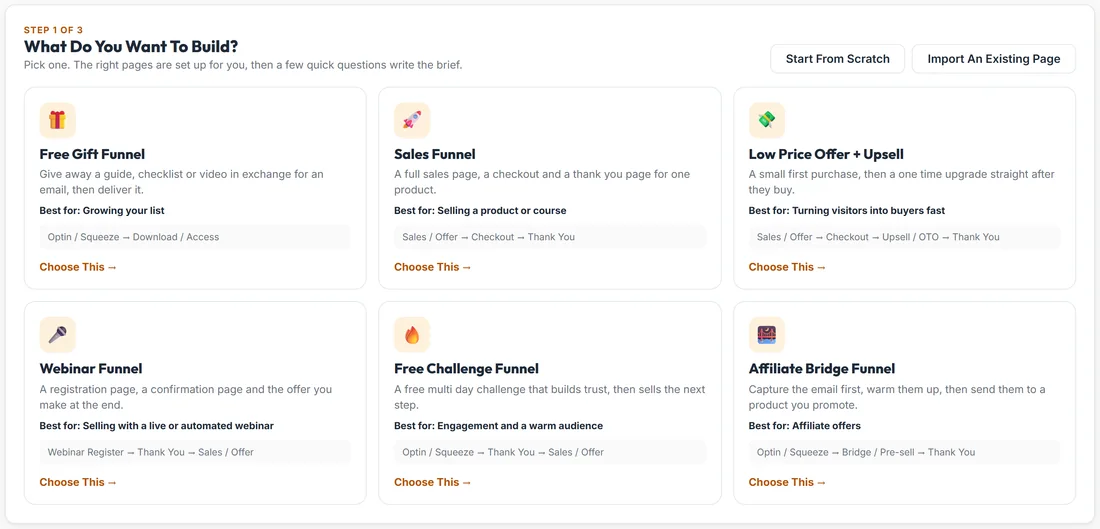
- Free Gift Funnel: Optin / Squeeze, then Download / Access. Give away a guide, checklist or video in exchange for an email, then deliver it. Best for growing your list.
- Sales Funnel: Sales / Offer, Checkout, Thank You. A full sales page, a checkout and a thank you page for one product. Best for selling a product or course.
- Low Price Offer + Upsell: Sales / Offer, Checkout, Upsell / OTO, Thank You. A small first purchase, then a one time upgrade straight after they buy. Best for turning visitors into buyers fast.
- Webinar Funnel: Webinar Register, Thank You, Sales / Offer. A registration page, a confirmation page and the offer you make at the end. Best for selling with a live or automated webinar.
- Free Challenge Funnel: Optin / Squeeze, Thank You, Sales / Offer. A free multi day challenge that builds trust, then sells the next step. Best for engagement and a warm audience.
- Affiliate Bridge Funnel: Optin / Squeeze, Bridge / Pre-sell, Thank You. Capture the email first, warm people up, then send them to a product you promote. Best for affiliate offers.
Each card shows its pages in order, so you know exactly what you will get before you click.
The questions each funnel asks:
- Free Gift Funnel: What is the free gift? What does it help them do? Who is it for? What do you offer them next? (optional)
- Sales Funnel: What are you selling? Price. Who is it for? The main result they get. Guarantee, bonuses or anything else (optional)
- Low Price Offer + Upsell: The low price product. Its price. The upgrade they are offered after buying. The upgrade price. Who is it for?
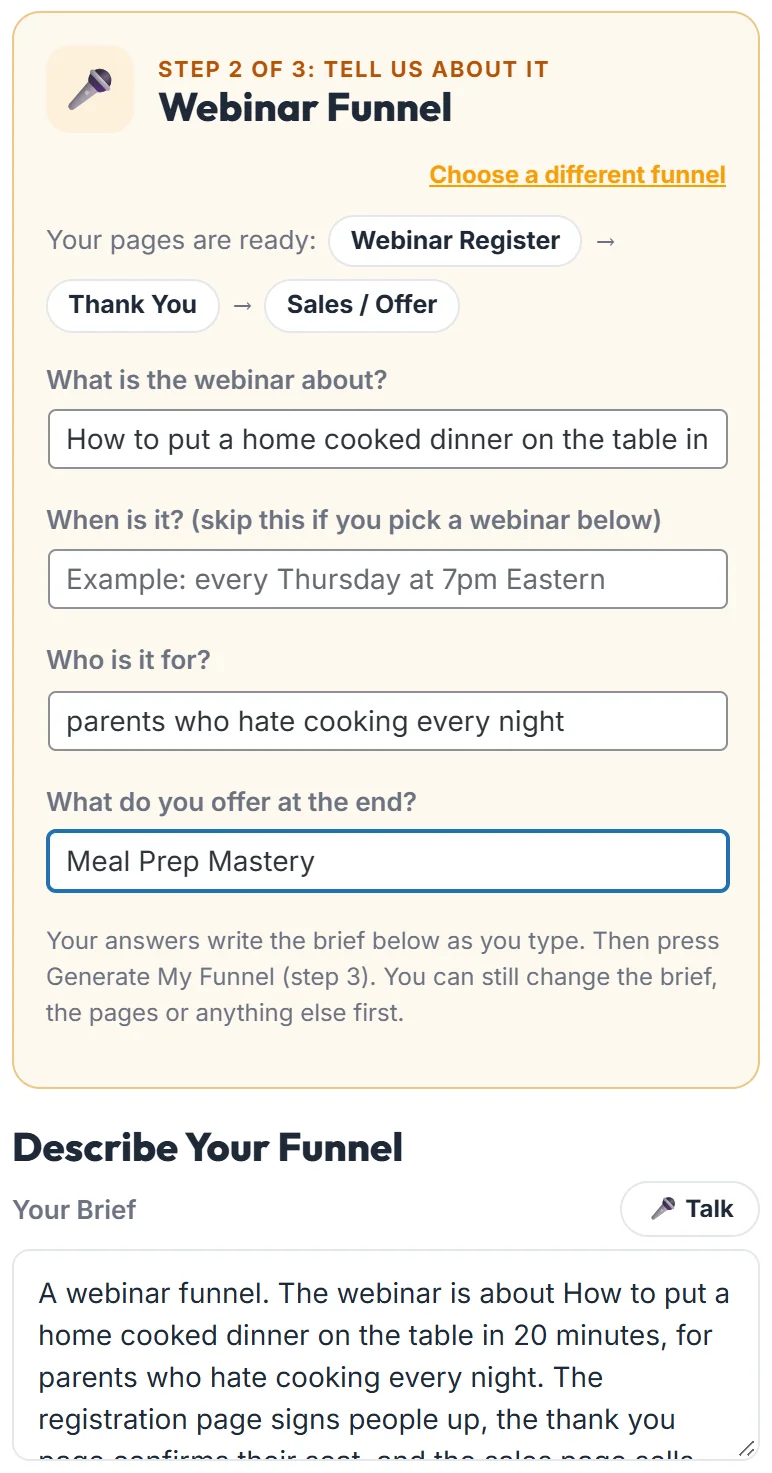
- Webinar Funnel: What is the webinar about? When is it? (skip this if you pick a webinar below). Who is it for? What do you offer at the end?
- Free Challenge Funnel: Name of the challenge. How many days, and what happens each day? What they have by the end. What you sell at the end.
- Affiliate Bridge Funnel: The product you promote. Why you recommend it. Your own bonus for buying through you (optional). Who is it for?
Every box shows an example in grey, so you can see the kind of answer that works.
How it works, step by step:
- Step 1: on the Dashboard, click Choose This on a funnel.
- Step 2: the Build Funnel screen opens with a card called Step 2 of 3: Tell Us About It. Your pages are listed under Your pages are ready. Answer the questions. Your answers write the brief underneath as you type.
- Step 3: press Generate My Funnel, exactly as you always would.
Choose a different funnel, at the top right of the card, takes you back to the six.
Everything else still works:
- Change the brief, add or remove pages, paste your own copy with My Copy, or add a countdown timer.
- Once you edit the brief by hand, your words win and the questions stop overwriting it.
- A question marked optional can be left empty. That part of the brief is simply left out.
- Press Generate with a required question still empty and it points you at that question once. Press Generate again to build anyway.
- On the Webinar Funnel, with ResultsAiX Webinars installed, the webinar picker opens for you. See Webinar Funnels: Registrations, Reminders And Replays.
A real example:
Sarah picks Free Gift Funnel. She answers: The 7 Day Meal Prep Starter Guide (a 12 page PDF), cook a week of healthy dinners in 2 hours on a Sunday, busy parents who are tired of takeaway, and Meal Prep Mastery, my six week course. The brief writes itself underneath, and she presses Generate My Funnel.
Not one of the six?
Start From Scratch opens the builder with a blank brief. Import An Existing Page rebuilds a page you already have. See Import Any Page You Already Own.
Tips:
- Answer in the words your customers use. The AI reuses them in the copy.
- Be specific about the result. Cook a week of dinners in two hours beats save time.
- You can always add pages after choosing. A Free Gift Funnel plus a Sales / Offer page is a common next step.