Import Page brings old pages onto the new engine. It reads a page you already own and rebuilds it as a funnel page you can restyle, edit, publish or export. Your copy stays your copy. Only the engine underneath changes.
Where to find it:
Open AiX Funnels, then Import Page. Import An Existing Page on the Dashboard opens the same screen.
What it is good for:
- Sales pages built years ago that no longer look right on a phone
- Squeeze pages inside a page builder you no longer want to use
- A page on another platform that you want to move into WordPress
- Any page whose copy is proven and worth keeping
How it works:
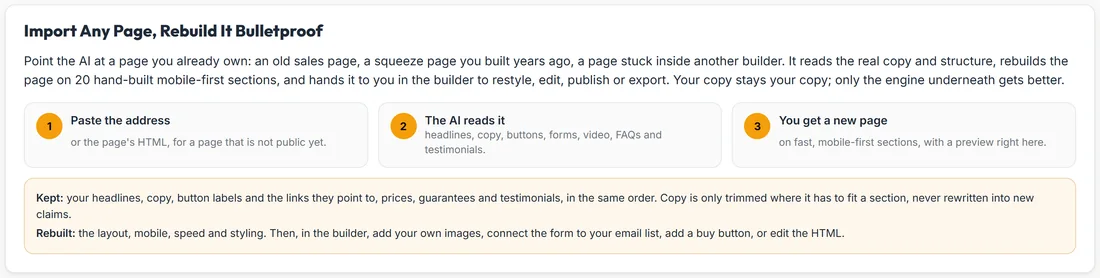
The top card shows it in three steps: Paste the address, The AI reads it, You get a new page. It also says what is Kept: your headlines, copy, button labels and the links they point to, prices, guarantees and testimonials, in the same order. And what is Rebuilt: the layout, mobile, speed and styling.
Importing from an address, step by step:
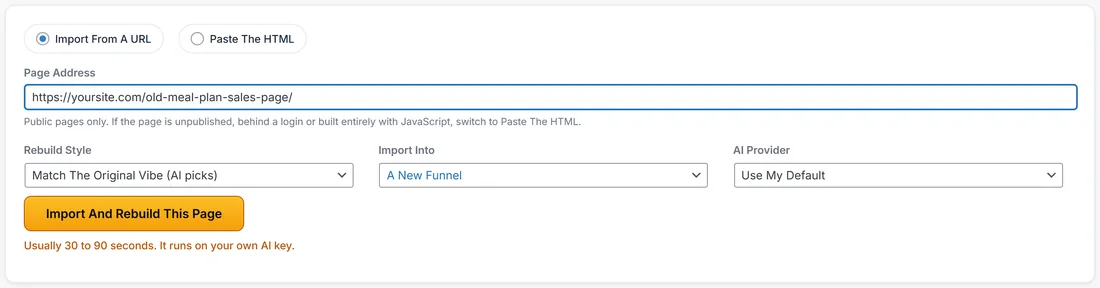
- Leave the mode on Import From A URL.
- Paste the full public address into Page Address.
- Choose Rebuild Style. Match The Original Vibe (AI picks) lets the AI choose the closest theme, or pick any of the ten themes.
- Choose Import Into: A New Funnel, or Add As A Page Of and one of your funnels.
- Choose AI Provider, or leave Use My Default.
- Click Import And Rebuild This Page.
Importing by pasting the HTML:
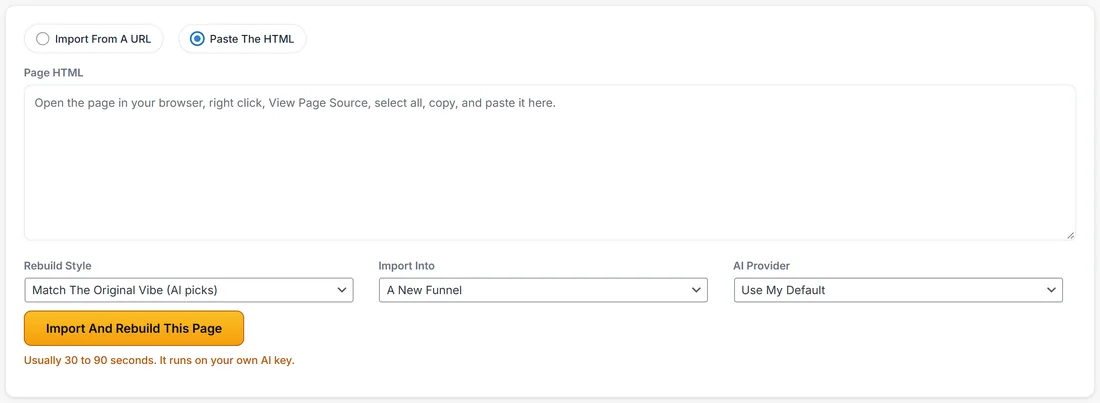
Use this when the page is not public, for example a draft, a members only page, or a page built entirely with JavaScript.
- Open the page in your browser, right click, and choose View Page Source.
- Select all and copy.
- Choose Paste The HTML and paste it into Page HTML.
- Set Rebuild Style, Import Into and AI Provider as above.
- Click Import And Rebuild This Page.
While it works:
Three steps light up in turn: Fetching The Page, Reading The Copy And Structure, and Rebuilding It On 20 Bulletproof Sections, with a running timer. It usually takes 30 to 90 seconds and runs on your own AI key.
After the import:
The result card says what was found and how many sections were built, and previews the rebuilt page right there. Click Open It In The Builder and you have a normal funnel page: restyle it, edit the copy, add your own images, connect the form to your email list, add a buy button or use Edit HTML, then publish or export it. Import Another Page starts again.
What the importer reads:
The real content of the page in its original order: headings, paragraphs, bullets, quotes, button labels and links, form fields, image descriptions and video markers. That summary is what the AI works from.
Your copy is kept:
This is an import, not a rewrite. The AI is told to reuse your real headlines, paragraphs, bullets, prices and testimonials wherever a section fits them, and your buttons keep the links they pointed to. Copy is only trimmed where it has to fit a section.
Safety and privacy:
- Only public web addresses are fetched, and the download is capped at 2 MB
- The raw HTML is never stored and never sent to the AI. Only the text summary is used, which also keeps the cost to a cent or two
A real example:
Sarah has an old meal plan sales page from her previous site builder at yoursite.com/old-meal-plan-sales-page/. She pastes the address, chooses Forest in Rebuild Style and Add As A Page Of: Sunday Meal Prep Starter in Import Into. A minute later the old page is a new tab in her funnel, in her own words, on the same sections as everything else.
If an import comes back thin:
Some pages are drawn entirely by JavaScript, so a plain fetch sees almost nothing. Switch to Paste The HTML and copy the source from your browser, which always holds what you can see. If the address cannot be reached, check it in a private browser window, and use Paste The HTML for anything behind a login.
Tips:
- Import one page at a time and check it before the next.
- Choose Match The Original Vibe for a faithful copy, or a theme to modernise the look at the same time.
- Add your images after the import. The AI never adds pictures for you.