When a session ends, the plugin works out what each person did and queues the right follow up. This is where a webinar keeps earning after the show.
Where to find it:
Emails tab. The follow ups are the last four emails in the list.
The groups:
- no show: never came live
- attended: came live, on a webinar with no offer time
- left early: left before the offer appeared
- saw offer: still watching when the offer appeared
- clicked offer: clicked the offer button
The follow up emails:
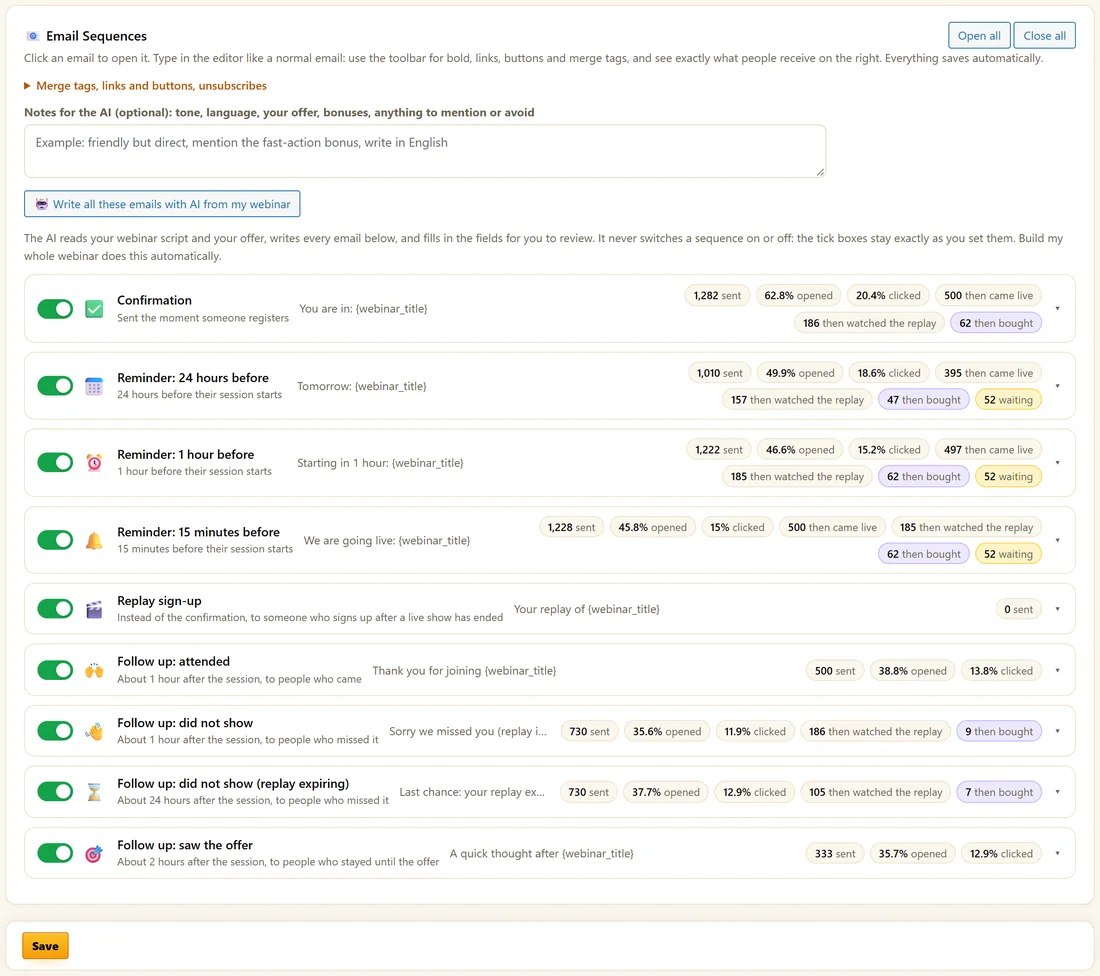
- Follow up: attended. About 1 hour after the session, to people who came.
- Follow up: did not show. About 1 hour after the session, to people who missed it, with their replay link.
- Follow up: did not show (replay expiring). About 24 hours after, to people who missed it.
- Follow up: saw the offer. About 2 hours after, to people who stayed until the offer.
All four are written for you and start switched off. Click the switch on each one you want.
Who gets what:
- Follow up: attended goes to everyone who came in any way, including left early, saw the offer and clicked.
- Follow up: saw the offer also goes to people who clicked.
- So a person who clicked gets the attended and saw the offer emails, and a no show gets both did not show emails.
- People who unsubscribed get none. People who cancelled are not sorted at all.
Setting them up:
- Switch on the follow ups you want.
- Open each one and make the copy yours. They use the same merge tags as the reminders, including {replay_link} and {offer_url}.
- Click Save.
Where the data comes from:
The room checks in when someone enters and then every minute while they watch, saving the furthest point they reached. That decides left early or saw the offer, and draws the attendance curve on Analytics. Watching the replay is counted separately and never as attending live.
When they go out:
The scheduler closes sessions every five minutes after their end, so follow ups are queued shortly after the show finishes.
A real example:
Maya switches on all four. After Tuesday's session, 13 people who clicked her offer get the attended email and the saw the offer email. The 30 no shows get "Sorry we missed you (replay inside)" an hour later, and "Last chance: your replay expires soon" the next day, which matches her 72 hour replay window.
Tips:
- Point the replay expiring email at a real deadline. See Replays And Expiry Windows.
- The same groups become tags and lists in your autoresponder. See Connecting Your Autoresponder.
What to write in each follow up:
- Follow up: attended. Thank them, sum up the key idea in one line, and give the offer link for anyone still deciding.
- Follow up: did not show. Keep it friendly, give the replay link, and say how long the replay is open.
- Follow up: did not show (replay expiring). One reason to watch today, and the replay link.
- Follow up: saw the offer. Answer the most common question about your offer, and give the offer link.
Matching emails to the replay window:
The replay expiring email goes about 24 hours after the session. With a 72 hour replay window, it lands with two days left. With a 24 hour window, it lands as the replay closes, so consider a longer window if you use it.
Using {offer_url} in follow ups:
{offer_url} carries each person's affiliate and campaign tags to your checkout, so a sale from an email still credits the person who sent them.
Following up beyond these four:
For longer sequences, use your autoresponder. With Tag by behaviour on, each person is tagged Attended, No show, Saw the offer, Clicked the offer or Watched the replay, and lists can move them into separate sequences. See Different Lists For Each Webinar And Behaviour.
Seeing the results:
On the Emails tab, the follow up rows show Then watched replay and Then bought, so you can see which follow up brings people back and which one sells.
What to do next:
- Replays And Expiry Windows
- Tags And Custom Fields Sent To Your Autoresponder
Common questions:
Can I change when a follow up goes out?
The four follow ups go at about 1, 1, 24 and 2 hours after the session. For other timings, use your autoresponder with behaviour tags.
Do replay viewers count as attended?
No. Replay viewing is counted separately and has its own tag.