Beyond the built in connections, the plugin can post every webinar event to any inbound webhook address. Use it for tools that are not on the connection list, such as WP Sync, a CRM or an automation service.
Where to find it:
AiX Webinars, Email, the Send It Even More Places (WP Sync) card.
Setting it up:
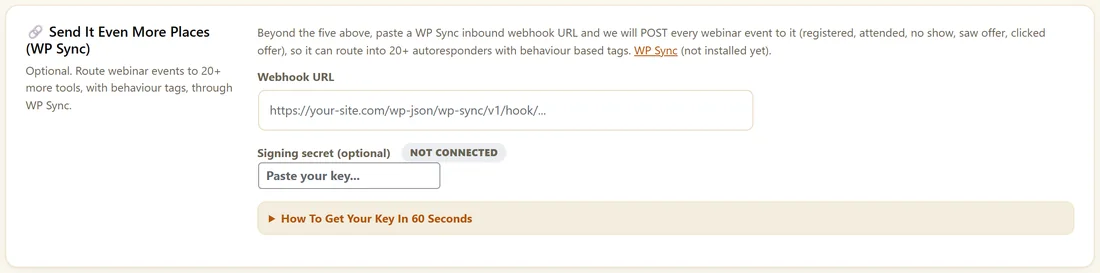
- Paste your inbound webhook address into Webhook URL.
- Optional: set a Signing secret.
- Click Save Integrations.
The seven events:
- registered, when someone signs up
- attended, when they first enter the live room
- no show, when their session ends without them
- left early, when they left before the offer
- saw offer
- clicked offer
- watched replay, the first time they press play on the replay
No show, left early and saw offer are worked out when the session ends. Cancelled and unsubscribed reach your connected autoresponders as tags instead.
What each post contains:
The event, the email, the first name, the webinar ID and title, the session ID and session time in UTC, the person's time zone, the registration source, your site address and a timestamp, as JSON.
Signing the posts:
With a signing secret set, every post carries an X-RWB-Signature header with a sha256 HMAC of the body. Check it with the same secret on the receiving side to know the post came from your site.
How delivery works:
Posts are sent without waiting for an answer, so a slow endpoint never slows a visitor down. Treat the webhook as a fast route for your tools.
A real example:
Maya pastes her WP Sync inbound address. Every Clicked offer event from her Kitchen Garden Plan goes to her CRM as a hot lead, while registrations go to her list.
What you can build with the webhook:
- Add clickers to your CRM as hot leads
- Post a message to your team chat when someone clicks the offer
- Start a different automation for no shows and replay viewers
- Keep a sheet of every registration and what happened
An example of a post:
For a sign-up, your endpoint receives JSON with event registered, the email and first name, webinar_id and webinar_title, session_id and session_time, tz, source, site and ts. Other events carry the same fields with their own event name.
Testing your webhook:
- Paste a test address from your automation tool.
- Click Save Integrations.
- Register yourself for a webinar.
- Check the registered event arrives.
- Join the room to send attended.
Checking the signature:
- Read the raw body of the post.
- Work out a sha256 HMAC of it with your signing secret.
- Compare it with the value after sha256= in the X-RWB-Signature header.
- Accept the post when they match.
Using WP Sync:
WP Sync takes the same events into its own connectors with tags. The card tells you whether WP Sync is installed on this site.
What to do next:
- Connecting Your Autoresponder
- Behaviour Follow Ups After The Webinar
Common questions:
Is the webhook needed for my autoresponder?
No. Built in connections handle the common tools. The webhook is for everything else.
Can I send events to two places?
Point the webhook at a tool such as WP Sync that forwards to several places.