This article explains exactly what ResultsAiX Sign records when someone signs, and where you can see it. It does not tell you whether a particular document is valid in your country. That depends on local law and the type of document, and it is a question for a lawyer.
Knowing what is recorded helps you answer a client who asks "how do I know this is safe?" and helps you if a signature is ever questioned.
Where to find it:
Open AiX Sign, then the Documents tab, and click any sent document. The Signers table and the Audit trail on that page show everything recorded so far. On completed documents, the same evidence is printed into the Certificate of Completion at the end of the final PDF.
Consent to sign electronically:

Near the top of the signing page is a checkbox that reads: I agree to use electronic records and signatures for this document, and I understand my consent, views and signature will be recorded with time, date and IP address as legal evidence.
The I Agree and Sign button stays switched off until this box is ticked and a signature is added. Ticking the box is saved straight away as a consent event. When the signature is submitted, the server checks that consent is on record and records it if it is missing.
Intent to sign:
The signer draws, types or uploads a signature, then clicks I Agree and Sign. The line under the button reads: By clicking "I Agree and Sign" you adopt the signature above as your legal electronic signature on this document.
Who signed, and when:
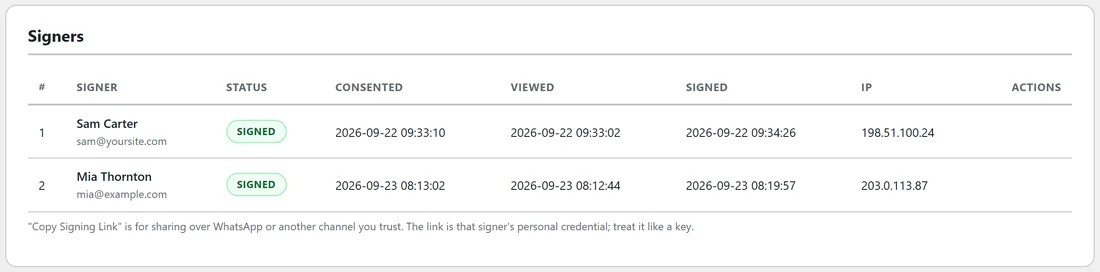
Each signer gets their own private link sent to their own email address. The link carries a long random token, and that token is the only way into their copy of the signing page. For each signer the plugin records:
- The time they first opened the document
- The time they gave consent
- The time they signed
- The IP address they connected from
- Their browser and device, as reported by the browser
An optional access code per signer adds a second check that you share through a different channel. See Signers, Signing Order And Access Codes.
The audit trail:
Every event is added to an audit trail that is never edited. The events are: Document created, Invitation emailed to signer, Invitation re-sent to signer, Signing link generated for manual sharing, Signer opened the document, Signer agreed to use electronic records and signatures, Signer signed the document, Signer declined to sign, Document voided by sender, Document expired before completion, Automatic reminder emailed to signer, All parties signed; document completed, Final document sealed with SHA-256 hash, and Completed document downloaded.
Each event carries a time and, where there is one, the IP address.
The record of the file:
When the last person signs, the final PDF is built and its SHA-256 fingerprint is stored. Change one character of that file and the fingerprint changes completely. The Certificate of Completion also prints a separate evidence hash built from the agreed text, the signer details and the signature images. See Document Integrity And Verify Integrity.
Where the evidence ends up:
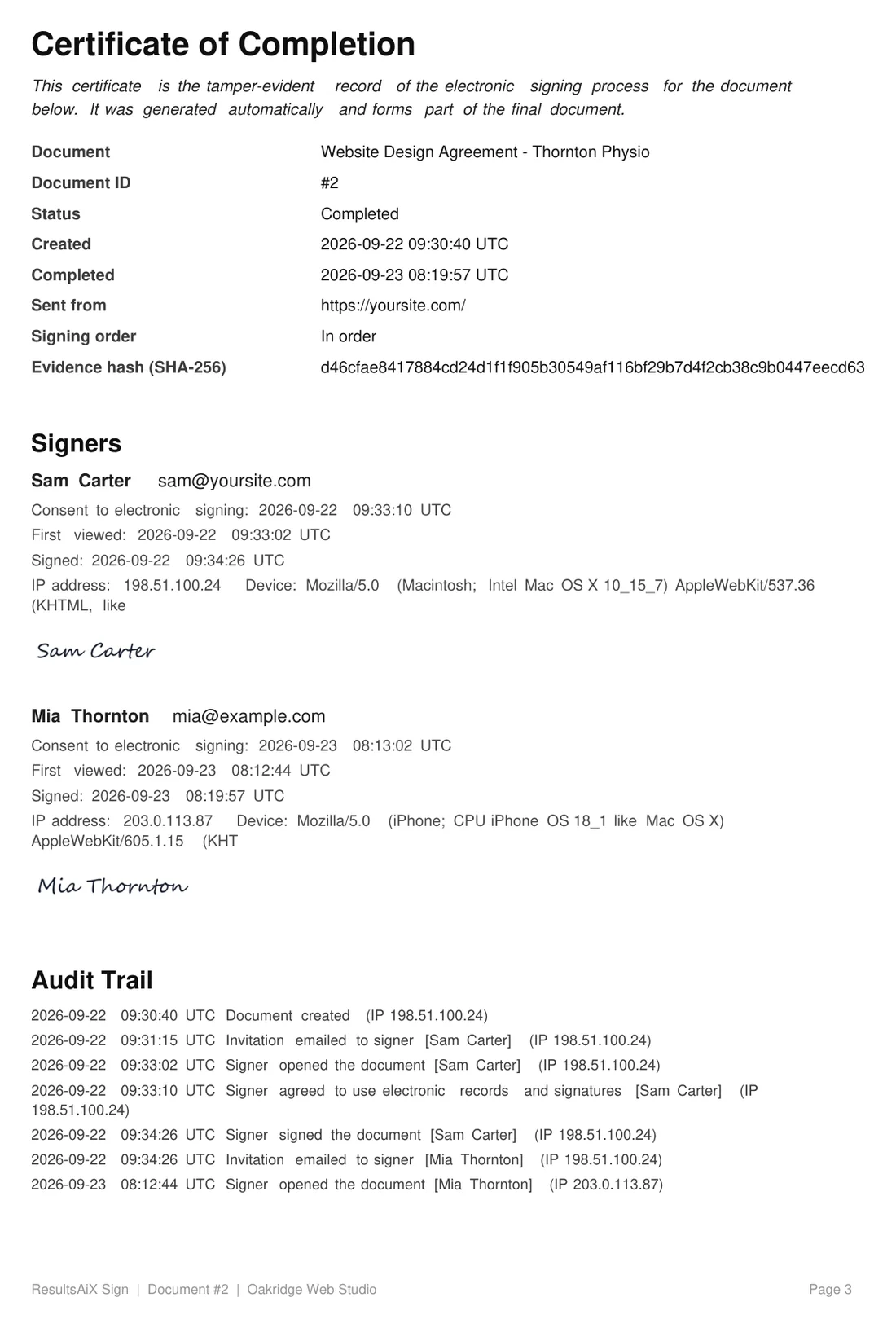
The Certificate of Completion is part of the final PDF that everyone receives. It lists the document, its ID, the times it was created and completed, the site it was sent from, the signing order, every signer with their consent, view and signing times, IP address and device, each signature image, and the complete audit trail.
Templates and legal wording:
Every built in template ends with a note that it was prepared from a general template, is provided for convenience only and is not legal advice. Some kinds of document have special formal rules in many places, for example wills and court papers. Check what applies where you are before using electronic signatures for those.
A real example:
Mia Thornton signed Oakridge Web Studio's website agreement on her phone. Her row shows she opened it at 08:12:44, ticked consent at 08:13:02 and signed at 08:19:57, from IP 203.0.113.87 on an iPhone. All of that is printed in the certificate attached to the email she received.
Tips:
- Keep the completion email. It holds the sealed PDF and its fingerprint.
- Set your WordPress timezone to UTC under Settings, General if you want the times to match the UTC label exactly. See Working With International Clients.
- This plugin gives you tools and records, not legal advice. For high value agreements, have a lawyer review the wording before you send it.