Signing with a client in another country works exactly like signing with a neighbour. A few choices make the documents clearer for everyone.
Where to find it:
- Date format: Settings tab, Sending section, Date format on documents
- Currency and governing law: the {currency} and {jurisdiction} merge fields in every template
- AI Localize, PRO: PRO Tools
Set the date format deliberately:
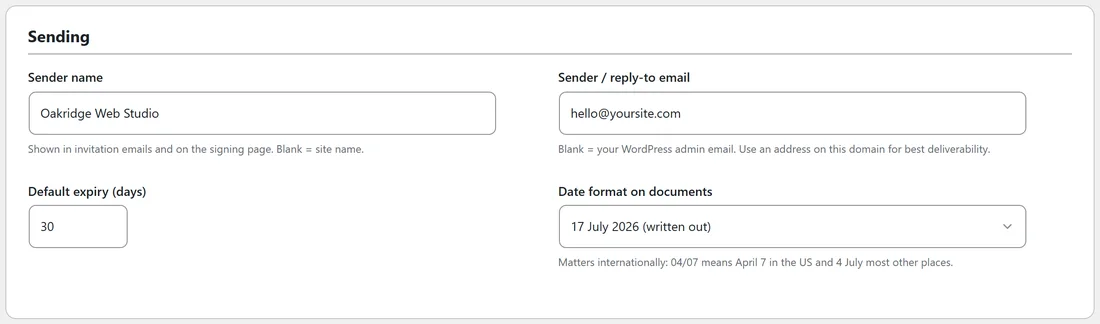
04/07 means April 7 in the United States and 4 July in most other places. Choose the format your clients read correctly, or pick the written out format, such as 17 July 2026, which nobody can misread. The format is used in the agreement text, the Documents tab and the deadline in emails.
Be specific about the governing law:
Every template has a Governing Law section with the {jurisdiction} merge field. Fill it precisely, for example Ireland, with the courts of Dublin, rather than just a country.
Bill in any currency:
{currency} is separate from {amount}, so the same template works for EUR, USD or GBP. Write the currency code the way you want it to read.
Accented characters:
The final PDF uses the Western European character set, so names and text in English, Portuguese, Spanish, French, German, Italian and other Western European languages print correctly, accents included. For scripts outside that set, such as Greek, Cyrillic or Asian scripts, use the Upload a PDF route with a PDF you prepared, so the original keeps its own fonts.
Times on the certificate:
The audit trail and certificate show times with a UTC label. They are taken from your WordPress clock, so set Settings, General, Timezone to UTC in WordPress to keep the label exact. Dates written in the agreement body follow your chosen date format.
The signing page language:
The signing page sets its language from your WordPress site language. The plugin's own wording on the page is in English.
Translating an agreement, PRO:
AI Localize adapts any template for a country and language and saves it to Your templates, with merge fields and signature tags kept. See AI Draft And AI Localize With Your Own Key (PRO). Have a native speaker read anything important before you send it.
Where the data lives:
Every document, signature and audit record stays on your own hosting. When a client asks where their contract is stored, the answer is simple: on your own website server, and nowhere else. What that means under the rules that apply to you is a question for your adviser.
A real example:
Oakridge Web Studio works with clients in Ireland, Portugal and the United States. Sam uses the written out date format, EUR or USD in {currency}, and a localized Portuguese copy of the Client Services Agreement for clients in Lisbon.
Tips:
- Mention the time zone in your message if a deadline matters, for example sign by 5pm Dublin time.
- Use the client's local language for the personal message, even if the agreement is in English.
- Keep a localized copy for each country you work with often.