Everything ResultsAiX Sign creates stays on your own hosting. There is no outside signing service holding your contracts, so you always know where they are.
This article explains what is stored where, who can open it, and what happens when the plugin is removed.
Where to find it:
Open AiX Sign and click the Diagnostics tab. The Database Tables section lists the plugin's tables and row counts, and the Plugin section shows whether the storage folder exists and can be written to.
The database side:
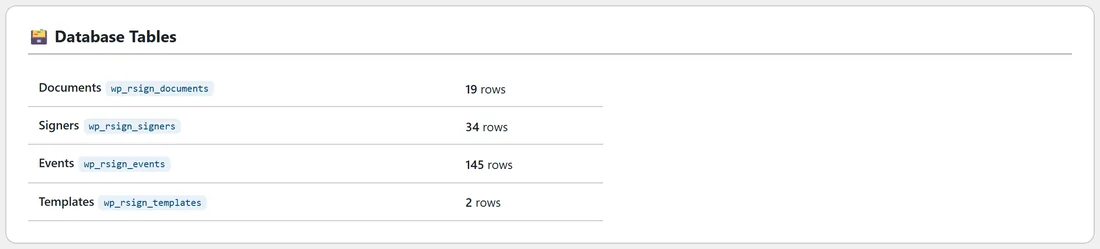
The plugin keeps four tables in your WordPress database:
- Documents: title, status, the text, the signing order, the message, the deadline, the fingerprints and the dates
- Signers: name, email, private token, order, status, access code, the values they entered, consent, view and signing times, IP address and browser details
- Events: the audit trail, one row per event, never edited
- Templates: the templates you saved yourself
The file side:
Signature images, uploaded PDFs and the final sealed PDFs are saved in a folder called rsign-documents inside your WordPress uploads folder. When it creates the folder, the plugin adds an .htaccess file that blocks direct web access on servers that read .htaccess files, and an index.php so the folder cannot be listed. Every file name also includes a random part, so names cannot be guessed.
The plugin never links to these files directly. They are sent through checked links instead.
Who can open what:
- WordPress administrators reach every document through AiX Sign.
- A signer reaches only their own document, through their private link.
- A signer can open an uploaded original PDF from their signing page.
- A signer can download the final PDF only once the document is completed.
Admin downloads and signer downloads of the final PDF are added to the audit trail as Completed document downloaded.
IP addresses:
The plugin records the address that connects directly to your site. If your site sits behind a proxy or a service such as Cloudflare, check that your host passes the visitor's address to WordPress.
Search engines and caching:
Signing pages tell search engines not to index or follow them, and are sent with no-cache headers.
Retention:
Signer data stays on your site, so you decide how long to keep it. A signed contract is often a record you need to keep for a set time. Ask your accountant or lawyer what applies to you before deleting signed records.
Deleting documents:
- Drafts, documents out for signature, declined, voided and expired documents can be deleted from the Documents tab. This removes the document, its signers, its audit trail and its stored files.
- Completed documents have no Delete button. They are signed records.
- The Danger Zone on the Settings tab removes everything at once. See The Settings Tab Explained.
When the plugin is removed:
Deleting the plugin from the Plugins screen keeps your documents, signers, audit trails, files and settings. It only clears scheduled tasks and cached update data. If you install it again, everything is still there.
A real example:
A client asked Sam where their signed contract is kept. Sam's answer: on Oakridge Web Studio's own website hosting, in a protected folder, with the signing record in the site database, and nowhere else.
Tips:
- Include the uploads folder and the database in your backups.
- Check the Protected storage line on the Diagnostics tab after moving hosts.
- Limit administrator accounts on your site to people you trust, since they can open every document.