Every destination on a bridge has an action. The default is to add the contact, and every app supports that. Many apps support more, which turns a bridge from a copier into a small automation.
The actions:
- Add to list. Subscribe the contact to the chosen list, form, audience or sequence. Kit calls this Add to form.
- Unsubscribe from list. Remove the contact from the chosen list.
- Add tag. Apply one or more tags.
- Remove tag. Take one or more tags off.
- Update fields only. Write the mapped name and custom fields without changing list membership.
Some apps add their own. AWeber (Developer OAuth) has Delete from this list (permanent). Referly and Instantly have actions of their own, such as Record a sale or Add to blocklist.
Which actions you will see:
The builder shows only the actions the chosen app actually supports. When an app only adds contacts, the action box stays hidden and the step looks like it always did. ActiveCampaign, Mailchimp and Kit offer all five.
Where to set the action:

- Open a destination step and choose the app.
- The action box appears next to it. Pick the action.
- The step reshapes itself for that action.
How the step changes with the action:
- Add to list shows the list picker and the full field mapping.
- Unsubscribe shows the list picker only.
- Add tag opens the field mapping with the tag box first. Type the tags to add.
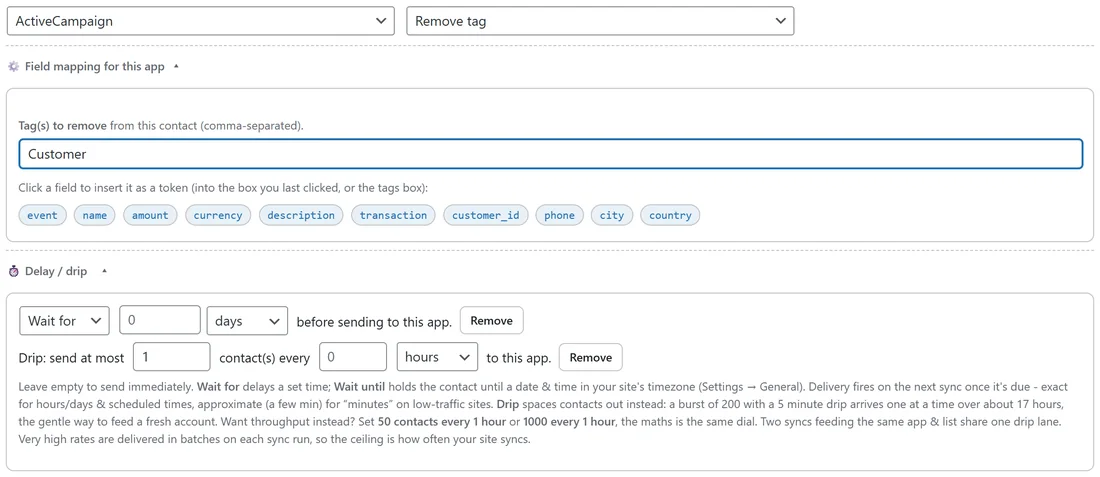
- Remove tag shows only the tag box. Type the tags to remove.
- Update fields only shows the name rows and custom fields.
The collapsed step summary reads the action back, such as Remove tag: Customer or Update fields.
Actions with no list:

Some actions work on the whole account. Kit's Unsubscribe (account-wide) removes the person from the whole Kit account, so the builder hides the list picker and shows No list needed. Apps whose tags live on a list, such as Mailchimp and AWeber, keep the list picker for their tag and field actions.
Real examples from yoursite.com:
- Refunds remove the Customer tag. Source: Stripe, Refunds. Destination: ActiveCampaign, Remove tag, Customer.
- WarriorPlus buyers to Kit. A second destination on the bridge uses Add tag with Review request and a two day delay.
- Mailchimp Events on unsubscribed, with ActiveCampaign Unsubscribe from list on the newsletter list, keeps both lists in step.
- A Calendly booking can use Update fields only to stamp a Last call booked field on somebody already on the list.
Combining with No source:
A bridge with No source and a single action is how you fire something from a click or a conversion. For example, No source and ActiveCampaign Add tag Clicked offer. Save it, then attach it where the trigger lives, such as the Also fire on click box on a WP Conversion Tracker link.
Reading the results:
Each action reports in its own words in the Activity Log, such as Tag added, Tag removed, Unsubscribed from the list or Fields updated. When the contact is not in the app at all, an unsubscribe or tag removal reports that there was nothing to change, which counts as done.
Tips:
- Test a new action with Send live test on your own email first.
- If you pick an action an app does not support, the builder will not save it and tells you to pick another.